
Learning from video content takes time. You watch long tutorials, lectures, or lessons, yet finding one important explanation later feels slow and frustrating. Many learners replay entire videos to locate one useful detail. This wastes time and breaks momentum.
A better method exists. Timestamped notes help you capture key moments while watching. You link ideas to exact seconds in a video. Later, you return to those exact moments without searching.
This guide explains how to take timestamped notes on YouTube videos. You will learn the workflow, the benefits, and how tools like JumpNotes help you build a structured video learning system.
Why Timestamped Notes Improve Video Learning
Video learning has grown fast across education, coding, language learning, and professional training. Platforms like YouTube hold millions of tutorials. Yet many learners struggle to retain knowledge from long videos.
Timestamped notes solve common learning problems:
- You stop searching for lost explanations
- You revisit key ideas in seconds
- You build structured learning records
- You review lessons faster before exams or projects
- You keep focus during long videos
Instead of bookmarking entire videos, you mark exact moments. This creates a personal reference system based on real learning moments.
What Are Timestamped Notes in YouTube Videos
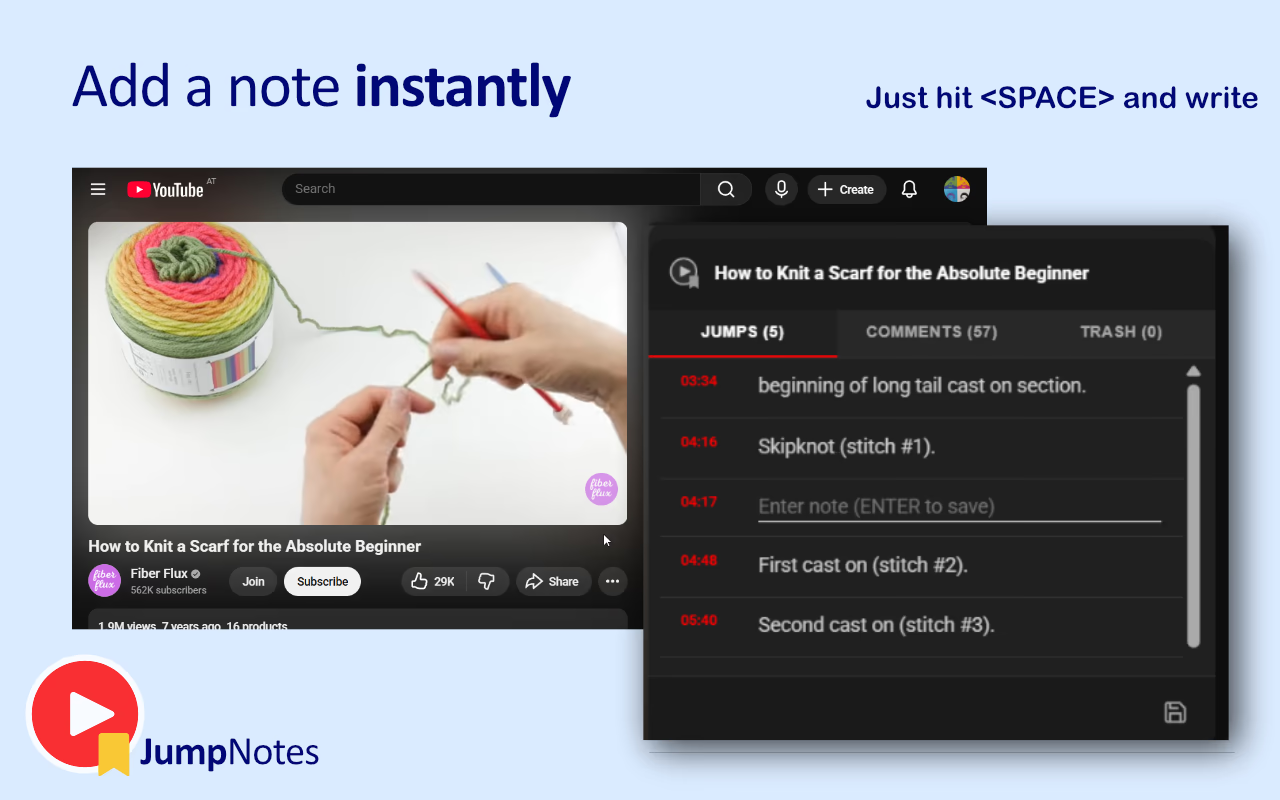
Timestamped notes link text to exact seconds inside a video. Each note stores:
- The time in the video
- A short description or insight
- The video reference
When reviewing notes, clicking a timestamp jumps directly to the recorded moment. This removes the need to scroll through timelines.
Modern tools automate this process. Some tools allow one-click timestamps while the video plays. Others group notes by video and store them locally for later review.
How to Take Timestamped Notes on YouTube Videos Step by Step
Follow this structured workflow to improve learning efficiency.
- Open the YouTube video you want to study
- Start watching normally
- Pause when an important idea appears
- Add a timestamped note
- Write a short summary in your own words
- Continue watching
- Repeat throughout the video
Keep notes short. Use phrases instead of paragraphs. Focus on concepts, definitions, and steps.
After finishing the video, review the notes. Edit unclear lines and group similar ideas. Over time, this builds a searchable learning archive.
Common Problems When Taking Notes on Videos
Many learners struggle with manual note-taking methods. These issues reduce productivity and limit retention.
Common challenges include:
- Switching between browser tabs interrupts focus
- Writing timestamps manually slows progress
- Notes become disorganized across documents
- Important insights get lost in long notes
- Review sessions take too long
These problems increase friction. Small interruptions accumulate and reduce learning speed.
How JumpNotes Simplifies Timestamped Note Taking
Tools designed for video learning remove manual steps. One example is NextGen Tools, which features curated solutions like JumpNotes for improving productivity and learning workflows.
JumpNotes integrates directly into the YouTube player. Instead of switching tools, you create notes without leaving the video environment.
Key capabilities include:
- One-click timestamp creation
- Automatic grouping of notes by video
- Keyboard shortcuts for fast navigation
- Export options for offline storage
- Local storage with no account requirement
- Automatic detection of video chapters
- Importing useful timestamps from comments
These features reduce friction. You spend more time learning and less time managing notes.
Tools like JumpNotes help learners capture insights without breaking attention flow. Notes remain organized and searchable across multiple videos. :contentReference[oaicite:0]{index=0}
Best Use Cases for Timestamped Notes
This method works across many learning scenarios.
Popular use cases include:
- Programming tutorials
- University lectures
- Language learning lessons
- Music practice videos
- Design and creative tutorials
- Professional certification training
- Personal development content
Developers benefit from marking key code explanations. Language learners record grammar rules. Students mark formulas or definitions.
Each use case shares one goal. Reduce repetition while improving recall.
How Timestamped Notes Improve Memory Retention
Memory improves when learning becomes active. Writing notes forces mental processing.
Timestamped notes strengthen retention through:
- Active engagement with content
- Context-based recall linked to visuals
- Faster review cycles
- Repeated exposure to key ideas
Instead of passively watching videos, learners create structured knowledge. This improves comprehension and recall during future tasks.
How to Build a Personal Video Learning Archive
Consistency transforms notes into a powerful reference system.
Use this process to build a long-term archive:
- Take notes during every learning video
- Use short summaries per timestamp
- Review notes after finishing each video
- Export or store notes regularly
- Group related videos by topic
- Return to notes during revision sessions
Over time, your archive becomes a searchable learning database. You access answers faster without rewatching entire videos.
Tips to Write Better Timestamped Notes
Short notes improve readability and retrieval speed.
Use these writing tips:
- Write one idea per timestamp
- Use keywords instead of full sentences
- Add context labels like "formula" or "example"
- Highlight mistakes to avoid repeating them
- Use consistent terminology
Clear notes improve future review speed.
Clarity reduces cognitive load during revision.
Keyboard Shortcuts Speed Up Note Taking
Keyboard workflows improve productivity during learning.
Common actions include:
- Pause video
- Add timestamp
- Resume playback
- Jump between notes
Keyboard-first tools reduce movement between mouse and keyboard. This shortens reaction time when recording insights.
Efficiency improves learning continuity.
How Timestamped Notes Help With Exam Preparation
Students face pressure during exam periods. Reviewing hours of video content wastes time.
Timestamped notes simplify revision.
Instead of watching entire lectures again, you:
- Open notes
- Select a timestamp
- Jump directly to key concepts
This reduces review time and increases coverage of important topics.
Students gain confidence because they know where their important insights exist.
How Professionals Use Timestamped Video Notes
Professionals use video learning to stay competitive.
Timestamped notes support:
- Skill development
- Technical training
- Product tutorials
- Industry certifications
For example, developers often watch coding walkthroughs. Timestamped notes allow quick returns to complex logic sections.
Designers mark color theory explanations. Marketers track case study examples.
Each profession benefits from structured recall.
How to Maintain a Consistent Note-Taking Habit
Consistency builds skill mastery.
Follow these habits:
- Take notes during every learning session
- Keep sessions focused
- Review notes weekly
- Remove duplicate ideas
- Update notes with new insights
Habit formation turns tools into long-term productivity systems.
Small actions repeated daily produce measurable learning gains.
Future Trends in Video-Based Learning
Video learning continues expanding across industries.
Future improvements include:
- Automated chapter detection
- Smart content extraction
- Improved search across video notes
- Integrated learning analytics
Tools that support structured learning workflows will remain essential. Timestamped notes will continue supporting efficient education models.
Final Thoughts on Learning Faster With Timestamped Notes
Learning from video content requires structure. Without organization, knowledge fades and time disappears.
Timestamped notes solve this problem. They connect ideas to exact moments. They reduce repetition. They speed up revision.
Whether you study programming, languages, or professional skills, timestamped notes turn passive watching into active learning.
Start using structured timestamped notes today. Over time, your collection becomes a personal learning system built from real insights and focused study sessions.