
When Was Your Weather Forecast Actually Made?
There is something reassuring about opening a weather app and watching it refresh.
A spinner turns. The screen updates. Perhaps a small label says “updated just now.” The implication seems obvious: you are looking at the latest weather forecast.
But “just now” can mean several different things.
It might mean the app contacted a weather service just now. It might mean that service returned the newest forecast it currently has. The forecast itself, however, may have been produced by a weather model some time earlier.
Those timestamps are related.
They are not the same.
For most casual weather checks, this distinction does not matter much. If you want to know whether tomorrow will be warm enough for lunch outside, the precise age of the underlying forecast model is unlikely to change your plans.
But there are moments when freshness matters considerably more: a storm is approaching, rain timing is shifting, snow totals are uncertain, or the forecast seems inconsistent with what is happening outside your window.
At those moments, “updated one minute ago” can provide more confidence than it deserves.
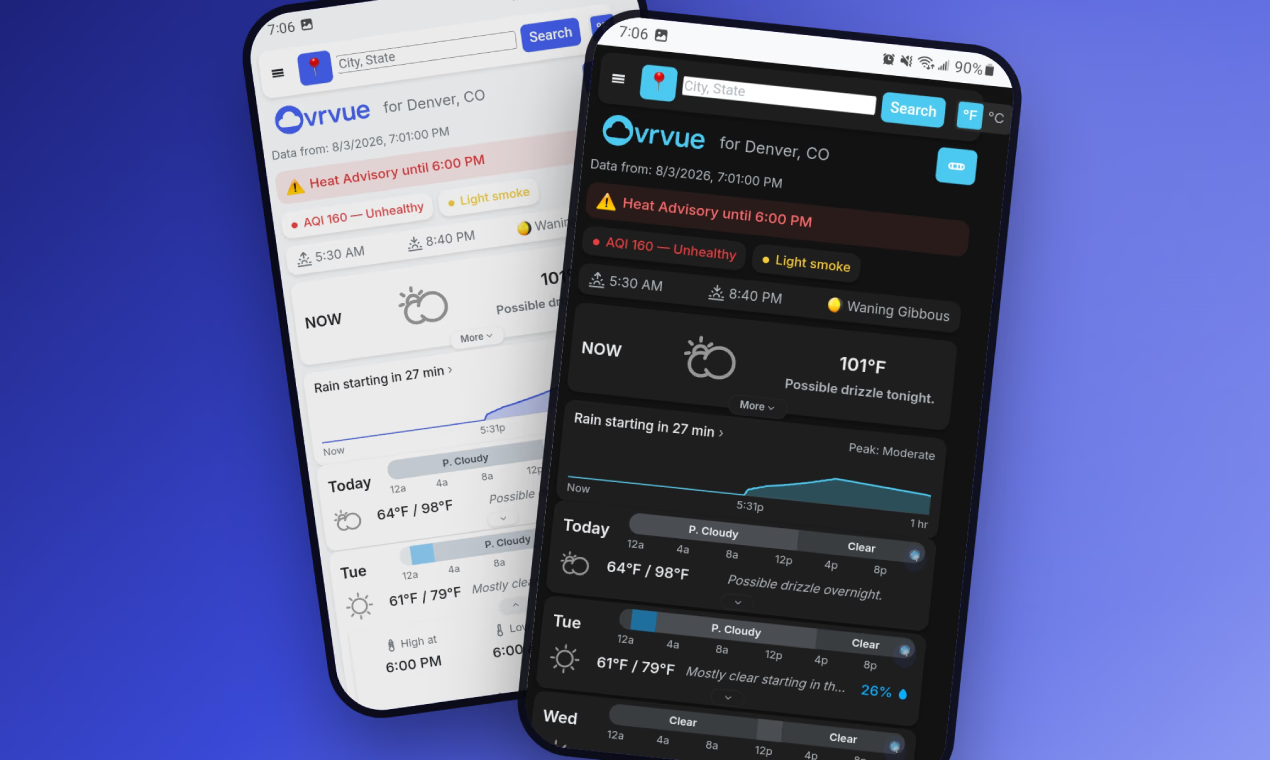
Ovrvue takes the unusual step of showing both when forecast data was fetched and when the weather model behind that forecast actually ran.
It is a small interface decision.
It also raises a much larger question about software: when an application tells us information is current, what exactly does “current” mean?
We Usually See The Delivery Time, Not The Creation Time
We are accustomed to treating information as fresh when it arrives.
A notification appears now, so it feels current. A webpage reloads now, so we assume the information on it has been newly produced. An application makes another network request, and the resulting screen appears to represent the present moment.
But digital information often travels through multiple stages before reaching us.
Weather forecasting makes this particularly easy to see. A forecasting model produces an output. A weather data provider makes that output available. An application requests information from the provider. The application then renders that information on your screen.
The final step can happen at 9:17.
That does not necessarily mean every part of the information was created at 9:17.
This is not evidence that something has gone wrong. It is simply how systems work. Computation, publication, caching, transmission and display are separate events.
Yet software interfaces frequently compress all of these events into one reassuring timestamp.
“Updated just now.”
Technically true.
Potentially incomplete.
The interesting design question is whether the distinction matters enough to show.
Most of the time, software concludes that it does not. Additional timestamps create visual complexity, and many users do not care about the machinery behind the information they consume.
That reasoning is understandable.
But hiding complexity and hiding provenance are not quite the same thing.
Freshness Is More Complicated Than A Refresh Button
The refresh button is one of the simplest metaphors in software.
Ask again.
It creates an intuitive relationship between user action and information freshness. If something looks old, refresh it. If you want the latest version, pull down on the screen.
This works remarkably well for information that changes at the source in something close to real time.
Weather forecasts are different.
Refreshing an app can ask for the latest available forecast. It cannot make the underlying forecast model run again.
That difference becomes important because users naturally infer causality from interface behavior. We perform an action, the app visibly updates, and therefore we assume the underlying information has become newer.
Sometimes only the delivery became newer.
Imagine checking the weather, seeing an uncertain storm forecast, and refreshing ten minutes later. The application makes another request and displays the data again. If the underlying forecast source has not changed, the new request may effectively be another delivery of the same forecast generation.
The interface has refreshed.
The forecast may not have.
That does not make the information useless. But knowing which thing changed gives the user a more accurate understanding of what they are looking at.
This is why Ovrvue distinguishes between the time the data was fetched and the time the model behind it ran. Its about page describes these as “two different times” and explicitly notes that the latter tells you how current the forecast really is.
The product is not merely showing another technical detail.
It is refusing to let interface freshness masquerade as forecast freshness.
Ovrvue.app Treats Provenance As Part Of The Forecast
Ovrvue is built around the idea that the first screen should prioritize what is actionable right now: temperature, approaching rain and genuinely notable conditions. Detailed information such as dew point, pressure, humidity, UV and visibility remains available one tap away.
At first glance, showing model timestamps might seem inconsistent with that philosophy.
A model run time is not exactly something you can wear, carry or cancel plans around.
But it changes how you interpret everything else.
Suppose rain is forecast to begin in twenty minutes. Ovrvue can show minute-by-minute precipitation when something is falling or approaching, with the chart disappearing entirely when precipitation is not relevant.
The prediction itself is useful.
The age of the forecast tells you something about how to read that prediction.
That becomes especially relevant when conditions are developing quickly or when what you see outside seems to disagree with the forecast. Instead of repeatedly refreshing and assuming each fetch represents an entirely new meteorological judgment, you can see whether the underlying forecast actually changed.
There is a broader principle here.
Metadata becomes useful when it changes the meaning of the data.
A timestamp does not deserve screen space merely because engineers have one available. It deserves space when it helps a person understand what the application knows and, just as importantly, what it does not know yet.
Software Often Hides The Chain Behind An Answer
Modern applications are very good at producing clean outputs.
That cleanliness is often a virtue. Nobody wants every weather forecast accompanied by a diagram of upstream services, model cycles, API requests and processing steps.
But abstraction has a side effect.
The simpler an answer looks, the easier it becomes to forget that the answer came from somewhere.
Weather applications do not create weather. They usually do not independently calculate atmospheric forecasts either. They sit somewhere in a chain of observation, modeling, distribution and presentation.
Ovrvue.app is unusually explicit about that chain.
Its about page states that forecasts come from Pirate Weather, radar comes from the U.S. National Weather Service’s RIDGE-II system, and place search comes from OpenStreetMap Nominatim. Users bring their own free Pirate Weather API key instead of having forecast requests silently resold through an opaque account system.
Ovrvue.app also acknowledges the boundaries this architecture creates. Forecasts are global, but radar does not appear outside the United States because its radar source is the U.S. National Weather Service. The app requires a connection for fresh conditions, though an installed version can open offline and display the last forecast it saw with its age clearly labeled.
None of these details make the forecast itself more accurate.
They make the relationship between the user and the forecast more legible.
That is a different kind of product quality.
There Is A Difference Between Simplicity And Pretending
We often say that good software should hide complexity.
Usually what we mean is that people should not have to understand implementation details to accomplish an ordinary task.
You should not need to understand geocoding to search for a city. You should not need to know the structure of a forecast API to find tomorrow’s temperature. You should not need meteorological training to understand whether rain is likely.
That kind of simplicity is useful.
But there is another form of simplicity that comes from hiding relevant uncertainty.
If a system suggests that information is newer than it actually is, simplicity has become distortion.
If a service silently removes the origin of its information, simplicity can become opacity.
If an application hides limitations because admitting them would make the product look less seamless, simplicity becomes pretending.
Ovrvue draws the line in an interesting place.
It keeps much of the weather detail off the primary screen, but it does not hide where the data comes from. It minimizes the number of signals competing for attention while still exposing model timing. It avoids requiring accounts, and says saved location, settings and the user's API key remain on the device.
The interface can be simple without implying that the system underneath it is magical.
Perhaps that distinction deserves more attention.
“Current” Should Tell Us What Changed
The freshness problem extends far beyond weather.
Consider a finance dashboard that says it updated seconds ago even though one underlying dataset only refreshes daily.
Or a shipping tracker whose screen reloads instantly even though the carrier has not reported a new scan.
Or an analytics product where the dashboard timestamp reflects the last query, not the last ingestion of new data.
Or an AI product displaying information from an external source without making clear when that source itself was last updated.
In each case, a timestamp can answer at least two very different questions:
When did the application check?
And when did reality last produce new information for it to check?
Software often answers the first while allowing users to infer the second.
This is not necessarily deliberate deception. Often it is simply the consequence of designing an interface around the mechanics of the application rather than the mental model of the person using it.
The application knows it made a successful request at 10:03.
So it says 10:03.
The user sees 10:03 and thinks: this information is from 10:03.
Those statements are close enough that the mismatch can remain invisible for years.
Until the distinction matters.
Honest Interfaces Sometimes Need To Admit Their Boundaries
There is a tendency to treat uncertainty as a product flaw.
Consumers prefer confidence. Interfaces prefer clean answers. Product teams prefer experiences that appear seamless.
Reality is less cooperative.
Weather forecasts are predictions. Data sources update on their own schedules. Radar coverage has geographic boundaries. Networks go offline. Models can be older than the application requesting them.
A trustworthy interface does not need to dramatize these limitations.
It simply should not disguise them.
Ovrvue’s approach to offline use is a good example. The app says fresh weather requires a connection. If installed to a phone’s home screen, however, it can open offline and show the last forecast it received, clearly labeled with when that forecast was seen.
The distinction matters.
There is a significant difference between showing old data and showing old data while pretending it is current.
The first can still be useful.
The second changes the user's understanding of the situation.
The same principle explains why model run times matter. Ovrvue is not claiming that everyone must study forecast-generation schedules before leaving the house. It is simply making the information available so the interface does not imply more freshness than the underlying system can support.
Honesty does not require explaining everything.
It requires avoiding the wrong implication.
The Best Metadata Changes Trust From Blind To Informed
Metadata has a reputation for being technical clutter.
Sometimes it is.
File sizes, build numbers, request IDs and obscure status codes may be useful to developers while adding little to an everyday interface.
But some metadata answers questions users genuinely have, even if they do not phrase those questions technically.
Is this still current?
Where did this come from?
Did anything actually change?
Am I looking at live information or the last thing the app happened to receive?
Ovrvue’s timestamps answer exactly this kind of question. Its source disclosures answer another. Its offline labeling answers another still.
That does not mean the application should become a diagnostic console.
Quite the opposite.
The strength of useful metadata is that a small amount of it can eliminate a large misunderstanding.
A single model timestamp can say more about forecast freshness than repeatedly animating a refresh icon.
A simple source label can say more about geographic limitations than pretending every feature exists everywhere.
A clearly marked stale forecast can remain useful without pretending to be live.
The goal is not maximum transparency in the sense of exposing every implementation detail.
It is meaningful transparency.
Show the machinery when understanding the machinery changes how someone should interpret the result.
A Refresh Should Not Be A Confidence Trick
Most days, you will probably open a weather app, glance at the temperature and move on.
That is how utility software should work.
The deeper questions only become visible when something does not quite line up. The storm moved. The rain did not arrive when expected. The forecast appears unchanged after several refreshes. The app says it updated now, but you wonder whether anything underneath actually did.
That is when interface language matters.
Software increasingly mediates our relationship with systems we cannot directly observe. Weather models are one example, but the same pattern appears in financial feeds, logistics systems, analytics platforms, AI services and almost every product built on external data.
We rarely see the underlying process.
We see the answer.
That gives designers a responsibility not merely to make answers readable, but to make their status understandable.
Ovrvue’s decision to show both fetch time and model time is tiny compared with the rest of a weather forecasting system. It does not improve the atmosphere, accelerate a weather model or eliminate uncertainty.
It does something simpler.
It tells you what actually became new.
And sometimes the difference between a trustworthy interface and a merely polished one is exactly that.
Ovrvue.app is a minimalist weather app that surfaces actionable conditions first while keeping detailed weather information one tap away. It is free, requires no account, and makes the sources and freshness of its forecast data visible.
Learn more: https://ovrvue.app