How Microsoft Teams Presence Can Improve Employee Availability Tracking
Knowing who's available, who's busy, and who's away is essential for keeping teams coordinated. In today's workplace, employees may be working in the office, remotely, attending meetings, visiting other locations, or temporarily away from their desks.
For organizations using Microsoft 365, Microsoft Teams already provides useful information about employee presence. However, presence alone doesn't always provide the complete picture of workforce availability.
By combining Microsoft Teams presence with a centralized employee in/out board, organizations can improve visibility, reduce manual status updates, and make everyday workplace coordination easier.
What Is Microsoft Teams Presence?
Microsoft Teams presence indicates a user's current communication availability. These indicators help coworkers understand whether someone might be available for a conversation, meeting, or collaboration.
Common Microsoft Teams presence indicators include:
- Available – The employee is generally available for communication.
- Busy – The employee may be working, attending a meeting, or otherwise occupied.
- Do Not Disturb – The employee prefers not to receive interruptions.
- Away – The employee may be temporarily inactive or away from their computer.
- Be Right Back – The employee has indicated a brief absence.
- Offline – The employee is not currently connected to Teams.
Presence can change based on user activity, calendar events, application behavior, or manual selections.
For example, Teams may automatically display Busy when someone joins a meeting. An employee may also manually select Do Not Disturb when concentrating on important work.
These indicators are valuable for communication, but they don't necessarily tell coworkers where an employee is working or whether they're available for broader workplace responsibilities.
Microsoft Teams Presence vs. Employee Availability
Although the terms are related, presence and availability are not identical.
Microsoft Teams presence primarily communicates a person's current availability for digital communication.
Employee availability tracking provides a broader operational view of whether someone is working, away, remote, out of the office, or otherwise available to colleagues.
Consider a few common situations.
An employee working remotely: Their Teams presence might show Available, but coworkers may still need to know they're working from home rather than at the office.
An employee attending an off-site appointment: Teams might show Away or Offline, but neither indicator explains the employee's actual workplace status.
An employee concentrating on a project: Teams might show Busy or Do Not Disturb even though the employee is actively working and available for urgent operational matters.
An employee away from their computer: Teams might automatically show Away, even though the employee is working elsewhere in the building.
These examples illustrate why Teams presence should be treated as a useful availability signal rather than a complete record of employee activity.
Organizations often benefit from combining presence information with employee statuses, workplace locations, and department information.
Why Traditional Employee Availability Tracking Can Be Difficult
Many organizations still rely on informal methods to determine employee availability.
Some use physical in/out boards near an entrance. Others maintain spreadsheets, shared calendars, messaging channels, or department-specific lists.
These approaches can work for smaller teams, but they become more difficult to maintain as organizations grow.
A physical whiteboard may be useful for employees working in one building, but it provides limited visibility for remote employees or colleagues at other locations.
Spreadsheets can provide a shared record, but employees must remember to update them. Information can quickly become outdated.
Shared calendars provide useful scheduling information, but interpreting multiple calendars to understand current availability can take time.
Messaging applications make it easy to contact coworkers, but repeatedly asking whether someone is available creates unnecessary interruptions.
A centralized employee in/out board helps address these challenges by providing one place to view workforce availability.
When that board can also use Microsoft Teams presence, organizations gain an additional source of information that may reduce the need for manual updates.
How Microsoft Teams Presence Integration Improves Coordination
Connecting Teams presence with an employee availability board offers several practical benefits.
1. Reduces Manual Status Updates
Employees shouldn't need to update multiple systems every time their availability changes.
A Teams-integrated availability board can automatically reflect supported presence changes, reducing duplicate effort.
For example, when Teams detects that an employee is away, an integrated board may be able to reflect that change according to the organization's configured synchronization rules.
Manual updates remain important because Teams presence doesn't always represent an employee's actual workplace situation.
The most useful approach combines automation with flexibility.
2. Creates a Centralized View of Employee Availability
Microsoft Teams provides presence information for individual users, but organizations may need a department-wide or company-wide overview.
A centralized in/out board can display employees together, making it easier to identify who is available without checking individual Teams profiles.
This is especially useful for department managers, reception staff, administrative teams, and employees who regularly coordinate work across multiple groups.
Instead of contacting several coworkers individually, someone can quickly review the shared board.
3. Supports Hybrid and Remote Work
Hybrid workplaces introduce additional coordination challenges.
An employee may be working productively from home while another is in the office and a third is visiting a different location.
Teams presence can help indicate communication availability, while an in/out board can provide workplace location context.
Together, these details help organizations distinguish between someone who is unavailable and someone who is simply working somewhere else.
4. Improves Department-Level Visibility
Larger organizations often have multiple departments with different operational needs.
An IT department may need to identify available support personnel. An administrative office may need to know which employees are on-site. A manager may want to review availability across several teams.
Department-based filtering and grouping help employees find relevant information without searching through an entire organization.
When Teams presence is integrated into that shared view, the availability information becomes more useful for daily coordination.
5. Reduces Unnecessary Interruptions
Finding the right person at the right time can be surprisingly time-consuming.
Employees may send messages, make calls, or walk between offices simply to determine whether someone is available.
A centralized availability board can help answer those questions before an interruption occurs.
This doesn't eliminate the need for communication. Instead, it helps employees make better decisions about when and whom to contact.
How Staff Glance Integrates With Microsoft Teams
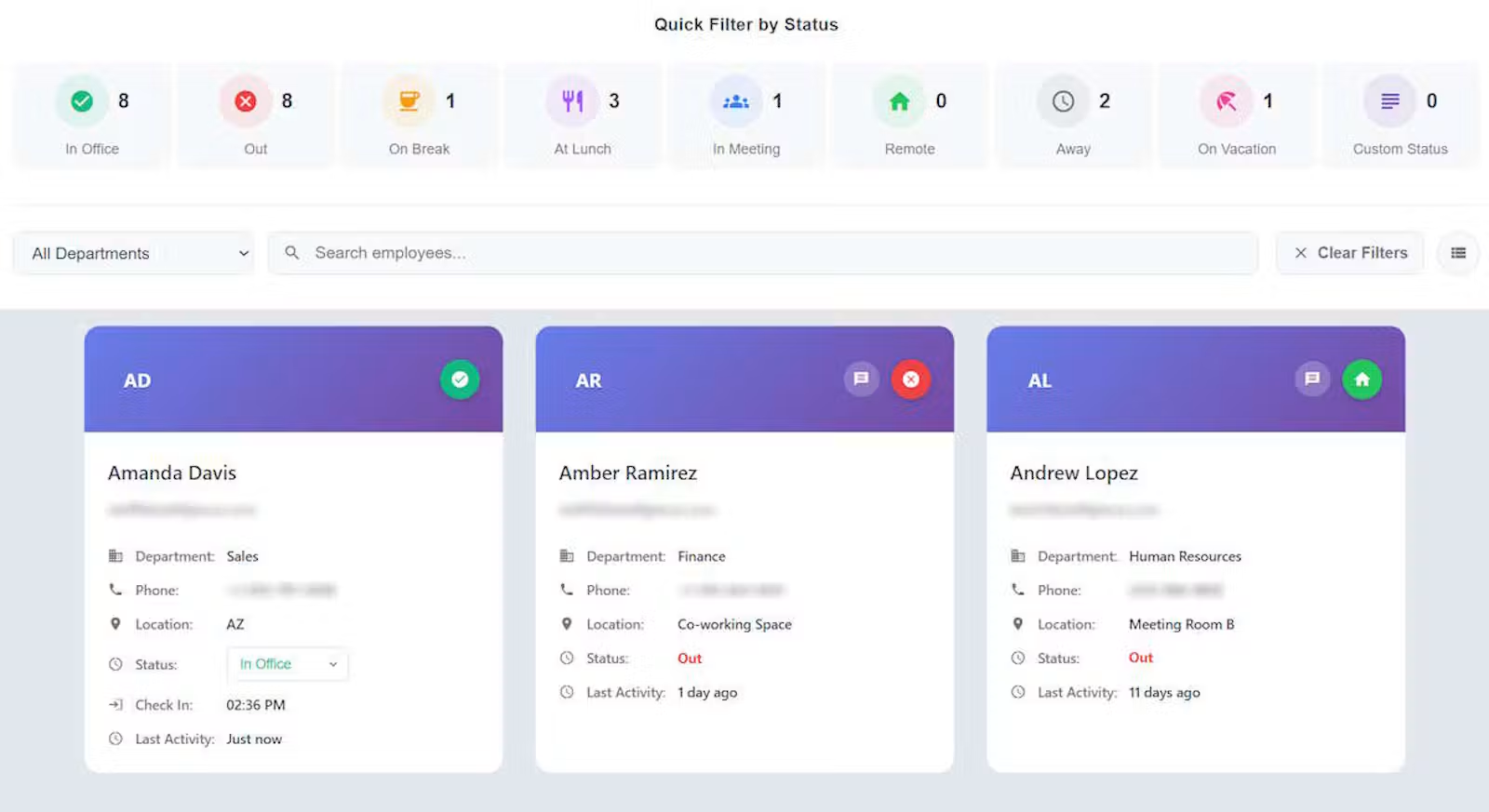
Staff Glance is a cloud-based employee in/out board designed to help organizations see who's in, who's out, who's remote, and who's available.
Its optional Teams Sense integration connects supported Microsoft Teams presence information with Staff Glance employee statuses.
Rather than requiring employees to maintain entirely separate availability information, organizations can use Teams presence as an additional input to their shared in/out board.
Staff Glance also provides features that extend beyond Microsoft Teams presence alone:
- Custom Statuses: Organizations can create employee statuses with their own names, icons, and colors.
- Custom Locations: Employees can indicate workplace locations such as Office, Remote, or other organization-defined locations.
- Department Management: Organize employees into departments and manage visibility according to organizational needs.
- Filtering and Grouping: Quickly locate employees by status, department, location, role, and other available attributes.
- Microsoft Entra SSO: Support organizational authentication through Microsoft Entra ID.
- Microsoft Teams App: Access Staff Glance from within the Microsoft Teams environment.
- Microsoft 365 Calendar Integration: Provide additional calendar-based availability context.
- Employee Status Management: Allow authorized users to update statuses when manual input is needed.
These capabilities help organizations maintain a broader operational view without replacing their existing Microsoft 365 communication tools.
Teams Sense is optional, and organizations can continue using Staff Glance as an employee availability board without enabling automatic Teams presence synchronization.
Practical Example: Coordinating a Hybrid IT Department
Imagine an IT department supporting several office locations and remote employees.
The department has technicians working on-site, administrators working remotely, and managers frequently attending meetings.
A support request arrives requiring assistance from someone physically present at the main office.
Microsoft Teams can help identify whether employees are available for communication. However, an Available indicator doesn't necessarily mean someone is physically present at the required location.
With Staff Glance, the department can view employee statuses alongside workplace locations.
A manager can filter the board to focus on the IT department and identify employees whose displayed statuses and locations suggest they may be able to help.
Teams Sense can also help keep supported availability statuses synchronized, reducing the need for employees to manually update every change.
The result is a clearer view of department availability and less time spent contacting people who may not be in the right location.
The same concept can benefit educational institutions, healthcare administration, professional services, government offices, and other organizations managing employees across departments or locations.
Employee Availability Is Not Employee Productivity
One important distinction is that employee availability tracking should not automatically be interpreted as employee productivity monitoring.
An employee appearing Away in Microsoft Teams may still be actively working. Someone displaying Available may be occupied with tasks that aren't reflected in their Teams presence.
Presence indicators are communication signals, not definitive measurements of work performed.
A useful employee availability system should help colleagues coordinate activities, identify appropriate contacts, and understand workplace availability.
Staff Glance focuses on providing that operational visibility rather than treating presence indicators as proof of productivity.
This distinction is particularly important for organizations adopting hybrid work arrangements, where employees may perform meaningful work away from their computers or outside traditional office environments.
Choosing an Employee Availability Solution for Microsoft 365
Organizations evaluating employee in/out board software should consider how well a solution fits their existing workflow.
Important questions include:
- Does it support Microsoft Entra single sign-on?
- Can it integrate with Microsoft Teams presence?
- Does it distinguish employee status from workplace location?
- Can employees be organized and filtered by department?
- Does it support remote and hybrid employees?
- Can administrators manage visibility and permissions?
- Is the interface simple enough for employees to use consistently?
- Does the pricing remain affordable as the organization grows?
The best solution isn't necessarily the one with the most features. It's the one that provides useful availability information without creating unnecessary administrative work.
For organizations already using Microsoft 365, integration with existing tools can make adoption easier and reduce the need to maintain disconnected systems.
Bringing Microsoft Teams Presence and Employee Availability Together
Microsoft Teams presence provides valuable information about communication availability, but organizations often need more context to coordinate employees effectively.
Combining Teams presence with a centralized in/out board helps connect communication signals with workplace statuses, locations, and department information.
For hybrid teams, multi-department organizations, and businesses using Microsoft 365, this approach can reduce manual updates and make employee availability easier to understand.
Staff Glance brings these capabilities together in an affordable, centralized employee in/out board designed for everyday workplace coordination.
Learn more about Staff Glance and its Microsoft 365 integrations at staffglance.com.