
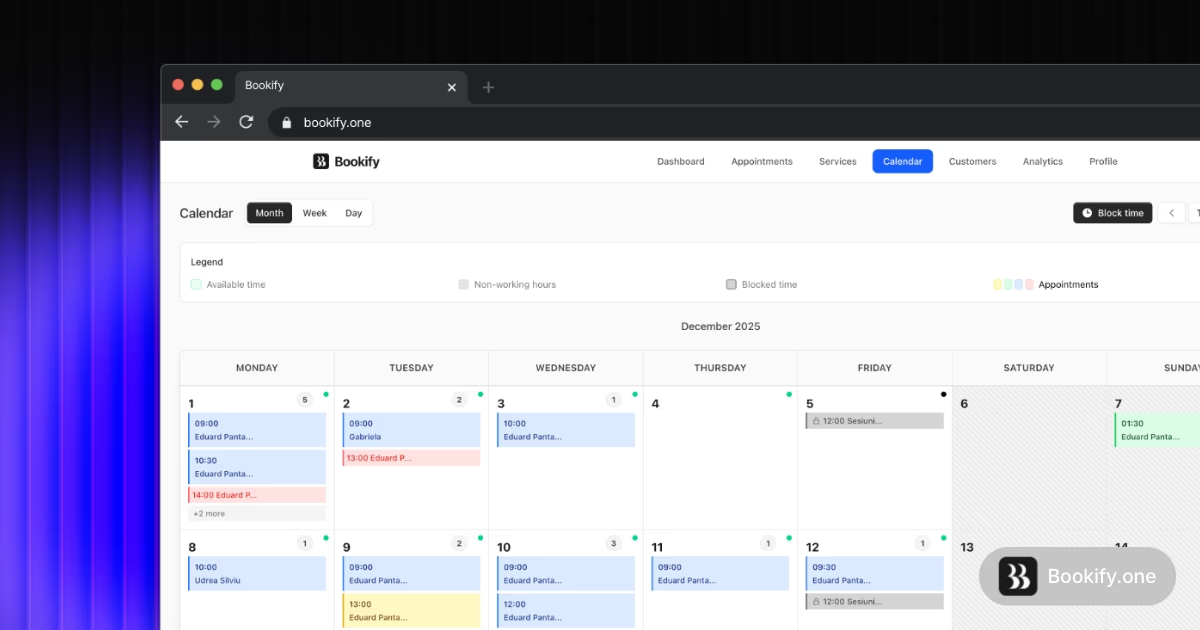
Managing appointments manually can quickly become overwhelming for small businesses. Phone calls, messages, spreadsheets, and scattered calendars often lead to missed bookings, double scheduling, and wasted time. Many service-based businesses struggle with these issues daily. Fortunately, modern tools make it easy to automate scheduling and give customers the ability to book appointments online.
If you have ever wondered how to set up an online appointment booking system for small business, the process is simpler than you might think. With the right software, you can automate bookings, prevent scheduling conflicts, and let customers reserve time slots anytime they want.
This guide will walk you through the entire process so you can implement a professional scheduling system and start saving time immediately.
Why Small Businesses Need an Online Appointment Booking System
Many small businesses still rely on manual scheduling methods such as phone calls, email chains, or handwritten calendars. While this may work initially, it becomes inefficient as the number of clients grows.
An online appointment booking system solves several common problems:
- Double bookings caused by multiple calendars
- Missed messages or forgotten appointments
- Time wasted coordinating schedules
- Customers unable to book outside business hours
- No clear insight into booking data and revenue
Online booking platforms allow customers to see available time slots in real time and schedule appointments instantly. These systems automatically update availability to avoid conflicts and keep everything organized in one place. Real-time scheduling also improves customer convenience and reduces manual work for staff. :contentReference[oaicite:0]{index=0}
Instead of answering scheduling messages all day, your business can focus on delivering great services.
Key Features to Look for in an Appointment Scheduling System
Before setting up a booking system, it helps to understand the most important features that make these tools effective.
Modern scheduling platforms usually include several powerful capabilities that simplify appointment management.
- 24/7 online booking for customers
- Real-time availability calendars
- Automated email and SMS reminders
- Team scheduling for multiple staff members
- Public booking pages for clients
- Analytics and reports
Automated reminders are especially valuable because they significantly reduce missed appointments. Reminder notifications help clients remember upcoming bookings and ensure your schedule stays full. :contentReference[oaicite:1]{index=1}
When choosing a system, make sure it supports these essential features so your business can run smoothly without manual scheduling headaches.
Step 1: Choose a Simple Booking Platform
The first step is selecting a booking tool that fits your business needs. Ideally, it should be easy to set up and flexible enough to support multiple services, staff members, and appointment types.
One option designed specifically for small service businesses is the Bookify appointment scheduling system. This platform allows customers to book appointments online, view available time slots, and receive automatic reminders.
Instead of juggling multiple tools such as spreadsheets, messaging apps, and calendars, the system centralizes everything into a single dashboard.
Businesses can also allow clients to book appointments anytime, including evenings and weekends, which helps fill more available time slots.
Step 2: Define Your Services and Appointment Types
Once you select a booking platform, the next step is setting up the services you offer.
This includes defining the details of each appointment type so customers can easily choose what they need.
You should configure the following information:
- Service name
- Appointment duration
- Price or cost
- Available time slots
- Assigned staff members
For example, a salon might create services like:
- Haircut
- Hair coloring
- Hair treatment
Each service would have its own duration and availability.
Clear service definitions make the booking process easier for customers and prevent confusion during scheduling.
Step 3: Set Your Business Hours and Availability
After defining your services, configure your working hours.
This ensures customers only see available time slots when your business is open.
Typical settings include:
- Business operating hours
- Break times
- Staff availability
- Days off or holidays
Advanced scheduling systems automatically block unavailable times and prevent customers from booking outside your schedule.
This feature eliminates the risk of double bookings and overlapping appointments.
Step 4: Create Your Public Booking Page
A public booking page is where customers actually schedule appointments.
This page shows available time slots, service options, and booking details.
Many modern booking systems allow you to customize the page with:
- Your business name and logo
- Service descriptions
- Staff members
- Location details
Customers simply visit the page, choose a service, select a time slot, and confirm their appointment.
This process takes only a few seconds and eliminates the need for back-and-forth messaging.
You can also share this booking link on your website, social media profiles, or messaging platforms so clients can book appointments easily.
Step 5: Enable Automated Appointment Reminders
No-shows can cost businesses significant revenue. One of the best ways to reduce missed appointments is by enabling automatic reminders.
Most booking systems send reminders through:
- Email notifications
- SMS messages
- Booking confirmations
These reminders are typically sent a day before the appointment to ensure clients remember their scheduled time.
This simple automation can dramatically improve attendance and reduce lost revenue.
Step 6: Monitor Bookings and Business Insights
Another major benefit of using a scheduling system is access to business analytics.
Instead of guessing how your services are performing, you can view detailed reports such as:
- Total bookings
- Revenue per service
- Number of new clients
- Most popular services
This information helps you make better decisions about pricing, scheduling, and business growth.
You can identify which services generate the most demand and adjust your schedule accordingly.
Best Businesses That Benefit From Appointment Booking Systems
Online scheduling tools are useful for many types of service businesses.
Some of the most common industries that use booking systems include:
- Hair salons and barbershops
- Beauty and wellness clinics
- Fitness trainers and gyms
- Consultants and coaches
- Repair services
- Tutoring and education services
Any business that relies on scheduled time slots can benefit from automating appointments.
Even small solo entrepreneurs can significantly improve efficiency by implementing a booking system.
Benefits of Automating Your Appointment Scheduling
Once your system is running, the advantages become clear almost immediately.
Here are some of the biggest benefits small businesses experience:
- Less time spent on scheduling messages
- Fewer missed appointments
- More organized calendars
- Higher customer convenience
- Better insight into business performance
Perhaps the biggest advantage is that your booking system works around the clock.
Customers can schedule appointments even late at night or during weekends when your business is closed.
This means you wake up to new bookings already scheduled.
Final Thoughts
Learning how to set up an online appointment booking system for small business can transform how your business operates.
Instead of spending hours managing messages and calendars, an automated booking platform handles scheduling for you.
Customers gain the convenience of booking appointments anytime, while your business benefits from fewer no-shows and better organization.
If you want to explore more tools that help businesses automate operations and grow faster, you can also discover additional solutions at NextGen Tools.
With the right booking system in place, your business can spend less time on administrative tasks and more time serving clients and increasing revenue.