There is a specific kind of frustration that comes from starting a long AI coding session, stepping away for a meeting, and coming back to find the agent stuck waiting on a question only you could answer. The work did not fail, it just paused, and now the momentum you had an hour ago is gone. This is the exact problem behind the search for how to keep an AI coding agent running while you're away from your desk, and the answer has less to do with making the agent smarter and more to do with closing the distance between where it runs and where you actually are.
Why Sessions Stall the Moment You Step Away
Coding agents are good at working independently for stretches of time, but they are not fully autonomous, and that is by design. A well-behaved agent stops and asks before merging something risky, before deleting a file it is unsure about, or before making a decision that touches business logic. That pause is a feature, not a bug. The problem is not that agents ask questions, the problem is that most workflows assume the only person who can answer is sitting at the same laptop the agent is running on.
Once you separate those two things, the agent's runtime and your physical location, the stalling stops being inevitable.
What "Keeping It Running" Actually Requires
Keeping an agent moving while you are away is not about giving it more autonomy. It is about making sure a few specific actions do not require a laptop.
- Seeing what the agent is doing in something close to real time
- Approving or rejecting a diff the moment it is ready
- Redirecting a prompt if the agent starts drifting off task
- Answering a quick clarifying question without opening an IDE
- Picking the session back up later exactly where it left off
When those five things work from a phone, a session stops depending on you being physically present, and starts depending only on you being reachable.
Pairing Once, Then Supervising From Anywhere
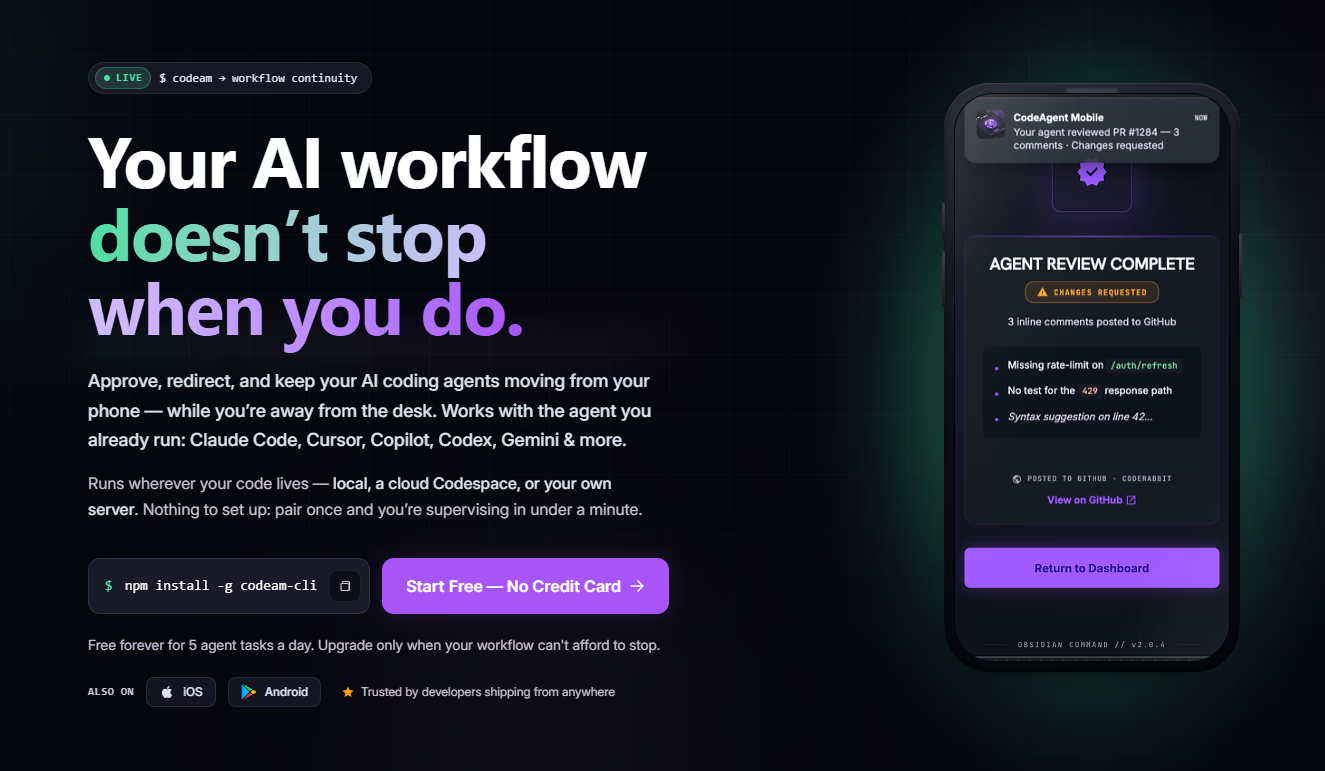
The setup that makes this possible is usually a one-time pairing step. You connect the agent already running in your IDE, CLI, or a cloud Codespace to your phone, and from that point the session lives across every device you sign into, not just the machine where it started. Tools built specifically for this, such as CodeAgent Mobile, stream the session's output to your phone as it happens, so you can approve a diff or redirect the agent from a meeting room without anyone noticing you are still working.
Handing Off Without Breaking the Thread
One detail that matters more than it seems is what happens when you switch devices mid-session. Walking away from a desktop, picking the session back up on a laptop later, or handing it off to a teammate should not mean losing the thread's history. A session that remembers everything that happened, regardless of which screen you are looking at it from, is what actually lets you step away without anxiety about losing context. Without that continuity, "keeping it running" just means checking a notification and hoping nothing important happened while you were gone.
Where the Agent Physically Runs While You're Gone
A common assumption is that the agent has to keep running on your laptop, which means closing the lid effectively pauses everything. That does not have to be true. A session can run on a freshly provisioned cloud Codespace, or on your own server, supervised remotely the entire time. Closing your laptop, switching wifi networks, or even changing time zones does not need to interrupt the run, since your phone is the constant connection point, not the machine actually doing the work.
This matters most on long refactors or multi-hour test runs, the kind of task where being tied to a single physical machine for the full duration was never realistic in the first place.
Answering Questions Without Typing on a Phone Keyboard
Part of why staying connected to a session used to feel impractical is that typing detailed answers on a phone keyboard is slow. Voice removes that friction. Speaking a quick answer, or attaching a screenshot instead of describing something in words, turns a clarifying question from a chore into something you can resolve in ten seconds without breaking stride in whatever you were doing at your desk-less moment.
Getting Started
If you already run an agent like Claude Code, Cursor, or Copilot locally, testing this does not require changing how you work, only adding a way to stay connected once you step away.
- Pair your existing agent session to your phone through the IDE plugin or CLI
- Start a normal task and let it run for a few minutes on its own
- Step away and try approving a diff or answering a question from your phone
- Test picking the session back up on a different device to confirm nothing was lost
- Try running a longer session on a Codespace to see it survive closing your laptop entirely
Once a session has survived one real interruption without stalling, it stops feeling like a fragile process you have to babysit, and starts feeling like work that simply continues whether or not you happen to be at your desk.
For more breakdowns of tools like this, visit nxgntools.com