
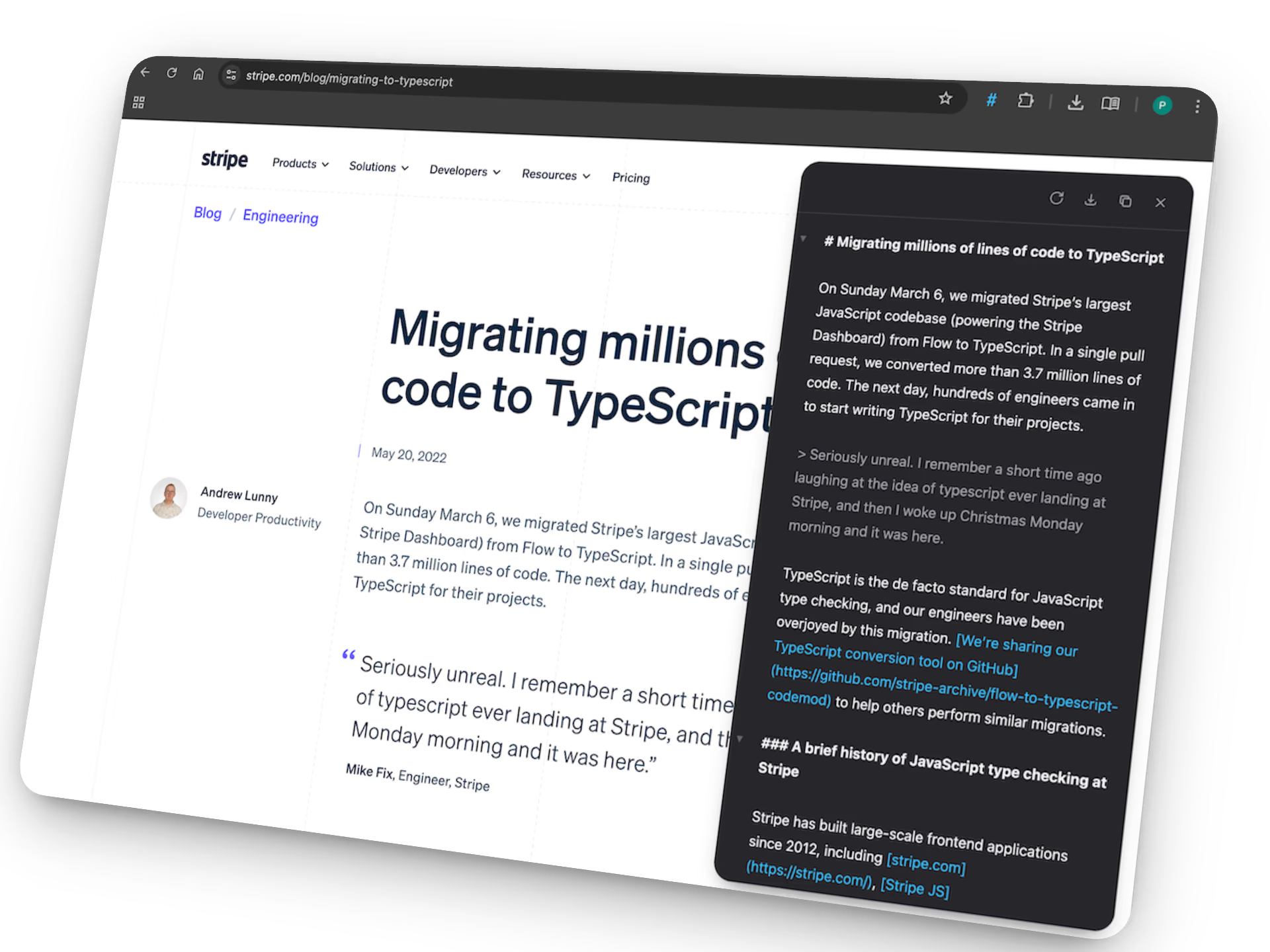
Many developers, writers, and researchers struggle with messy web content. Ads, navigation menus, and visual clutter make it hard to extract useful information. When you paste raw webpage content into an AI tool, the result often includes noise. This slows your workflow and reduces output quality.
A clean Markdown version of a webpage solves this problem. Markdown keeps structure while removing distractions. It creates readable, portable content that works across tools and platforms. Tools built for this purpose help you convert webpages into structured text with minimal effort. One example is Plain Markdown, a browser extension designed to turn webpages into clean Markdown instantly.
Why Clean Markdown Matters for AI Workflows
AI tools rely on structured input. When content includes ads, sidebars, or unnecessary elements, the results become less accurate. Clean Markdown improves how AI models process text.
Markdown itself is a lightweight formatting system that uses simple symbols to represent structure such as headings, lists, and links. It allows users to write readable text while maintaining structure that converts easily to HTML or other formats.
Using clean Markdown provides clear benefits:
- Improves AI prompt clarity
- Reduces token waste from irrelevant content
- Makes documents easier to reuse
- Supports structured data extraction
- Simplifies research workflows
If you work with large volumes of web content, Markdown conversion saves hours each week.
Common Problems When Copying Webpage Content
Most users copy webpage text manually. This method leads to several issues.
- Extra formatting breaks layout
- Navigation elements appear in pasted content
- Images and scripts create clutter
- Text structure becomes inconsistent
- Important headings lose hierarchy
These issues affect productivity. When preparing data for AI prompts, every extra character matters. Removing clutter manually takes time and increases error risk.
Automated webpage-to-Markdown conversion removes these steps.
How to Convert Webpage to Markdown for AI Prompts
The process is simple once you use the right workflow.
- Open the webpage you want to convert
- Activate your Markdown conversion tool
- Review the cleaned content
- Copy the Markdown output
- Paste into your AI tool or notes system
This workflow takes seconds instead of minutes. It produces structured content ready for processing.
Tools designed for this task convert webpages into clean Markdown with a single click. They remove visual clutter while preserving structure such as headings, lists, and links.
Key Features to Look for in a Webpage to Markdown Tool
Not all conversion tools work the same way. The best tools focus on accuracy and simplicity.
Look for these features:
- High fidelity content capture
- Live editing interface
- Auto-save functionality
- One-click copy or download
- Integration with productivity tools
Some tools also include AI commands. These allow you to summarize or rewrite content directly after conversion. This reduces the number of steps in your workflow.
Tools like nxgntools.com often feature modern productivity utilities built around structured workflows.
Use Cases for Webpage to Markdown Conversion
This workflow supports many professional tasks. Developers, researchers, and content creators all benefit from clean Markdown extraction.
Here are common use cases:
- Preparing AI prompts
- Saving research articles
- Extracting documentation
- Building knowledge bases
- Creating technical notes
- Archiving web content
Each use case relies on structured content. Markdown preserves structure while remaining easy to edit.
Using Markdown for AI Prompt Engineering
Prompt quality determines AI output quality. Structured prompts produce better results.
Markdown helps organize prompt content into readable sections.
Example prompt structure:
- Heading for topic
- Bullet list of key points
- Quoted source material
- Clear instructions
This format improves readability and reduces ambiguity.
When content arrives in clean Markdown, building structured prompts becomes easier.
Benefits for Developers and Technical Teams
Developers work with documentation daily. Converting web content into Markdown fits naturally into development workflows.
Markdown files integrate with:
- Git repositories
- Documentation platforms
- Static site generators
- Developer note systems
This integration makes Markdown an ideal format for long-term storage.
Markdown files also remain readable without specialized tools. This ensures long-term accessibility.
Benefits for Writers and Content Creators
Content creators gather research from multiple sources. Manual copying creates messy drafts.
Markdown conversion improves organization.
Writers benefit from:
- Clean research notes
- Readable article drafts
- Consistent formatting
- Easy publishing workflows
Structured content reduces editing time. It improves collaboration between writers and editors.
Benefits for Researchers and Students
Research often involves collecting information from many webpages. Maintaining organized notes becomes difficult.
Markdown conversion supports better note management.
Researchers gain:
- Structured research archives
- Quick reference notes
- Reduced duplication
- Improved searchability
These advantages support long-term projects and academic work.
How Markdown Improves Knowledge Management
Knowledge management depends on consistency. Markdown supports consistent formatting across documents.
Using Markdown improves:
- Search efficiency
- Document linking
- Content reuse
- Information retrieval
Many teams build internal knowledge bases using Markdown. Structured content makes indexing easier.
Clean webpage extraction supports this workflow.
Reducing Distractions During Reading
Webpages often include ads, banners, and popups. These elements interrupt reading.
Markdown conversion removes distractions.
This leads to:
- Faster reading speed
- Improved focus
- Better retention
- Cleaner note capture
Many users convert long articles into Markdown before reading them offline.
Automating Research Workflows
Automation saves time across repeated tasks. Webpage conversion tools support automated workflows.
Typical automation pipeline:
- Capture webpage content
- Convert to Markdown
- Run AI summary
- Store in notes system
- Tag for retrieval
This pipeline removes manual steps.
It also ensures consistent output.
Preparing Content for Large Language Models
Large language models process text tokens. Extra noise increases token usage.
Clean Markdown reduces token waste.
This leads to:
- Lower processing costs
- Faster response times
- Improved output relevance
- Better structured results
Preparing clean inputs supports efficient AI workflows.
Improving Productivity With Structured Text
Structured text improves productivity across many workflows.
Markdown provides:
- Simple syntax
- Portable files
- Readable formatting
- Easy editing
These advantages support both individual users and teams.
Consistent workflows lead to measurable productivity gains.
Best Practices for Webpage to Markdown Conversion
Follow these best practices to achieve consistent results.
- Convert content before editing
- Review headings for accuracy
- Remove unused sections
- Store files with descriptive names
- Use folders to organize topics
These steps improve long-term usability.
They also reduce time spent searching for information later.
Choosing the Right Workflow for Your Needs
Different users require different workflows.
Consider these factors:
- Volume of content processed
- Frequency of use
- Integration requirements
- Storage preferences
- Collaboration needs
Choosing the right workflow improves consistency.
It also reduces repetitive work.
The Future of Web Content Processing
Content consumption continues to increase. Efficient workflows become more valuable each year.
Markdown conversion tools represent a shift toward structured workflows. They enable faster research, cleaner prompts, and improved knowledge storage.
As AI tools become standard across industries, structured input formats will remain essential.
Learning how to convert webpage to Markdown for AI prompts positions you ahead of many users who still rely on manual methods.
Adopting structured workflows today leads to long-term efficiency gains across research, development, and content creation.