
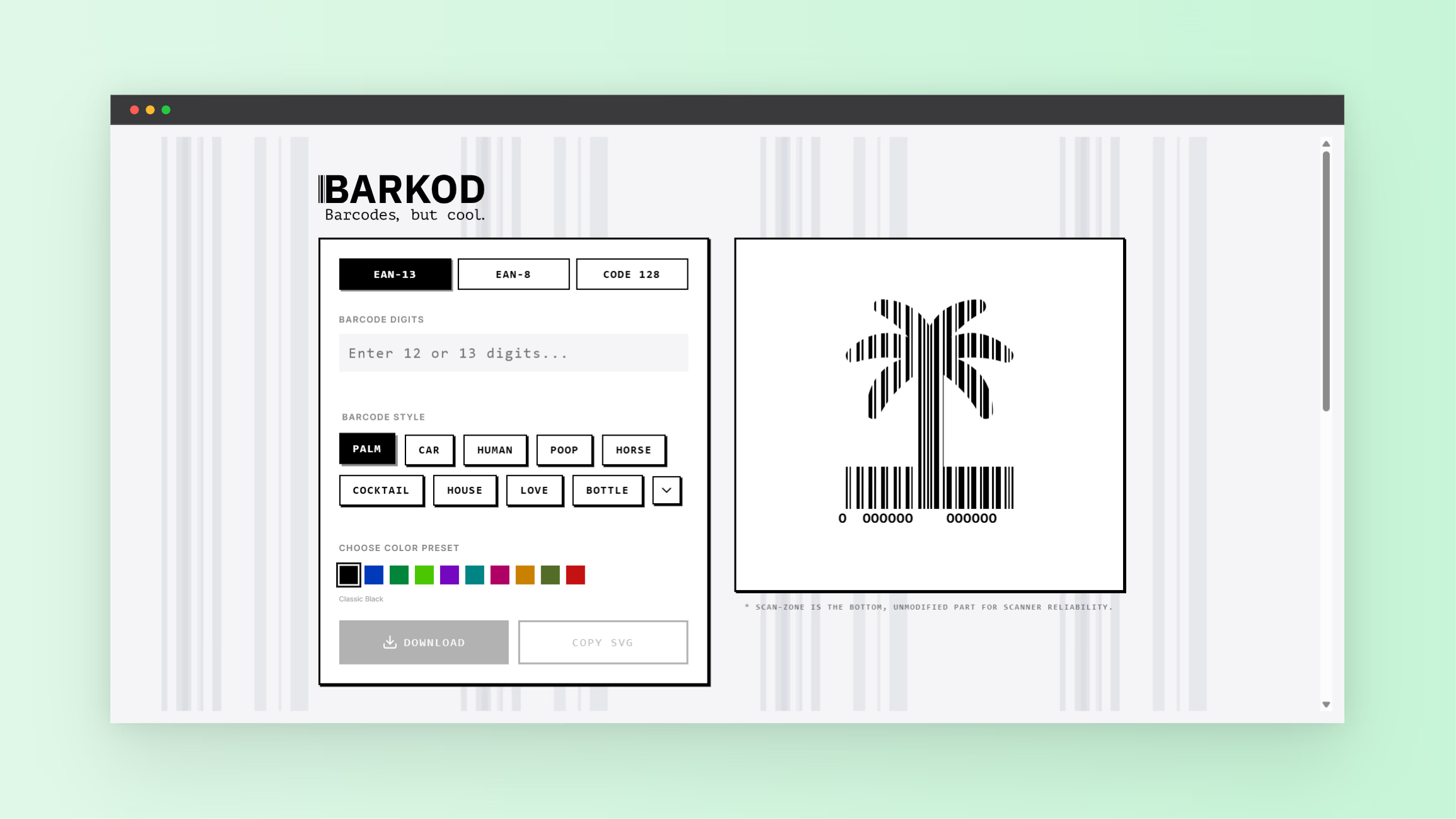
Product packaging often includes one element designers ignore: the barcode. It usually looks plain and breaks visual consistency on premium packaging. Barkod Studio changes this by turning standard barcodes into stylized SVG assets while keeping scan accuracy intact.
The tool focuses on a simple constraint. The barcode must scan on retail hardware while allowing visual customization on top. That balance makes it useful for packaging designers, brand studios, and indie product creators who want better visual control without breaking compliance rules.
What Barkod Studio does
Barkod Studio generates barcodes in formats like EAN-13, EAN-8, and Code 128. It outputs SVG files so designers can scale them without losing quality. The core idea is to preserve scanning reliability while allowing shape-based design elements around the code.
Each barcode keeps a protected scan zone at the bottom. This zone stays unchanged so scanners can read the code even when the top portion includes artistic shapes.
The system is built around a constraint-driven design model. The barcode data remains intact, while the visual layer changes based on selected styles.
How the artistic barcode system works
The tool separates structure from decoration. The vertical bars encode data. The decorative layer modifies shape language above the scan zone.
- Barcode data input supports numeric formats like product codes
- Scan-safe region remains untouched for reliability
- SVG output keeps quality consistent across print and web
- Style library applies visual transformations without altering encoding
This separation is important. It ensures the barcode stays functional while still matching a brand identity.
Why scannability matters in artistic barcode design
Retail systems rely on strict scanning rules. Even small distortions can break recognition. Barkod Studio avoids this by keeping a stable baseline scan region across all designs.
The platform was tested across multiple scanner types including handheld retail devices and mobile scanners. The goal is consistent decoding across real-world environments, not just digital previews.
This approach allows creative freedom without risking checkout failures or packaging reprints.
Use cases in packaging and branding
Design teams use artistic barcodes in several production scenarios where visual consistency matters.
- Premium food packaging with brand-themed shapes
- Craft beverage labels with decorative barcode integration
- Merchandise packaging where visual identity extends across all print elements
- Indie product launches where design differentiation matters
For smaller brands, this reduces friction between design intent and manufacturing constraints.
Workflow from input to export
The process starts with entering a product barcode number. The system generates a structured barcode, then applies a selected style layer.
Designers choose visual presets such as icons, shapes, or themed silhouettes. The system converts these into barcode-safe vector overlays.
The final output is an SVG file ready for print or digital packaging layouts.
Where Barkod Studio fits in modern design workflows
Barkod Studio sits between branding tools and production tools. It does not replace packaging software. It improves one specific component inside that workflow: the barcode.
Designers working in tools like Figma or Illustrator can import SVG outputs directly into packaging layouts without additional conversion steps.
The focus stays on compatibility with real production systems while improving visual consistency.
Why designers search for artistic barcode generators
Most designers face the same issue. Packaging looks refined until the barcode is added. That single element often breaks layout balance.
Search intent behind this problem usually includes:
- how to make barcodes look better on packaging
- how to design scannable artistic barcodes
- barcode SVG generator for branding
- how to keep barcode functional while customizing design
Barkod Studio targets this gap by combining functional encoding with controlled design flexibility.
Technical constraints behind barcode styling
Barcodes follow strict rules. Line spacing, quiet zones, and contrast levels affect readability. Any design tool working in this space must preserve those rules.
The system keeps a stable scan region and avoids modifying critical encoding patterns. This ensures compatibility with retail scanners and inventory systems.
Without these constraints, artistic barcodes would fail at checkout systems or warehouse scanners.
Why SVG format matters for barcode design
SVG files scale without quality loss. That matters for packaging because barcodes appear in different sizes across labels, boxes, and digital previews.
Raster formats introduce blur and scanning risk. SVG avoids that problem and keeps edges sharp for machine readability.
Conclusion
Artistic barcode design works only when structure and aesthetics stay separated. Barkod Studio uses that principle to turn standard barcodes into visual assets without breaking scan reliability.
Designers gain flexibility in packaging layouts while keeping compliance with retail scanning systems. That combination makes it useful for branding workflows where every visual element matters.
Try the tool here: https://barkod.studio/
Explore more design and workflow tools here: https://www.nxgntools.com