
We’ve all been there: you’re right in the middle of a creative flow state—finishing an important blog post, tweaking a modern website layout, or putting together a crucial pitch deck for a key client—and suddenly, a simple image upload stops you completely cold in your tracks. "File format not supported." Or maybe you’ve just downloaded a large batch of personal photos from your modern smartphone, only to realize they are all saved in Apple’s high-efficiency .HEIC container format, while your online web content management system strictly insists on accepting standard .JPG or web-optimized .WebP files.
In those immensely frustrating moments, the last thing you want to do is open heavy, resource-intensive, subscription-based desktop photo software that takes several minutes just to load up, or risk uploading your private photos to a sketchy online conversion website packed with intrusive pop-up advertisements, unexpected wait times, and hidden daily limits.
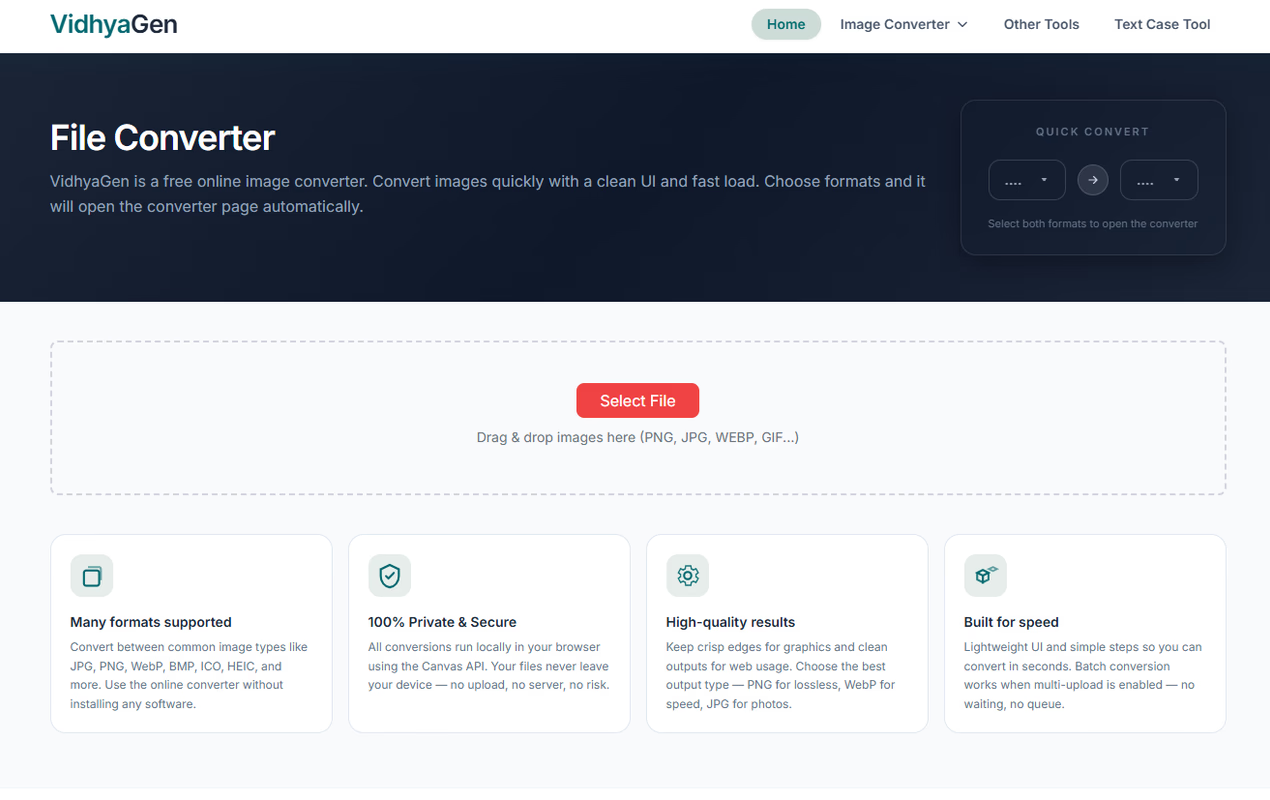
That’s precisely where VidhyaGen - Image Converter feels like a genuine, refreshing breath of fresh air. It’s intentionally designed from the ground up to be the quick, quiet, transparent, and completely dependable digital assistant that you keep permanently pinned in your browser bookmarks bar for whenever sudden media formatting headaches arise during your workday.
Why It Feels Completely Different: Total Privacy First
Most traditional online image editing tools work through a standard, old-fashioned cloud pipeline: you upload your image file, it travels across the internet to a remote corporate server, converts behind the scenes on someone else's server infrastructure, and then eventually gets sent back down to your computer. Beyond being noticeably slow when dealing with large high-resolution images or weaker internet connections, this server-side approach always leaves behind a lingering sense of privacy unease. If you are working with personal family photos, sensitive client assets, confidential financial receipts, or unreleased product design renders, sending those private files to an unknown third-party server feels like an entirely unnecessary security risk.
VidhyaGen completely flips this conventional cloud model on its head by relying entirely on client-side processing.
When you drag and drop any image into the VidhyaGen web app, your actual files never leave your physical machine. The core image conversion, resizing, cropping, and compression calculations happen directly inside your browser’s local sandbox environment using WebAssembly execution and modern browser web APIs.
- Instantaneous Execution: Because there is zero network transfer time required for uploading or downloading large image files over the internet, conversions happen almost instantly—even when dealing with multi-megabyte, high-resolution graphic assets.
- Complete Privacy & Peace of Mind: Your private personal photos, sensitive corporate documents, and unreleased graphic designs remain 100% confidential to your device. In fact, if your internet connection suddenly drops offline mid-task, the conversion engine continues working locally without missing a beat.
Everyday Scenarios Where VidhyaGen Saves the Day
To really appreciate why having a lightweight browser utility matters so much in modern digital work environments, consider how often mismatched or unoptimized image formats derail everyday tasks across different professional roles:
1. Content Creators, Writers, & Digital Marketers
Web performance and page loading speed are directly tied to image payload size. Uploading uncompressed heavy PNGs directly to a website tanks your overall user experience, increases bounce rates, and severely hurts your search engine rankings. With VidhyaGen, you can instantly convert heavy .PNG hero graphics into sleek, lightweight .WebP images and compress their overall file size in a single click before hitting publish on your site.
2. Web Developers & UI/UX Designers
Building modern web applications often requires quickly generating specialized icon formats like web browser favicon files (.ICO) or converting scaleable vector assets (.SVG) into fixed raster backups (.PNG). Instead of opening heavy graphics suites or toggling back and forth between complex photo-editing desktop applications, VidhyaGen lets you drop your design assets in and immediately export the exact file type required for your build pipeline.
3. Remote Workers & Administrative Teams
Handling scanned document images, expense receipts, or email attachments frequently leads to unexpected file type mix-ups between .TIFF, .PSD, and .JPG. VidhyaGen gives non-technical team members an effortless, straightforward way to clean up, reformat, and standardise files before sending them in client emails or uploading them to internal corporate databases.
Built Intentionally for Real-World Workflows
Whether you are a professional full-time designer balancing half a dozen different graphic file formats daily, or a non-technical user simply trying to update a profile picture on a strict web portal, VidhyaGen provides the solid capabilities you actually need without cluttering your screen with confusing menus or redundant knobs.
- Broad Format Switching: Easily convert files back and forth between standard graphic, print, vector, and modern web formats, including PNG, JPG, WebP, GIF, SVG, ICO, HEIC, TIFF, and PSD.
- Bulk Batch Processing: Have dozens of event photos, product shots, or graphic asset exports that need to be transformed all at once? The batch conversion feature allows you to select an entire folder and reformat everything in one single, smooth action, completely eliminating repetitive manual exports.
- Integrated Lightweight Editing: Need to quickly trim an unwanted border, adjust exact pixel dimensions, or shrink file sizes for strict email attachment limits? You can crop, resize, and compress your images directly during the conversion step—no secondary photo software required.
- Zero User Friction: There are no mandatory account registration forms, hidden paywalls after three image conversions, restrictive daily file size limits, or unsightly watermarks stamped across your final exported images. You simply open the web tool, process your files in seconds, and carry on with the rest of your day.
Modern Web Performance & Technical Simplicity
By taking full advantage of modern browser technologies, VidhyaGen successfully bridges the gap between full-fledged desktop editing software and traditional web tools. Heavy desktop software requires manual installation steps, frequent update downloads, and hundreds of megabytes of valuable local drive storage space, while cloud-based web tools waste significant bandwidth and time continually transmitting data back and forth over the network.
Client-side web application architecture effectively solves both of these core problems simultaneously:
- Zero Storage Footprint: You get true desktop-grade image processing power instantly inside your browser without installing gigabytes of software onto your hard drive.
- Cross-Platform Compatibility: Whether you are working on Windows, macOS, Linux, ChromeOS, or even a mobile device browser, VidhyaGen runs seamlessly inside all standard modern web browsers like Google Chrome, Mozilla Firefox, Apple Safari, and Microsoft Edge.
- Hardware Resource Efficiency: By processing files on your device's local memory and CPU, execution power dynamically scales alongside your system hardware, ensuring ultra-fast image conversions on modern multi-core processors.
The Ultimate Everyday Workflow Companion
Digital utility tools don't need to be overly complicated, bloatware-heavy, or wrapped in costly subscription models to make a massive positive impact on your daily productivity. By combining rapid local browser execution with an uncompromising, privacy-first approach to user data protection, VidhyaGen - Image Converter permanently removes the routine friction and frustration that comes with managing digital media assets across different platforms.
If you're completely tired of fighting with unsupported file formats, dealing with strict file size warnings on web forms, or constantly worrying about where your uploaded private photos end up on external servers, VidhyaGen stands out as a genuinely lightweight, reliable, and respectful browser utility that truly earns its place on your primary bookmark bar.