Why I built WebEDrums, and who it's for
Play songs on your electronic drum kit, in your browser, with nothing to install.
If you own an electronic drum kit, you probably know the gap. Your kit has a USB port, and the games that make drumming fun (Clone Hero, YARG, Rock Band) either need a desktop install, a decent gaming PC or a console. The apps built for learning mostly ask you to work through their own lessons and songs. Plenty of drummers just want to plug in, pick a song they love and play it.
That's why I made WebEDrums: a free app that runs in Chrome or Edge, reads the community's drum charts from a folder on your computer and lets you play them on any USB MIDI kit. One cable, about a minute of setup, and you're playing.
What it does
- Plays community charts. Clone Hero (.chart, .mid), YARG (.sng) and Rock Band CON files open straight from your folder. WebEDrums hosts no music and uploads nothing.
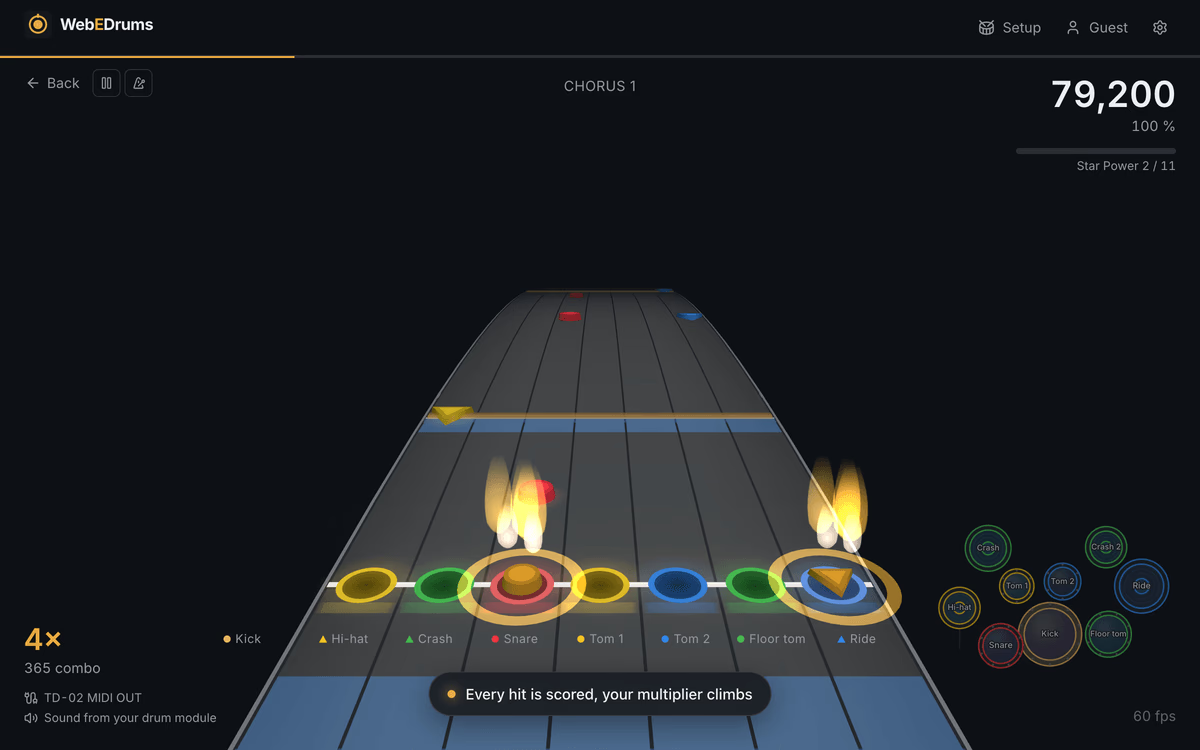
- Takes drumming seriously. Pro drums with cymbals and toms as separate notes, Expert+ double kick, Star Power, and accents and ghost notes judged on how hard you hit.
- Scores every hit for timing and dynamics, with a six-second calibration from your own snare hits.
- Practice tools drummers actually need. Loop a section, slow it down with the pitch kept, use a metronome that follows the song's tempo, and see a heat map of the sections you miss most.
- Setup that works with your kit. A guided pad setup with presets for Roland, Alesis and Yamaha modules. Synthesised kit sounds in the browser if your module is muted.
- Lyrics on the highway, whenever the chart includes them, so you can sing along while you play.
Getting started takes a minute
The kit always connects to the computer with a USB cable: that is how WebEDrums sees every hit. After that, you choose where the drum sounds come from.
If you want your module's own sounds with no browser delay, WebEDrums plays only the song. You join the computer's audio and the module's output with a splitter cable or a small mixer and send both to one speaker. If your module is muted or has no audio output, turn on kit sounds in the browser and WebEDrums plays the song and a synthesised kit through your speakers or headphones. Six kit styles are included, from jazz brushes to 808s. The browser route adds a little latency, so you run the timing calibration once.
Then the guided pad setup asks you to hit each pad and records what your module sends, so cymbals, toms and zones land on the right lane. If you don't have your kit to hand, you can try any song on a computer keyboard first, or tap the lanes on a phone or tablet to play the demo song.
Is it good for learners?
It's a good fit if you're a beginner or a returning player who learns best by playing songs. It comes with built-in lessons: short grooves in four levels, from quarter notes on the hi-hat up to the shuffle and ghost notes. Each is built up in steps and judged on your own kit, and the tempo climbs as you play it cleanly.
The practice tools do the rest of the work. Slow-down and looping let you take a hard fill down to a speed you can manage, then bring it back up. After a song, the heat map shows which sections you missed most, and one click opens that section in practice. That turns "I keep messing up somewhere in the second chorus" into a specific thing to fix.
Because you choose the songs, motivation tends to take care of itself. Practising a groove you chose, from a band you love, is easier to stick with than an exercise you were handed.
To be upfront: it isn't a video course. Technique, posture and grip are best learned from a teacher, and WebEDrums is where you apply them to songs you chose. If you want a full curriculum with instructor videos, a dedicated course platform is the better choice. Many players will happily use both.
How it compares
- Versus Clone Hero and YARG: they need a desktop download and have no built-in lessons. WebEDrums runs in a browser tab, and also plays your own community charts.
- Versus lesson apps (Melodics, Drumeo, Beatlii): they play only their own catalogue, mostly need an app download and usually need an account, with songs kept in a cloud account. WebEDrums plays songs you choose, needs no account and keeps them on your machine.
- Chromebooks and locked-down laptops: WebEDrums works on them, which most of the others don't.
Where WebEDrums wins: it's the only one here that combines Clone Hero-style song play, practice tools and lessons in a browser tab, with no install and no account. It runs on a Chromebook or any ordinary laptop. Your songs, scores and settings stay in your browser.
Where others win: Clone Hero and YARG are mature, full desktop games with years of features. The lesson platforms have far deeper teaching content and video.
Your songs and your data
WebEDrums finds charts through the community library or reads them from your disk, and uploads nothing. Songs, scores, settings and pad maps stay in your browser. There are no analytics cookies. An account exists only for the Pro plan and holds your email, name and subscription status. Install it as an app and it also loads without a connection.
What to know before you try it
Chrome and Edge are fully supported on Windows, macOS, Linux and ChromeOS. Firefox works after a one-time site-permission prompt, but it can't remember your songs folder between visits. Safari has no Web MIDI, so it can't talk to a kit. I test on a Roland TD-02KV; other modules use the same General MIDI drum notes, and you can remap pads in settings.
Who it's for
WebEDrums suits a few kinds of player especially well: beginners who bought an electronic kit and want something more motivating than a metronome, returning drummers who want to play along to the rock and pop songs they grew up with, and Clone Hero or YARG players who would like their charts on a laptop without installing anything. It also works for teachers and students who share a Chromebook or a school laptop where installing software isn't an option, since everything runs in the browser tab.
Try it
Three plays a day are free, with every feature and no account. A Pro plan removes the daily limit and is what pays for the project.
Plug in your kit, open WebEDrums in Chrome or Edge, and see how far you get in your first song: https://webedrums.com/