
Over the past year, generative video technology has developed at a breakneck pace. From photorealistic human biomechanics to synchronized sound design, modern AI video models are now capable of producing cinematic quality straight from a text prompt or still image.
However, for creators, video editors, and marketers looking to leverage these tools without a costly monthly subscription, finding reliable information is remarkably difficult. Virtually every major AI video platform advertises a free plan, but the fine print reveals vastly different credit economies, expiring token policies, resolution downgrades, and watermark restrictions.
To cut through marketing claims, our research team conducted hands-on benchmarks across the leading platforms in 2026. By analyzing actual credit transaction ledgers, measuring token consumption per resolution tier, and verifying export rules, we have compiled an exhaustive comparison of the top free AI video generators available today.
- Kling AI: The Gold Standard for Motion and Audio Synthesis
Kling AI has earned a dominant position among digital filmmakers due to its exceptional physical simulation, complex camera movements, and cinematic lighting control.
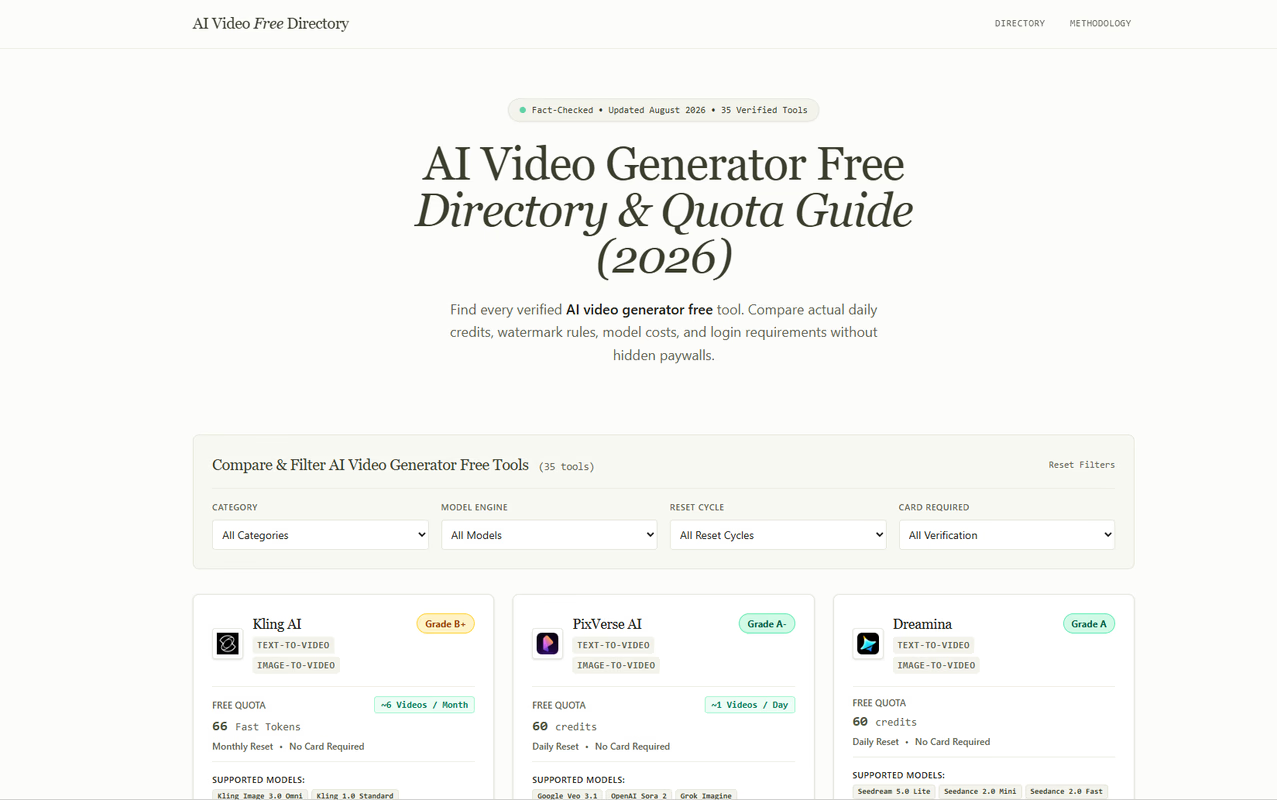
- Free Tier Allowance: Grants 66 Fast Tokens per monthly billing cycle upon login refresh, plus 3 free trial passes for 1080p and 4K upscaling, and 2 video extension passes.
- Credit Cost Breakdown: Generating a standard 5-second clip on Kling 1.0 costs 10 credits (yielding approximately 6 free videos per month). Generating with the newer Kling Video 2.6 with Native Audio costs 15 credits (yielding 4 complete audio-synced videos per month).
- Resolution and Export: Free generation outputs up to 720p natively (or 1080p with trial passes) with a discreet watermark in the bottom corner.
- Best For: Dynamic action sequences, martial arts, complex camera pans, and realistic character movement.
- Usability Verdict: While credits reset monthly rather than daily, the inclusion of native audio generation on Kling 2.6 makes it one of the most capable free engines on the market.
- PixVerse AI: The Daily Volume Champion
PixVerse is designed for rapid iteration and daily content production, offering one of the most generous daily replenishment models available.
- Free Tier Allowance: New signups receive 90 total credits (60 daily credits plus a 30-credit welcome bonus), with 60 credits refreshing automatically every 24 hours.
- Credit Cost Breakdown: Standard PixVerse V6 and PixVerse C1 generations cost 38 credits for a 5-second clip at 540p (allowing 1 to 2 free generations every single day). Advanced experimental models like Google Veo 3.1 Lite can also be tested at 60 credits per generation.
- Resolution and Export: Free outputs default to 540p with a watermark. Higher resolution upscales require paid tokens.
- Best For: Fast social media concept testing, daily viral meme creation, and rapid B-roll generation.
- Usability Verdict: PixVerse is ideal for creators who need a dependable daily allotment of generation credits without worrying about monthly caps.
- Dreamina: ByteDance Ecosystem Integration
Built as part of the creative ecosystem alongside CapCut, Dreamina delivers state-of-the-art multimodal video generation tailored for short-form video creators.
- Free Tier Allowance: Provides 60 free credits every single day upon login.
- Credit Cost Breakdown: Supports text-to-video and image-to-video workflows with optimized credit costs across Seedance and Video 3.0 foundation models.
- Resolution and Export: Outputs high-definition clips optimized for vertical 9:16 and cinematic 16:9 aspect ratios.
- Best For: TikTok, YouTube Shorts, and Instagram Reels creators who need daily vertical video assets.
- Usability Verdict: Dreamina provides an exceptionally smooth editing bridge into CapCut, making post-production seamless for mobile-first creators.
- Luma Dream Machine: Unmatched Cinematic Fluidity
Luma Dream Machine is celebrated across the VFX and indie film community for its remarkable camera continuity and volumetric atmosphere.
- Free Tier Allowance: Offers standard queue monthly generation allowances that refresh each billing cycle.
- Credit Cost Breakdown: Processes standard 5-second camera motion prompts on a shared community queue.
- Resolution and Export: Generates clean 720p video clips with subtle watermarks.
- Best For: Architectural fly-throughs, surreal environmental transitions, and atmospheric golden-hour cinematography.
- Usability Verdict: Luma remains the top choice for establishing shots where natural lighting physics and smooth camera tracks are essential.
- Pika: Specialized Physics and Inpainting
Pika differentiates itself by providing granular regional control and stylized physics effects that go beyond traditional text-to-video generation.
- Free Tier Allowance: Grants monthly credit allocations for web-based studio generation.
- Credit Cost Breakdown: Allows modular modifications, including regional inpainting, canvas expansion, and physics effects like Melt, Inflate, and Explode.
- Resolution and Export: Standard resolution with corner watermarking on free exports.
- Best For: Creative transition effects, visual humor, commercial product teasers, and regional object replacements.
- Usability Verdict: Pika is the best tool for creators who need to alter specific portions of an existing clip without burning credits on a full regeneration.
- Minimax Hailuo: Realistic Character Expressions and Lighting
Minimax Hailuo has quickly become a favorite among narrative filmmakers for its remarkable facial preservation and nuanced prompt adherence.
- Free Tier Allowance: Periodic trial allowances for web studio users.
- Credit Cost Breakdown: Focused high-fidelity video generation prioritizing character consistency.
- Resolution and Export: High-resolution outputs with natural lighting and minimal facial morphing.
- Best For: Dialogue scenes, emotional character close-ups, and dramatic narrative storytelling.
- Usability Verdict: Hailuo excels where other models often fail, maintaining natural facial geometry and skin texture throughout multi-second shots.
Core Comparison Matrix: How the Free Tiers Stack Up
When evaluating free AI video generators, creators should evaluate three key metrics:
- Reset Frequency: Daily versus Monthly If your goal is to build an ongoing content pipeline, platforms with daily credit refills (such as PixVerse and Dreamina) offer superior long-term utility, yielding dozens of clips every month. Conversely, platforms with monthly allocations (like Kling and Luma) are better reserved for high-stakes, cinematic hero shots.
- Generation Cost versus Resolution Always check the underlying sub-model cost. A tool advertising 100 free credits that charges 50 credits per 1080p render is significantly less generous than a tool offering 60 credits that charges only 15 credits per render.
- Commercial Rights and Watermark Flexibility Free tier outputs on almost all major commercial platforms include a corner watermark and restrict commercial monetization. Creators planning client work or monetized ad campaigns should use free tiers for client prototyping, upgrading only when final broadcast renders are approved.
Where to Find Live, Verified Free AI Video Benchmarks
Because AI video platforms adjust their credit allocations, sub-model pricing, and trial policies on a near-weekly basis, keeping track of changes manually is nearly impossible.
To stay up to date, creators can consult the comprehensive free AI video generator comparison directory at AI Video Generator Free. The platform maintains real-time, verified research on dozens of commercial and open-source models, providing granular ledgers on exact credit costs, watermark rules, and direct links to generation studios.
Whether you are producing your first zero-budget short film or scaling daily video production for social media, referencing a verified directory ensures you never waste time or credits on outdated trials.
Conclusion: Choosing the Right Tool for Your Workflow
There is no single best AI video generator for every scenario. The smartest approach is to build a diversified multi-tool stack: utilize PixVerse and Dreamina for your daily volume needs, turn to Kling AI for high-motion action scenes, leverage Luma for sweeping environmental continuity, and rely on Hailuo for emotional character close-ups.
By understanding the exact credit economics and strengths of each platform, you can produce professional, broadcast-ready AI video content without spending a single dollar.