
Most people do not think of themselves as designers.
They think of themselves as founders, marketers, sellers, creators, or operators who occasionally need a visual. A product photo for a listing. A hero image for a landing page. A social ad before a campaign goes live. A thumbnail before a video is published.
The need is real.
The workflow usually is not.
The Gap Between Needing a Visual and Making One
The traditional path is familiar.
Open a design tool. Choose dimensions. Hunt for templates. Adjust fonts. Fix alignment. Export. Realize the export is wrong. Repeat.
For people without design training, this is not creative work. It is translation work — turning a clear idea in your head into software operations you never wanted to learn.
AI image generators promised to remove that translation layer.
Type a prompt. Get an image.
That part worked.
The rest often did not.
A Prompt Is Not a Workflow
A single prompt box solves one moment in a creative process.
It does not solve iteration.
It does not solve editing.
It does not solve "make five variants for different channels."
It does not solve "place this product in a lifestyle scene without reshooting."
It does not solve the back-and-forth that real creative work requires — when the first result is close but not quite right, when the lighting should be warmer, when the background should be cleaner, when the composition needs to feel more premium.
Most AI image tools treat every request as isolated.
Real visual production is sequential.
You refine. You compare. You branch. You publish.
A prompt box alone makes that feel awkward — as if every correction requires starting over in a new tab with a new tool.
Design Tools Assume You Already Speak Design
Photoshop, Figma, Canva — each assumes a different kind of fluency.
Layers. Masks. Components. Grids. Brand systems.
Even "easy" tools still ask you to think like a designer even when you only wanted an outcome.
AI tools flipped part of that equation.
Now you can describe what you want in plain language.
But many of them stopped there.
They replaced the canvas with a text field and called it progress.
That is only half the shift.
The other half is making the conversation itself the workspace — where generation, editing, variation, and direction all happen in one continuous thread, the way you would explain a visual to a colleague sitting next to you.
What Changes When Chat Becomes the Interface
There is a difference between typing a prompt into a generator and talking to a design agent.
A generator returns output.
An agent maintains context.
"Make the lighting warmer."
"Remove the background."
"Try a marketplace-ready crop."
"Give me three angles for Instagram."
These are not four separate products.
They are one conversation.
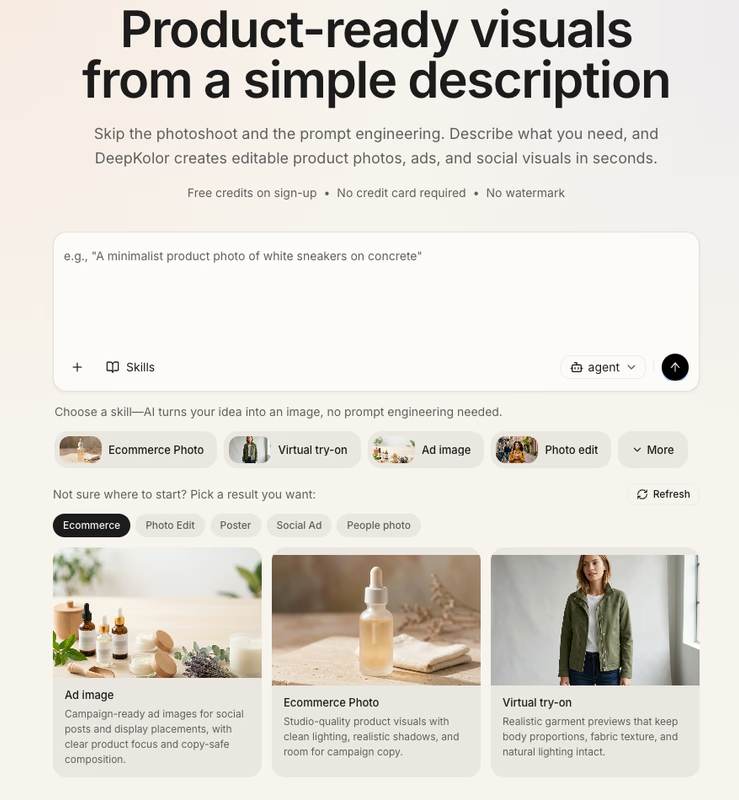
DeepKolor was built around that distinction. Instead of treating image creation as a single-shot prompt transaction, it treats visual production as dialogue — text-to-image generation, photo editing, product photography, and short-form video creation in one conversational workspace, with multiple AI models available behind a single chat interface.
You do not need to know which model handles upscaling or which one handles product scenes.
You describe the outcome.
The workspace handles the routing.
The People Who Need This Most Are Not Designers
The most interesting users of AI visual tools are often the least interested in becoming designers.
An ecommerce seller needs clean product shots without booking a studio.
A marketer needs campaign visuals before a launch window closes.
A content creator needs thumbnails and social assets that match a brief, not a design degree.
A founder needs a credible landing page image before the product video is even filmed.
These users do not want a creative suite.
They want publishable output.
That is a different product requirement.
It favors speed over precision tooling.
It favors iteration over perfect first drafts.
It favors commercial-ready results over watermarked previews.
DeepKolor's credit-based model reflects that usage pattern — pay for outputs when you need them, across image and video creation, without subscription friction for people whose visual needs come in bursts rather than daily cadences. New users receive free credits on sign-up, and generated images ship without watermarks, with commercial usage rights included.
Product Photography Is the Quietly Hard Use Case
Text-to-image demos often show surreal scenes and artistic portraits.
Most business visual needs are more mundane — and more valuable.
A skincare bottle on a clean surface.
A gadget in a lifestyle setting.
Jewelry with consistent lighting.
A food product that still looks appetizing after generation.
These tasks fail quietly when the tool treats them like generic prompts.
Product photography requires structure: consistent composition, believable lighting, backgrounds that do not compete with the product, crops that work on marketplaces and ads.
That is why a conversational workspace matters more here than in pure art generation.
You are not asking for "an image."
You are asking for "this product, in this context, at this quality, in this format" — then adjusting until it ships.
DeepKolor supports that workflow directly: product shots without reshoots, background removal, batch visual variants for different channels, and brand-aware art direction so colors, lighting, and composition stay aligned instead of starting from scratch every time.
Variants Are Where Visual Work Actually Happens
One image is rarely the deliverable.
The deliverable is options.
A hero image and a square crop.
A warm version and a cool version.
A studio look and a lifestyle look.
An ad concept and a marketplace thumbnail.
Most teams do not need one perfect generation.
They need a small set of strong candidates they can choose from quickly.
Batch variation is not a luxury feature for power users.
It is the normal shape of marketing and ecommerce work.
When variation requires opening new sessions, re-uploading references, and re-explaining context each time, the tool is fighting the user's actual job.
A conversational workspace keeps the brief alive across variants — the product, the mood, the brand cues, the channel constraints — so iteration feels like refinement instead of restart.
The Subscription Mismatch
Creative output does not arrive on a schedule.
Campaigns cluster before launches.
Product catalogs spike before seasonal sales.
A creator might need forty images in one week and none for the next three.
Subscription pricing makes sense for daily-use software.
It fits awkwardly for bursty visual production.
Credits align better with reality: spend when you produce, stop when you do not, scale up when a deadline demands it.
That is a small pricing decision.
It changes who feels comfortable adopting the tool.
Founders and small teams often hesitate before committing to another monthly SaaS line item for something they will use intensively for two weeks and lightly afterward.
Output-based pricing lowers that barrier without pretending everyone needs unlimited generation.
Maybe the Best Design Tool Is the One You Forget Is a Design Tool
There is a useful test for creative software.
Show it to someone who says, "I am not creative."
If they spend the first ten minutes learning panels, shortcuts, and terminology, the tool is still asking them to become someone else.
If they spend the first ten minutes describing what they want and reacting to what comes back, the tool is meeting them where they already are.
That is the bet behind conversational visual design.
Not that AI replaces designers.
Not that prompts replace craft.
But that most people who need visuals today are not trying to become designers.
They are trying to ship something.
A product page.
A campaign.
A post.
A pitch deck slide.
A launch asset.
They already know how to explain what they want.
They should not have to learn an entire creative stack to get there.
From Prompt to Publishable
The shift from prompt boxes to conversational workspaces is still early.
Most tools remain optimized for the demo moment — the impressive first generation — rather than the production path that follows.
The harder problem is everything after the first image:
edit it, variant it, format it, trust it commercially, and do it again tomorrow with a different brief.
DeepKolor approaches that path as one continuous conversation: generate, refine, upscale, and batch visual variants in a single creative workspace, with no design skills required and multiple AI models available without forcing users to become model experts.
For marketers, ecommerce sellers, content creators, and founders who need publish-ready visuals fast, that may be the more honest interface — not a canvas with a chat feature bolted on, but a chat that happens to produce canvases.
DeepKolor is a conversational AI design agent for text-to-image generation, photo editing, product photography, and visual content creation. Chat naturally to create stunning images and short videos — one workspace, multiple AI models, free credits on sign-up, commercial rights included, no watermark.
Stop by the website to learn more: https://deepkolor.ai
Read more about DeepKolor — visit the tool page to learn more.