10 Best Employee In/Out Board Software Solutions Compared (2026)
An employee in/out board gives your team a shared view of who is available, away, working remotely, or expected to return later. The best choice depends on how your organization works: a hybrid team may prioritize Microsoft Teams integration, while a front desk may need return times, visitor workflows, or a simple browser-based board.
This guide compares Staff Glance with nine products covered in its comparison library. It examines employee availability tracking, status automation, Microsoft 365 integration, reporting, deployment, and pricing.
Quick answer: Staff Glance is worth considering for a web-based employee status board with optional Microsoft 365 integration and department visibility controls. Simple In/Out offers a broad range of apps and automation methods. InOutBoard includes time-oriented reports and resource scheduling. Savance and Virtual In/Out offer options for organizations with wider workplace or safety requirements. OfficeStatus is included for teams researching a replacement; it has been discontinued.
Editorial disclosure: This guide is published from Staff Glance’s perspective. Product descriptions draw on provider documentation and Staff Glance’s comparison pages. Products are numbered for navigation, not ranked by an independent test. Features, pricing, and availability can change; confirm your requirements with each provider.
Employee in/out board software at a glance
Solution | Consider it for | Access or deployment | Pricing overview |
|---|---|---|---|
Staff Glance | Web-based availability, department visibility, and optional Microsoft 365 integration | Hosted web app; optional Teams app | Free for up to 5 users; paid plans start at $10/month |
Simple In/Out | Multiple apps, integrations, and status automation options | Web, mobile, desktop, and other apps | Published monthly tiers vary by capacity and feature level |
InOutBoard | Status tracking with time reports and resource scheduling | Web browser on computers, tablets, and phones | Starts at $15/month for up to 10 users |
StaffStatus | A straightforward shared status board and HR Partner integration | Responsive web browser | Published employee-count pricing; check the provider for your team size |
Savance Electronic In Out Board / EIOBoard | Organizations evaluating a board alongside broader workplace modules | Cloud and on-premise options; web, mobile, and Windows interfaces | User-based licensing and optional add-ons; request a quote |
Virtual In/Out | Status tracking with visitor and lone-worker workflows | Browser and mobile apps | Starts at $15/month; employee count and selected options affect cost |
Out’n About! for Outlook | Teams using a supported installed Outlook workflow | Outlook add-in with a Windows server component | Listed at $349 per server; confirm deployment and license terms |
OfficeStatus | Organizations researching a replacement for an existing installation | Historical Windows, web, and mobile-web interfaces | Discontinued; new licenses and support have concluded |
OfficeView Pro | Organizations considering a network-based status board | Network-based Windows software | Published name-based license pricing; confirm current terms |
CyberMatrix In Out Scheduler | A locally installed or network-shared board with custom reports | Windows and shared-network installations | Published license tiers; confirm current pricing and upgrade terms |
A status board can show information entered by employees or supplied by a configured integration. A displayed status is not, by itself, proof that someone is physically present or working. If you need payroll records, safety mustering, or attendance enforcement, evaluate those requirements separately.
1. Staff Glance
Consider Staff Glance for: a shared employee availability board with optional Microsoft Teams and Microsoft 365 capabilities.
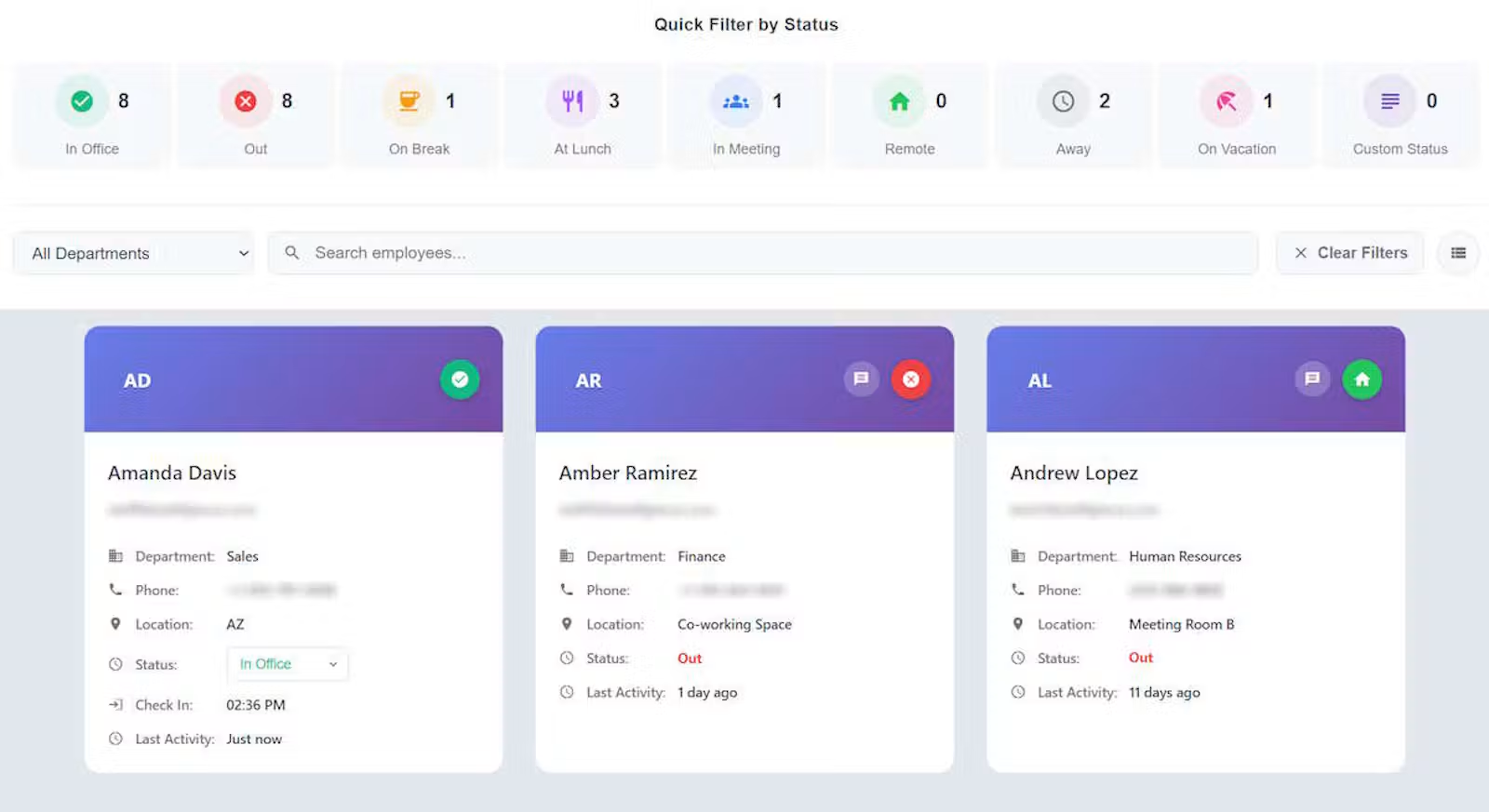
Staff Glance is a hosted employee in/out board designed to show who is in the office, remote, away, on break, in a meeting, or otherwise unavailable. Teams can choose card, table, or compact views and organize the board using filters and grouping.
Employees can normally update their own status. Depending on their role and department scope, authorized managers and administrators can also update other employees’ statuses. Administrators can configure custom statuses, and organizations can use department hierarchy and optional scoped visibility to manage which employees a viewer can see.
Microsoft capabilities are optional and have separate setup requirements. They include a Teams personal app, Entra ID sign-in, selected-group user synchronization, profile-attribute synchronization, and Teams presence and work-location integration. Calendar Snapshot displays authorized calendar availability; it does not itself change an employee’s board status.
Staff Glance also offers optional scheduled status changes, expected-return settings, and administrator-only availability and status-history reports. Its reporting is designed for availability and check-in information, not payroll-hour calculation.
Pricing: The free plan supports up to five users. Published paid monthly plans are $10 for up to 20 users, $20 for up to 50, $30 for up to 125, and $50 for up to 350. Paid plans offer a 30-day trial with up to 50 trial users. See Staff Glance pricing.
Keep in mind: Staff Glance is a web app and installable progressive web app; teams specifically seeking native mobile apps, geofencing, or payroll timekeeping should check whether another product better matches those needs.
2. Simple In/Out
Consider Simple In/Out for: organizations that want a range of apps and ways to update availability.
Simple In/Out combines a shared employee status board with phone and desktop applications. Its documented automation options include geofences, Wi-Fi, beacons, desktop activity, and scheduled or calendar-based statuses.
The product also documents Microsoft Teams, Outlook, Microsoft 365, and Slack integrations. Its reporting options include activity, timeline, and time-card reports, making it worth examining when availability and time-oriented reporting are both part of the purchase decision.
Pricing: Simple In/Out publishes fixed monthly tiers that vary by user capacity and features. For example, its pricing page lists Basic 25 at $19.99/month, Pro 50 at $29.99/month, and Enterprise 50 at $35.99/month. Check which plan includes your required integrations, notifications, or single sign-on. See Simple In/Out pricing.
Compare in detail: Staff Glance vs. Simple In/Out.
3. InOutBoard
Consider InOutBoard for: teams that want an online status board with return information, time reports, and resource scheduling.
InOutBoard provides a shared board where employees can display their status, expected return time, and contact information. Its published features include board views, custom status options, calendar-driven status changes, and alerts for missed return times.
InOutBoard also documents time-card and time-history reports as well as bookable resources such as rooms or equipment. Those features may matter to an organization looking beyond a basic availability board.
Pricing: Plans start at $15/month for up to 10 users, with published tiers based on user count. The provider states that every feature is included on every plan and advertises a 30-day trial. See InOutBoard pricing.
Compare in detail: Staff Glance vs. InOutBoard.
4. StaffStatus
Consider StaffStatus for: a browser-based board focused on employee status updates and simple organization.
StaffStatus offers a shared status board where employees can update their availability and provide optional details, including expected-return information. Its website describes departments, locations, search, and employee-specific update links.
StaffStatus also documents an integration with HR Partner. Organizations with a specific Microsoft 365, reporting, or mobile-app requirement should confirm the desired workflow directly with the provider.
Pricing: StaffStatus publishes employee-count pricing on its website. Check the current amount for your employee count and review trial terms before purchasing.
Compare in detail: Staff Glance vs. StaffStatus.
5. Savance Electronic In Out Board / EIOBoard
Consider Savance for: organizations evaluating an employee status board alongside broader workplace management features.
Savance’s Electronic In Out Board provides employee status information, configurable statuses, comments, return times, and organizational grouping. Savance documents browser, mobile, and Windows interfaces, along with Microsoft 365 and Outlook-related options.
Depending on the configuration, Savance also offers workplace capabilities such as time and attendance, access-control integration, kiosks, and emergency mustering. Cloud and on-premise deployment options are available.
Pricing: Savance uses user-based licensing and offers separately licensed options. Request a quote for your employee count, deployment preference, and required modules. See Savance purchasing information.
Compare in detail: Staff Glance vs. EIOBoard.
6. Virtual In/Out
Consider Virtual In/Out for: teams that want employee status tracking alongside visitor, evacuation, or lone-worker workflows.
Virtual In/Out provides employee status and location information, return details, departments, and visibility settings. It documents browser access and mobile apps, as well as integrations including Slack, Zoom, Teamwork, and Zapier.
Its broader feature set includes visitor registration, evacuation mode, and lone-worker tasks and check-ins. These capabilities may be useful when the status board is part of a wider workplace safety process.
Pricing: Plans are advertised as starting at $15/month. Employee count and selected options affect the total, with additional charges for options such as logging and SMS. Use the Virtual In/Out pricing calculator for your configuration.
Compare in detail: Staff Glance vs. Virtual In/Out.
7. Out’n About! for Outlook
Consider Out’n About! for Outlook for: organizations that want an in/out board inside a supported installed Outlook environment.
Out’n About! for Outlook is an Outlook add-in that displays employee availability, departments, status messages, and return information. Its documented features include using Outlook appointments to schedule future status changes and receiving alerts when another employee checks in.
The product uses an installed Outlook client and a self-hosted Windows server component. Organizations should review the provider’s compatibility information carefully: its pricing page states that the product does not support the new Outlook for Windows.
Pricing: The provider lists a $349 one-time per-server license with unlimited users. Confirm the current license, installation, support, and compatibility terms before purchasing. See Out’n About! pricing.
Compare in detail: Staff Glance vs. Out’n About!.
8. OfficeStatus
Consider this comparison for: replacing an existing OfficeStatus installation.
OfficeStatus was an employee in/out board from Key Metric Software. Historical product information described employee status and contact details, an organizational tree, status history, time-card reports, and workstation activity sensing.
OfficeStatus was discontinued on December 31, 2023. Its vendor says support, software, and new licenses have concluded. It is included here because organizations with an existing installation may be comparing replacement products—not because it is a current purchasing option.
When evaluating a replacement, make a list of the OfficeStatus workflows your team still uses: status updates, department views, historical reports, messaging, and any automatic workstation sensing. Test each one in the proposed replacement rather than assuming similarly named features work the same way.
Compare in detail: Staff Glance vs. OfficeStatus.
9. OfficeView Pro
Consider OfficeView Pro for: organizations evaluating a network-based in/out board with messaging.
OfficeView Pro is a network version of an in/out board with integrated messaging. Its status-board approach may appeal to teams that prefer software running on their own network and want employees to add status information or remarks.
Before choosing it, review the deployment and administration requirements, including how users access shared information and how the organization will maintain the installation.
Pricing: The OfficeView order page lists name-based prices that vary by quantity and a site-license option. Confirm the current license terms and any upgrade costs with the provider.
Compare in detail: Staff Glance vs. OfficeView Pro.
10. CyberMatrix In Out Scheduler
Consider CyberMatrix In Out Scheduler for: organizations that want a Windows-based in/out grid with network sharing and editable reports.
CyberMatrix In Out Scheduler displays employee in/out status and expected return information. The provider describes shared-network access, historical reporting, CSV data exchange, and a separate view for resources such as rooms and equipment.
Its documentation describes both single-machine and shared installations. Teams considering a shared deployment should review folder permissions, security settings, backups, and maintenance responsibilities.
Pricing: CyberMatrix publishes multiple license tiers in its product manual. Confirm current prices, seat coverage, and upgrade terms with the provider before comparing them with a monthly subscription.
Compare in detail: Staff Glance vs. CyberMatrix In Out Scheduler.
How to choose an employee in/out board
Start with the question your employees need answered most often: Who is available, where are they working, and when might they return? Then compare products against the workflows that make the answer reliable and easy to find.
1. Decide how statuses should be updated
Manual updates are straightforward and give employees direct control. Automatic updates can reduce effort, but the source matters. A Teams presence signal, a calendar event, a Wi-Fi connection, and a geofence describe different things.
Ask each provider what triggers an update, how quickly it appears, and what happens when an employee manually changes a status. Test exceptions such as a meeting running late or an employee working remotely.
2. Separate Microsoft Teams features
“Microsoft Teams integration” can mean several different things:
- Opening the board inside Teams.
- Reading Teams presence or work location.
- Signing in with Microsoft Entra ID.
- Synchronizing users or profile attributes.
- Viewing calendar availability.
- Changing status based on calendar events.
These are distinct capabilities and may require separate configuration, permissions, or plans. For example, Staff Glance’s Teams app, Teams Sense, Entra sign-in, and Calendar Snapshot are separate options. See Staff Glance’s Microsoft Teams integration overview.
3. Check who can see and update whom
Departments and filters help people find colleagues. Visibility and permissions determine what they are authorized to see or change.
For larger organizations, ask whether the product supports department hierarchy, employees in multiple departments, scoped manager access, and administrative controls. Confirm that the model fits your privacy and operational requirements.
4. Match reporting to its purpose
Availability reports, first check-in reports, time cards, and payroll exports serve different needs. If your organization needs payroll calculations, verify how the product handles breaks, corrections, approvals, overtime, and exports.
If you only need to understand status history or staff availability, a lighter reporting feature may be sufficient. Staff Glance’s reporting, for example, is intended for availability and check-in information rather than calculating payroll hours.
5. Compare the full cost and deployment model
A monthly hosted plan and an installed software license have different cost structures. Compare:
- The tier that covers your actual employee count.
- Required feature levels, add-ons, and integration fees.
- Trial limits and setup requirements.
- Server, backup, and maintenance responsibilities for installed products.
- Support and upgrade terms.
For a consistent comparison, request quotes for the same employee count and list the features each quote includes.
Frequently asked questions
What is employee in/out board software?
Employee in/out board software is a shared digital view of employee availability. Depending on the product, employees can show whether they are in, out, remote, away, or expected to return at a particular time.
Is there a free employee in/out board?
Yes. Staff Glance offers a free plan for up to five users. Organizations with more employees can review its paid capacity tiers and trial. Other providers may offer trials or different free options, so check their current terms.
Can an in/out board work with Microsoft Teams?
Some products integrate with Teams, but the integration can vary. One product may provide a board inside Teams, while another may synchronize presence or offer Microsoft sign-in. Confirm each capability separately.
Can an in/out board replace a time clock?
It depends on the product and the organization’s requirements. Some boards include time-card or attendance features. Others, including Staff Glance, focus on availability and status history. Verify payroll calculations and approval workflows before using any product for timekeeping.
What is an alternative to OfficeStatus?
Staff Glance is one option for organizations replacing OfficeStatus, particularly if they want a hosted board and optional Microsoft integration. Other products in this guide may be a better fit for specific requirements such as installed software, time-card reporting, or broader workplace modules. OfficeStatus itself has been discontinued.
Which in/out board is best for a hybrid team?
The right choice depends on how the team updates its status, whether it uses Microsoft 365, and what employees need to see. Hybrid teams should compare browser and mobile access, remote-work statuses, department visibility, and the behavior of any automatic updates.
Explore all nine Staff Glance comparisons or view Staff Glance plans.