
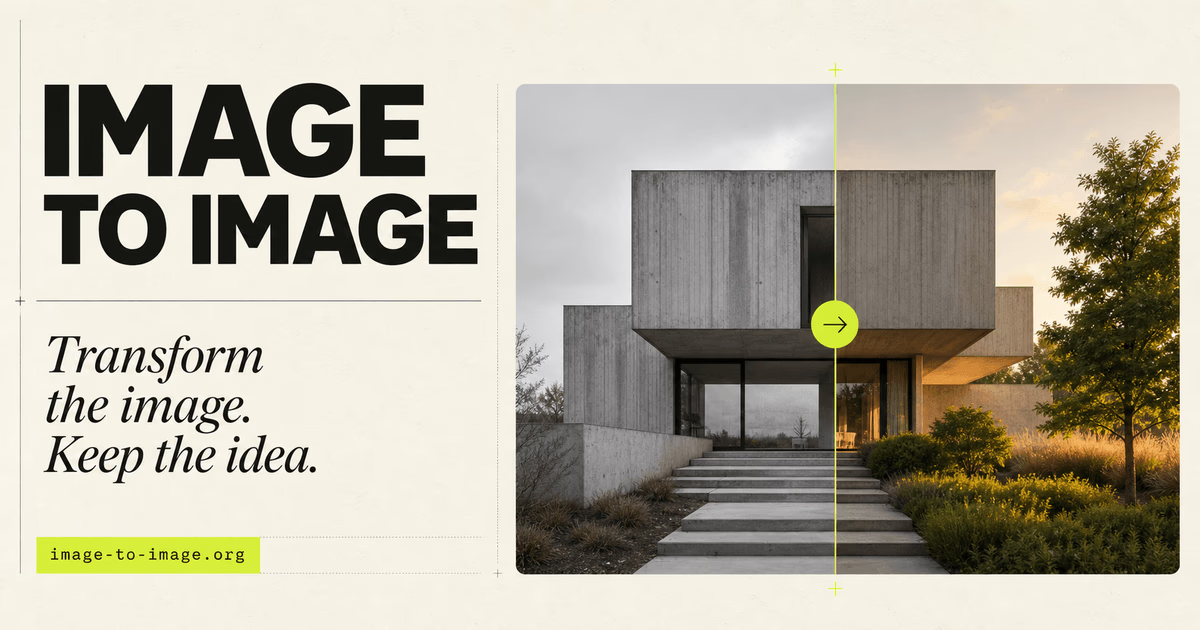
Image To Image is designed for this type of workflow. Instead of starting from a blank canvas, the tool uses an existing image as a visual reference and lets you describe the changes you want with a text prompt. The goal is to transform the image while keeping important elements such as the subject, layout, proportions, framing, and overall composition recognizable.
What Is Image To Image?
Image To Image is a browser-based AI image transformation tool that combines a source image with text instructions.
Users can upload a JPG, PNG, or WebP image and then explain what should change. The AI uses the original image to understand the visual structure of the scene while the prompt provides direction for the transformation.
For example, a user could upload an architectural visualization and ask the AI to change the lighting, landscaping, materials, or interior style while keeping the camera perspective and room geometry consistent.
This approach is different from traditional text-to-image generation. Text-to-image tools create a new visual primarily from written instructions, while image-to-image workflows use an existing image as a foundation. That makes the latter particularly useful when controlled revisions are more important than generating a completely new composition.
How Image To Image Works
The workflow is relatively straightforward.
First, upload an existing photo, render, sketch, or AI-generated image. Next, write a prompt describing the transformation you want. It is useful to specify both what should change and what should remain unchanged.
For instance:
"Redesign this interior with warm natural wood, soft daylight, and restrained modern furniture. Keep the room geometry, window placement, camera angle, and proportions unchanged."
After entering the prompt, users can select an AI model and generate one or more results. The output can then be compared with the original image, and the prompt can be adjusted if further refinement is needed.
Key Features
Prompt-Based Image Editing
Image To Image allows users to modify visual elements through natural-language instructions. Prompts can direct changes to objects, colors, materials, lighting, weather, backgrounds, and overall visual style.
This removes the need to describe an entire image from scratch when most of the original composition should remain intact.
Structure Preservation
One of the main reasons to use image-to-image generation is continuity.
The uploaded image provides information about subject placement, framing, perspective, proportions, and scene layout. This gives the model a reference point when generating the new version and can make controlled revisions easier than repeatedly generating new images from text alone.
Multiple AI Models
The platform provides multiple AI model options, including GPT Image 2 and Nano Banana variants. Users can select a model according to factors such as output detail, resolution requirements, and credit cost.
Having multiple options can be useful because different image-editing tasks may require different balances between speed, quality, and resolution.
Multiple Outputs and Aspect Ratios
The generation workspace allows users to select an aspect ratio and request multiple outputs from the same transformation. This makes it easier to compare variations before deciding which result works best for a project.
Additional AI Image Tools
Image To Image is also part of a broader set of image tools available on the website.
These include an AI image generator, image editor, background changer, old photo restoration tool, image upscaler, background remover, image enhancer, and a collection of style effects.
What Can You Use Image To Image For?
The tool can support several types of visual workflows.
Product photography is one example. A product can remain the focus of an image while its environment is changed to explore different campaign concepts or visual contexts.
Architecture and interior design is another useful scenario. Designers can experiment with materials, lighting conditions, landscaping, seasons, or interior styles while using an existing visualization as the structural reference.
Creative direction can also benefit from this workflow. A rough concept, photograph, or early render can become the starting point for exploring a more polished visual direction without rebuilding the entire scene.
The same principle can apply to portraits, illustrations, marketing visuals, social content, and personal creative projects where some parts of an existing image should remain consistent.
Image-to-Image vs. Text-to-Image
The main difference between these two AI workflows is the starting point.
Text-to-image begins with words and generates a visual from a largely blank canvas. This is useful for brainstorming or creating an entirely new concept.
Image-to-image begins with an existing visual. The source image gives the AI information about composition and identity, while the prompt describes the desired modification.
If your priority is experimentation without strong visual constraints, text-to-image may be the better choice.
If your priority is changing an existing image while retaining its important visual characteristics, image-to-image is usually the more relevant workflow.
Tips for Better Results
A clear prompt is important when working with image-to-image AI.
Instead of simply writing "make this better," describe the specific change you want. It can also help to explicitly identify the elements that should remain unchanged.
For example:
"Change the kitchen cabinets to light oak and add warmer daylight. Keep the existing room layout, camera position, countertops, and appliance locations unchanged."
The website also notes that lower transformation strength can be useful when fidelity to the source image matters, while stronger settings allow more creative departure from the original.
Who Is Image To Image For?
Image To Image can be useful for designers, content creators, marketers, photographers, ecommerce teams, architects, and other users who already have a visual starting point but want to explore controlled variations.
It is especially relevant when recreating an entire image would be inefficient or when keeping the original composition is an important part of the task.
Final Thoughts
Image-to-image generation fills a different role from AI tools focused entirely on creating visuals from text.
Image To Image focuses on transforming something that already exists. By combining a source image with text-based direction, users can experiment with new environments, materials, styles, lighting, and creative treatments without intentionally abandoning the visual foundation of the original image.
For workflows involving iterative design, product scenes, architecture, creative concepts, or visual experimentation, this makes Image To Image a practical option for exploring variations while retaining greater continuity with the source material.