
Most people trying text-to-speech quit within ten minutes. They paste in a chapter, choose a voice that sounded good in the demo, hit generate, and then listen to ninety seconds of audio that uses their words but is hard to listen to. They end up thinking the technology just is not ready.
The technology works. What is missing is skill. Synthetic narration usually fails in a few predictable ways, and each one has a quick fix. This guide explains those problems for people who want their writing to sound as good as it reads.
The real issue is not the voice itself, but how flat it sounds.
If you ask someone what is wrong with a bad TTS recording, they will probably say, “it sounds robotic.” If you dig deeper, the real problem is that it sounds the same from start to finish.
Human narrators change their pitch, speed, and energy as they read. They slow down for tough paragraphs, raise their voice a bit for new sections, and lower it for side comments. These changes happen naturally and help listeners follow along, even when they cannot see the text.
A synthesis engine will not do any of this if you just give it a block of text, because it has no clues. The words have meaning, but the formatting that would show emphasis to a human is lost as soon as you paste it in.
So instead of looking for a better voice, start by giving the engine the same information a human reader would use.
Fix one: stop narrating everything in the same voice
The biggest improvement most people can make is also the one they use least. Most writing is not just one long block. Articles have a hook, body, and conclusion. Tutorials mix prose and code. Interviews have two speakers. Podcast scripts have an intro, segments, and an outro.
Reading all of that in the same voice and style is like setting a whole document in one font size with no paragraph breaks.
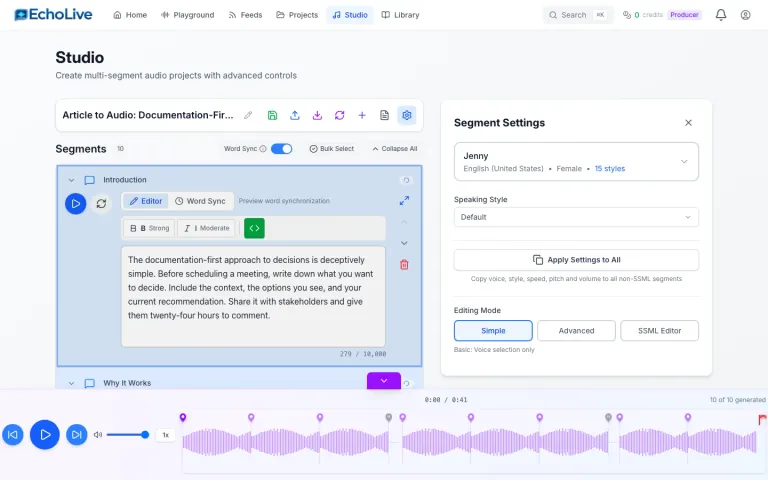
Breaking your text into segments and choosing voices or settings for each one turns a simple recording into a real production. The intro can sound warmer and slower. The technical middle can use a clear, neutral voice. A quoted passage can have a different speaker, which helps people understand much more than just saying “as the author writes.”
This is why EchoLive is built around a Studio editor with per-segment control, not just a single text box. The single box works for a quick test, but it is not right for anything you want to publish. Engines take their timing cues from punctuation. A comma buys a short pause, a period a longer one. This works until you need a pause that the grammar does not justify.
Take this line: “There are three things that matter here. Speed. Accuracy. Cost.” When a person reads it, there is a pause before each item. When an engine reads it using only punctuation, it just sounds like a quick list and loses the emphasis.
SSML solves this problem. It is a markup tool that lets you add breaks, change speed and pitch, add emphasis, and control how numbers and dates are spoken. Adding a half-second pause in the right spot can improve a paragraph more than using a pricier voice.
You do not have to learn SSML syntax by hand. EchoLive lets you add SSML visually, so you just insert a pause instead of typing a tag. Still, it helps to know what the tool is doing, because knowing where to put a pause is the real skill. The tool just saves you from typing.
Fix three: fix pronunciation once, not every time
Every piece of writing has words the engine will mispronounce. These include product names, author names, acronyms that should be spelled out, acronyms that should be read as words, and technical terms from other languages. If a name is mispronounced in the first thirty seconds, you might lose your listener, because it shows no one checked.
The key is to listen to your own recording before publishing, note every word that sounds wrong, and fix it using phoneme control instead of misspelling the word to get the right sound. Misspelling might work once, but if you use the text again, you will wonder why your transcript is full of typos.
If you do this once for words you use often, the problem will mostly go away in future projects.
Fix four: writing for the eye is not writing for the ear
This is the step people avoid, because it means editing.
Writing meant to be read silently uses tricks that do not work when spoken. Parenthetical asides make sense on a page because you can see the brackets, but when read aloud, they are just a sudden detour. Long clauses are fine on paper because you can reread, but when listening, you cannot go back. Footnotes, “see above,” “the following table,” and “as shown in the diagram” all help readers who can see, but not listeners.
Before you record anything, read it aloud once. If a sentence makes you run out of breath, it is too long. Any mention of where something is on the page needs to be rewritten. Every acronym should be explained the first time you use it. This quick review takes about ten minutes for a typical article and does more to improve the result than any setting.
Fix five: the economics decide whether you iterate
None of this happens if making changes is expensive or difficult, because good work takes several tries. You listen, notice a pause is off, fix it, and listen again. Doing this three or four times is normal for work you care about.
Under a monthly subscription that limits characters, every change feels like it costs money. So people do not make changes. They accept the first version, publish it, and end up thinking synthetic narration is just average, without ever hearing an improved version vs. selling minutes rather than a subscription. Packs start at $ 5 for 100 minutes at 5 cents a standard minute, going up to $ 50 for 1,000 minutes, and the balance does not expire. Billing is based on the length of audio produced rather than the characters you feed in, and you see an estimate before each generation.
There are three quality options, and using them wisely is a real skill. Low-cost voices make your minutes last about four times longer, so they are best for drafts, internal use, and long content where clarity is more important than warmth. Standard includes over 650 voices in more than 100 languages. HD and Lifelike voices use up minutes twice as fast, which is great for the first minute of a piece but usually not for the whole thing.
Draft with cheaper voices and finish with higher-quality ones. This habit saves money and improves the part of the recording people really notice.
A workflow that holds up
Here is a simple process you can use every time.
First, read your text aloud and edit it so it sounds good. Break it into segments where the structure changes. Assign different voices to each segment, especially when the content changes. Make a draft using low-cost voices and listen all the way through, noting any pacing issues or mispronunciations. Fix these with SSML breaks and phoneme corrections. Then, regenerate the important segments with a higher-quality voice. Listen to the whole thing again before exporting.
This whole process takes less than an hour for an article, and most of that time is just listening.
What this is actually for
It is important to be clear about why this matters, because “turn your blog into a podcast” is not a strong enough reason on its own.
Audio can reach people when reading cannot—during commutes, walks, workouts, chores, or when their eyes are tired at the end of the day. A written piece competes for a reader’s time and attention, but an audio version can fit into many more moments.
Audio also helps people who cannot easily read your writing. This includes people with visual impairments, dyslexia, or those reading in a second or third language who find it easier to follow speech than text.
None of this matters if the recording is hard to listen to. That is the main point: the difference between text-to-speech people give up on and narration they finish is not the engine—it is twenty minutes of focused work in the right spots.
If you have writing stored away that no one has time to read, it is worth seeing what it sounds like when someone has really thought about how it should be heard.