How Department-Based Employee Availability Boards Improve Workplace Coordination
In a busy workplace, knowing whether someone is available shouldn't require sending multiple messages, making phone calls, or walking from office to office.
Yet this is how many organizations still operate.
An employee needs to speak with someone in another department. They check Microsoft Teams, but the person's status says "Away." Does that mean they're working remotely, attending a meeting, out for the day, or simply away from their computer?
A receptionist receives a call asking for a particular employee. The employee isn't at their desk, and nobody knows whether they're working from home, visiting another location, or taking the day off.
A department manager wants a quick overview of who's working in the office, who's remote, and who's unavailable. Instead, they have to piece together information from calendars, messages, and conversations.
These are everyday workplace coordination problems. They're especially common in organizations with multiple departments, hybrid work arrangements, and employees who frequently move between locations.
A department-based employee availability board provides a practical solution by bringing employee status information into one shared, organized view.
Rather than treating every employee as part of one large list, organizations can organize availability around the departments and teams where people actually work.
What Is a Department-Based Employee Availability Board?
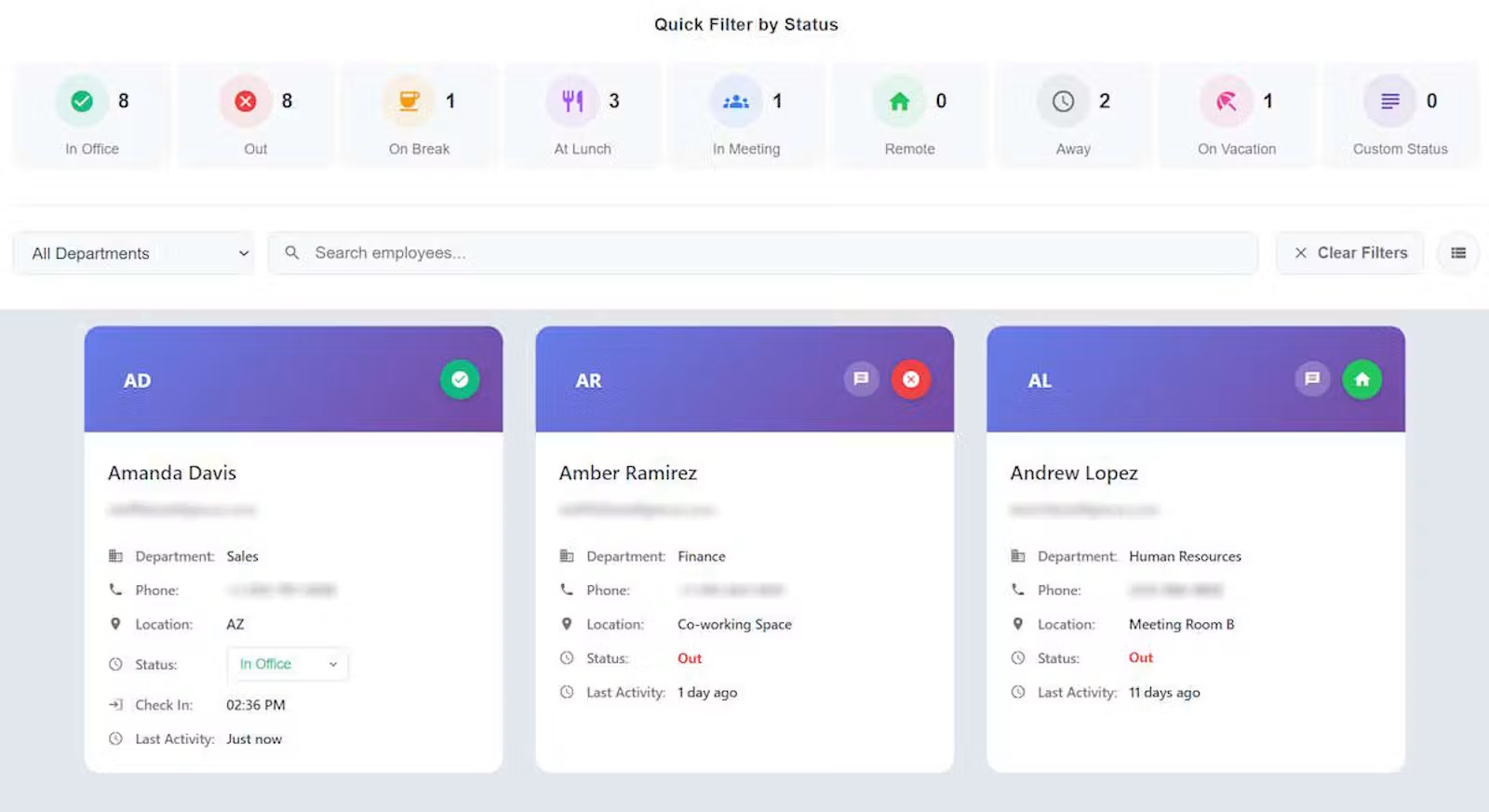
A department-based employee availability board is a digital system that shows the current working status of employees, organized by department or team.
It answers questions such as:
- Who is working in the office today?
- Which employees are working remotely?
- Who is out of the office, sick, or on vacation?
- Which team members are currently unavailable?
- Who belongs to a particular department?
- Which employees are available across multiple departments?
Unlike traditional employee directories, which primarily store contact information, an availability board provides a current view of employee working status.
For example, a healthcare organization might organize its board into Administration, Finance, Human Resources, Information Technology, and Operations.
A local government office might use Administration, Public Works, Finance, Planning, and Community Services.
A professional services firm might organize employees into Accounting, Consulting, Client Services, and Management.
Each department can maintain a clear view of its employees while remaining part of the organization's broader availability system.
The result is a more useful picture of workplace activity without requiring employees to constantly ask one another for updates.
1. Reduce the Time Spent Looking for Employees
One of the most immediate benefits of an employee availability board is reducing the effort required to determine where someone is working or whether they're available.
Consider a typical situation.
An employee in Finance needs assistance from Information Technology. They open Microsoft Teams and see that the person they need is marked "Busy."
That doesn't necessarily answer the question.
Is the employee in the office? Working remotely? Attending a meeting? Out of the building for the afternoon?
The employee sends a message and waits.
A department-based availability board provides additional context.
Instead of relying exclusively on a communication tool's presence indicator, employees can see a shared working status such as:
- In Office
- Working Remotely
- Out of Office
- On Vacation
- Sick
- At Another Location
- In a Meeting
These statuses help employees make better decisions about when and how to contact coworkers.
For example, if someone is marked "Working Remotely," a Teams message may be appropriate. If they're marked "On Vacation," the employee knows to contact someone else.
This doesn't eliminate communication. It makes communication more informed.
Over the course of a workday, avoiding unnecessary messages and interruptions can make routine coordination noticeably easier.
2. Organize Employee Availability Around Departments
A company-wide employee status board is useful, but a single list can become difficult to navigate as an organization grows.
Imagine an organization with 150 employees across 10 departments.
A receptionist might need to find someone in Human Resources. An IT manager might primarily need to see employees in Information Technology. An administrator might need a broader view across the organization.
Presenting everyone in one unorganized list makes these tasks more difficult than necessary.
Department-based organization allows employees to find relevant coworkers more quickly.
For example:
Human Resources
- Employee A — In Office
- Employee B — Working Remotely
- Employee C — Out of Office
Information Technology
- Employee D — In Office
- Employee E — Working Remotely
- Employee F — On Vacation
Finance
- Employee G — In Office
- Employee H — In a Meeting
- Employee I — Out of Office
This structure makes the information easier to scan and understand.
Department grouping also becomes valuable when organizations have hierarchical structures.
For example, an Information Technology department might contain Infrastructure, Applications, and Help Desk teams.
A well-designed availability board can reflect these relationships, helping employees navigate both departments and their subteams.
The objective isn't to create another organizational chart. It's to make employee availability easier to find within the organization's existing structure.
3. Improve Coordination Between Departments
Work rarely stays within one department.
Human Resources may need help from Information Technology. Finance may need approval from Administration. Customer Service may need assistance from Operations.
When employees don't know whether someone in another department is available, routine requests can turn into unnecessary delays.
A shared availability board helps departments coordinate without requiring everyone to maintain separate lists or contact directories.
Consider a municipal government office.
A resident calls asking to speak with someone in the Planning Department. The receptionist can see that the requested employee is out of the office but another department employee is working.
Instead of repeatedly transferring the call or leaving messages without context, the receptionist has better information to help route the request.
The same principle applies to hospitals, educational institutions, professional services firms, and other organizations with multiple departments.
A shared board can help employees answer three basic questions:
- Is the person working today?
- Where are they working?
- Are they currently available?
These aren't complicated questions, but answering them consistently can improve day-to-day operations.
4. Support Hybrid and Remote Work Without Losing Visibility
Hybrid work introduces an important distinction between an employee's physical location and their working availability.
An employee working from home may be fully available.
An employee sitting in the office may be unavailable because they're attending meetings.
An employee whose Microsoft Teams presence shows "Away" may still be working.
Traditional office whiteboards and sign-in sheets were designed primarily around physical presence. They become less useful when employees regularly work from different locations.
A digital availability board can represent both working status and location.
For example:
- In Office — Available
- Remote — Available
- In Office — Busy
- Remote — In a Meeting
- Out of Office — Unavailable
This provides a more complete picture than physical attendance alone.
For hybrid organizations, department-based views make the information even more useful.
Managers and coworkers can quickly understand how employees are distributed across office and remote locations without manually checking with every person.
Importantly, this information should support coordination rather than become a substitute for employee performance evaluation.
Being available on a status board does not measure productivity, and being marked away does not mean someone isn't working.
The purpose is to improve communication and visibility.
5. Give Departments Appropriate Visibility and Management Controls
Not every organization wants every employee to see the same information.
Some organizations benefit from a company-wide availability board. Others need visibility to follow departmental boundaries.
For example, a hospital may want employees to see availability within their own department and related teams.
A large organization might want department managers to maintain information for their teams without giving them administrative control over every employee.
This is where department-based permissions become valuable.
A well-designed system should distinguish between two separate concepts:
Visibility: Which employees and departments someone is allowed to see.
Management: Which employees and departments someone is allowed to update or administer.
These permissions don't always need to be identical.
A department manager might be authorized to manage their own team while having more limited administrative permissions elsewhere.
Similarly, an organization might allow broad visibility while restricting who can edit employee information.
Separating visibility from management helps organizations support different operational structures without requiring every user to have full administrative access.
It also reduces the risk of employees accidentally changing information outside their responsibilities.
For organizations with multiple departments, clear permissions are an important part of making a shared availability board practical.
6. Complement Microsoft Teams and Microsoft 365
Many organizations already use Microsoft Teams to communicate throughout the workday.
Teams provides valuable presence information, including whether someone is available, busy, away, or in a meeting.
However, Teams presence and an employee availability board serve related but different purposes.
Microsoft Teams primarily helps users understand communication availability.
An employee availability board provides a broader organizational view of working status, location, and department membership.
For example, Teams may indicate that someone is "Away," but that alone doesn't necessarily communicate whether the employee is on vacation, working remotely, or temporarily away from their desk.
A dedicated board can provide additional context through manual statuses, custom status options, and organization-specific availability information.
Organizations don't necessarily need to choose one or the other.
A system that integrates with Microsoft 365 can help connect communication presence with broader employee availability information.
For example, Staff Glance supports Microsoft Entra single sign-on, Microsoft Teams presence integration, and Microsoft 365 calendar functionality.
These integrations are designed to complement the shared employee In/Out Board rather than replace Microsoft Teams.
This approach is especially useful for organizations that already rely heavily on Microsoft 365 but need a more organized view of employee availability across departments.
7. Make Shared Office Displays More Useful
Many workplaces have a reception desk, shared administrative office, or common area where employee availability information is frequently needed.
Traditionally, these locations might use a physical whiteboard listing employees as In or Out.
The concept is simple and effective, but manual boards have limitations.
Someone must update the board. Employees working remotely cannot easily change it. Information may become outdated when someone forgets to notify the office.
A digital availability board can provide the same familiar at-a-glance experience while allowing updates from different locations.
Department grouping makes shared displays even more useful.
Instead of showing one large employee list, a display can organize employees by department, making it easier to locate relevant information.
For example, a shared monitor in a hospital administration office might show employees grouped under Finance, Human Resources, and Information Technology.
Staff members can quickly glance at the display to understand who is available without navigating through several applications.
This is particularly helpful for receptionists, administrative assistants, and employees who regularly answer questions about coworker availability.
8. Improve Visibility Into Upcoming Availability
Knowing who's available right now is useful.
Knowing who's expected to be unavailable later in the day or during the week can provide additional value.
Calendar information can help employees understand scheduled absences, meetings, and other availability changes.
For example, a department employee may currently be available but have several scheduled meetings throughout the afternoon.
A shared department calendar can provide a broader view of upcoming availability without requiring employees to open individual calendars.
For privacy, this type of calendar should focus on availability information rather than exposing confidential meeting details.
A calendar might show that an employee is Busy, Tentative, or Out of Office, along with the relevant time period.
It doesn't need to reveal meeting subjects, participants, or private descriptions.
This distinction is especially important for organizations handling confidential information.
Combining current status information with calendar availability can help departments coordinate both immediate and upcoming work.
It is not a replacement for workforce scheduling, but it can make ordinary workplace coordination easier.
9. Reduce Dependence on Manual Spreadsheets and Whiteboards
Many organizations begin with simple approaches to employee availability.
A shared spreadsheet may list employee names and statuses. A physical whiteboard may track who's in or out. A receptionist may maintain a handwritten list.
These methods can work well for small teams with straightforward schedules.
As organizations grow, however, several challenges become more noticeable.
Information becomes outdated. Employees forget to update their status, or changes are communicated to only one person.
Remote access is limited. Physical boards cannot be updated directly by employees working elsewhere.
Department organization becomes harder. Large lists require more effort to maintain and navigate.
Permissions are difficult to manage. Shared spreadsheets may provide broader editing access than necessary.
Information becomes fragmented. Different departments may maintain separate lists that don't agree.
A centralized employee availability board addresses these challenges by giving employees one consistent place to view and update status information.
It also allows organizations to establish shared status definitions.
Instead of one department using "WFH" and another using "Remote," the organization can provide consistent options that employees understand.
Consistency is valuable because availability information is most useful when everyone interprets it the same way.
10. Which Organizations Benefit Most?
Department-based employee availability boards can be useful across many industries, but their value depends on how employees coordinate their work.
Hospitals and Healthcare Administration
Hospitals often contain numerous administrative and operational departments.
Human Resources, Finance, Information Technology, Facilities, and other support teams frequently need to coordinate with one another.
An employee availability board can help these teams understand who's working, where they're located, and whether they're available.
It should not be confused with clinical staffing, nurse scheduling, or patient-care coordination software.
Local Government Offices
City and county governments often operate through multiple departments with different responsibilities.
Administration, Finance, Public Works, Planning, and other departments may need a shared way to communicate employee availability.
A department-based board can help receptionists and employees identify available contacts and understand when someone is working remotely or away from the office.
Professional Services Firms
Accounting firms, engineering companies, consulting organizations, and other professional services businesses often have employees attending client meetings, working remotely, or visiting different locations.
A shared availability board can help coworkers understand whether someone is available without requiring repeated messages.
Public Education Administration
School districts, colleges, and educational administrative offices often have employees working across multiple buildings and departments.
Availability boards can support coordination among administrative personnel, IT teams, facilities staff, and other support departments.
They are not replacements for student attendance systems or substitute-teacher scheduling.
Healthcare Practices and Outpatient Offices
Medical practices and outpatient facilities frequently need to coordinate providers, receptionists, administrative employees, and support personnel.
A shared status board can help staff understand whether someone is in the office, working at another location, or unavailable.
It does not replace patient scheduling or electronic health record systems.
Across these industries, the common need is straightforward: employees need reliable information about coworker availability.
11. What to Look for in a Department-Based Availability Board
When evaluating employee availability software, organizations should consider how well the system fits their existing workflows.
Important capabilities include:
- Real-time status visibility: Employees can see current working statuses without waiting for manual updates from a central administrator.
- Department organization: Staff can be grouped and filtered by department.
- Flexible statuses: Organizations can represent their actual working arrangements rather than relying exclusively on In and Out.
- Permission controls: Employee visibility and management access can reflect organizational responsibilities.
- Microsoft 365 integration: Organizations using Microsoft Teams and Microsoft Entra can benefit from compatible integrations.
- Mobile access: Employees can view or update availability when away from their desks.
- Shared display support: Reception desks and administrative offices can display employee availability on a common screen.
- Simple administration: The system should remain manageable without requiring extensive technical resources.
The best availability board isn't necessarily the one with the longest feature list.
It's the one employees can understand, update, and use consistently throughout the workday.
12. How Staff Glance Supports Department-Based Employee Availability
Staff Glance is a digital employee In/Out Board designed to give organizations a centralized view of who's working, remote, away, or out of the office.
Rather than relying on disconnected spreadsheets, whiteboards, and individual status messages, Staff Glance brings employee availability into one shared system.
Its department-based capabilities help organizations organize employees around their actual team structures.
Staff Glance includes:
Department hierarchy and grouping. Organize employees by department and subdepartment, making larger organizations easier to navigate.
Department Visibility controls. Configure which departments and employees users can see based on the organization's visibility settings.
Department management roles. Give authorized managers and department administrators appropriate control over their teams.
Custom employee statuses. Support organization-specific statuses beyond basic In and Out.
Microsoft Teams integration. Use optional Teams presence synchronization alongside the Staff Glance availability board.
Microsoft 365 Calendar integration. Provide calendar-based availability information, including department-level calendar views when configured.
Display Mode. Present a streamlined employee availability board on shared office monitors.
Mobile-friendly access. Allow employees to access the board from supported mobile devices.
These features make Staff Glance suitable for organizations that need more structure than a basic sign-in sheet but don't need a complex workforce management platform.
Staff Glance focuses on employee status and availability visibility. It is not designed to replace payroll, timekeeping, shift scheduling, or industry-specific operational systems.
That focused approach helps organizations address a common workplace problem without introducing unnecessary complexity.
Conclusion: Better Department Visibility Leads to Better Coordination
Workplace coordination often depends on having the right information at the right time.
Employees shouldn't have to send multiple messages just to learn whether someone is working remotely, away from the office, or available to help.
Department-based employee availability boards make that information easier to find by organizing employees around the teams and departments where they work.
For organizations with hybrid employees, multiple departments, or shared administrative responsibilities, a centralized availability board can reduce confusion, improve communication, and simplify everyday coordination.
The objective isn't to monitor employees or replace existing communication systems.
It's to make employee availability information easier to access, understand, and maintain.
Give Your Teams a Clearer View with Staff Glance
If your organization still relies on spreadsheets, whiteboards, scattered Teams messages, or repeated phone calls to determine employee availability, it's worth exploring a more centralized approach.
Staff Glance helps organizations see who's in, out, remote, or unavailable across departments, all from one shared employee availability board.
With department grouping, configurable visibility, custom statuses, Microsoft 365 integrations, and shared display support, Staff Glance provides a practical way to improve workplace coordination.
Ready to simplify employee availability across your organization?
Visit StaffGlance.com to explore the features and start your free 30-day trial.
See how a department-based employee In/Out Board can help your teams spend less time looking for people and more time getting work done.