
From Quote to Payment: A Practical Workflow for UK Tradespeople
Running a plumbing, electrical, heating or building business involves much more than completing the work itself. Every job comes with customer enquiries, quotations, scheduling, paperwork, invoicing and payments.
For sole traders and small trade businesses, keeping these activities organised can become increasingly difficult as the number of customers and jobs grows.
The challenge isn't necessarily the amount of work. It's keeping all the information connected from the first customer enquiry to the final payment.
Whether you're a self-employed plumber handling several appointments a day or a building contractor managing multiple workers, having a clear workflow can help reduce unnecessary administration and make daily operations easier to manage.
This guide explores how UK tradespeople can organise their work from quotation to payment and how connected job management and invoicing software can support that process.
The Problem with Disconnected Systems
Many tradespeople rely on a combination of spreadsheets, calendars, messaging apps and separate invoicing software.
A quote might be saved in one system, the job details in another, and the invoice created separately after the work is finished.
This approach can create unnecessary administration.
Business owners may need to enter the same customer information several times, check messages to confirm job requirements, or chase workers for photographs and updates before preparing an invoice.
For growing businesses with multiple employees, these problems can become harder to manage.
Consider a heating engineer who receives an enquiry about replacing a boiler. The customer details arrive through a phone call, the quotation is prepared separately, and the installation date is recorded in a calendar. After completing the work, the engineer must locate the original quotation and manually prepare an invoice.
If the business handles several installations each week, repeating this process can consume valuable administrative time.
A connected job management system aims to reduce these gaps by keeping customer information, job records, documents and invoices together.
A More Connected Approach to Job Management
A connected workflow helps keep important information together throughout the job.
Rather than managing each stage independently, business owners can follow a structured process that connects customer enquiries, quotations, scheduled work, field workers and payments.
The process can be organised into six stages:
1. Customer Management
Start by recording customer contact details, job locations and previous work.
Keeping customer records organised makes it easier to prepare quotations, find past invoices and manage repeat business.
For example, an electrician returning to an existing customer's property may need to review previous installations or identify earlier invoices.
Instead of searching through emails and paperwork, having customer information stored in one place makes it easier to access relevant records.
A useful customer management process should allow businesses to maintain accurate contact information, distinguish between active and previous customers, and keep a record of relevant transactions.
For trade businesses that rely on repeat customers, organised records can also make future quotations and follow-up work easier to manage.
2. Quotes and Estimates
Create a professional quotation that clearly describes the proposed work, materials, labour and charges.
Once the customer accepts the quotation, the details should be easy to carry forward into the next stage without unnecessary retyping.
For example, a plumber quoting for a bathroom installation may need to include labour, plumbing materials, additional fittings and VAT where applicable.
A clearly presented quotation helps the customer understand what is included and provides a useful reference if the scope of work changes.
Businesses should also keep track of quotations that have been sent, accepted or declined.
When an accepted quotation can be converted into a job, the business avoids having to recreate the same information manually.
This creates a more consistent connection between the original estimate and the work scheduled for completion.
3. Job Scheduling
Schedule the work for the appropriate date and assign it to the relevant worker.
Some jobs require a single visit, while others involve multiple days or recurring appointments.
A job management system should accommodate these different working patterns.
For instance, an electrician might complete several small jobs in one day, while a builder may be working on the same project for several weeks.
Heating engineers may also have recurring maintenance appointments that need to be organised alongside one-off installations.
A central job calendar helps business owners see upcoming appointments, identify scheduling conflicts and keep track of work that is in progress.
When job details are connected to customer records, workers can access the information they need without repeatedly contacting the office.
For small businesses with limited administrative support, a clear scheduling process can be particularly useful.
4. Managing Field Workers
When employees or subcontractors are working on-site, business owners need visibility of job progress.
Workers may need access to the job address, customer instructions, supporting documents and a way to record completed work.
Having a separate field worker application can help keep operational information accessible without exposing unnecessary business administration functions.
For example, a plumbing company with three engineers may have employees working at different customer locations throughout the day.
Each worker needs to know where to go, what work has been assigned and what information should be recorded when the job is completed.
A dedicated field worker app can make job information available on a mobile device.
Depending on the software, workers may also be able to record their arrival, update job progress, capture photographs and submit information from the site.
This allows the business owner to spend less time requesting updates and more time coordinating ongoing work.
5. Job Evidence and Documentation
Photographs, notes and supporting documentation can provide a useful record of work completed.
For example, an electrician might record photographs of an installation, while a plumber might document work carried out before an area is concealed.
Keeping evidence alongside the job record makes it easier to locate later if needed.
Job documentation can also be useful when a customer asks questions about completed work or when a business needs to review the details of a previous visit.
For contractors managing multiple jobs, organising photographs and notes by customer and job can prevent information from becoming scattered across personal phones, messaging applications and folders.
A structured job record might include the work description, dates, assigned workers, photographs, notes and completion information.
Where appropriate, a job report can bring these details together into a document that can be reviewed or shared.
The objective is to maintain a clear record of what happened during the job without creating unnecessary paperwork.
6. Invoicing and Payment Collection
Once the work is completed, the business can prepare an invoice using the relevant customer and job information.
For UK trade businesses, VAT and Construction Industry Scheme (CIS) requirements may also need to be considered, depending on the business and type of work.
Clear payment records help business owners identify outstanding balances and follow up on unpaid invoices.
Professional invoices should contain the relevant customer details, work description, charges and payment information.
For VAT-registered businesses, the invoice must also include the information required for the relevant type of VAT invoice.
Construction businesses operating under CIS may need to account for applicable deductions when preparing payment documentation.
When invoices are connected to customer and job records, the business can more easily review what has been billed and what remains outstanding.
Online payment options can also give customers a convenient way to settle invoices.
For the business owner, recording payments against invoices makes it easier to monitor outstanding balances and keep financial records organised.
How Love Invoicing Brings These Activities Together
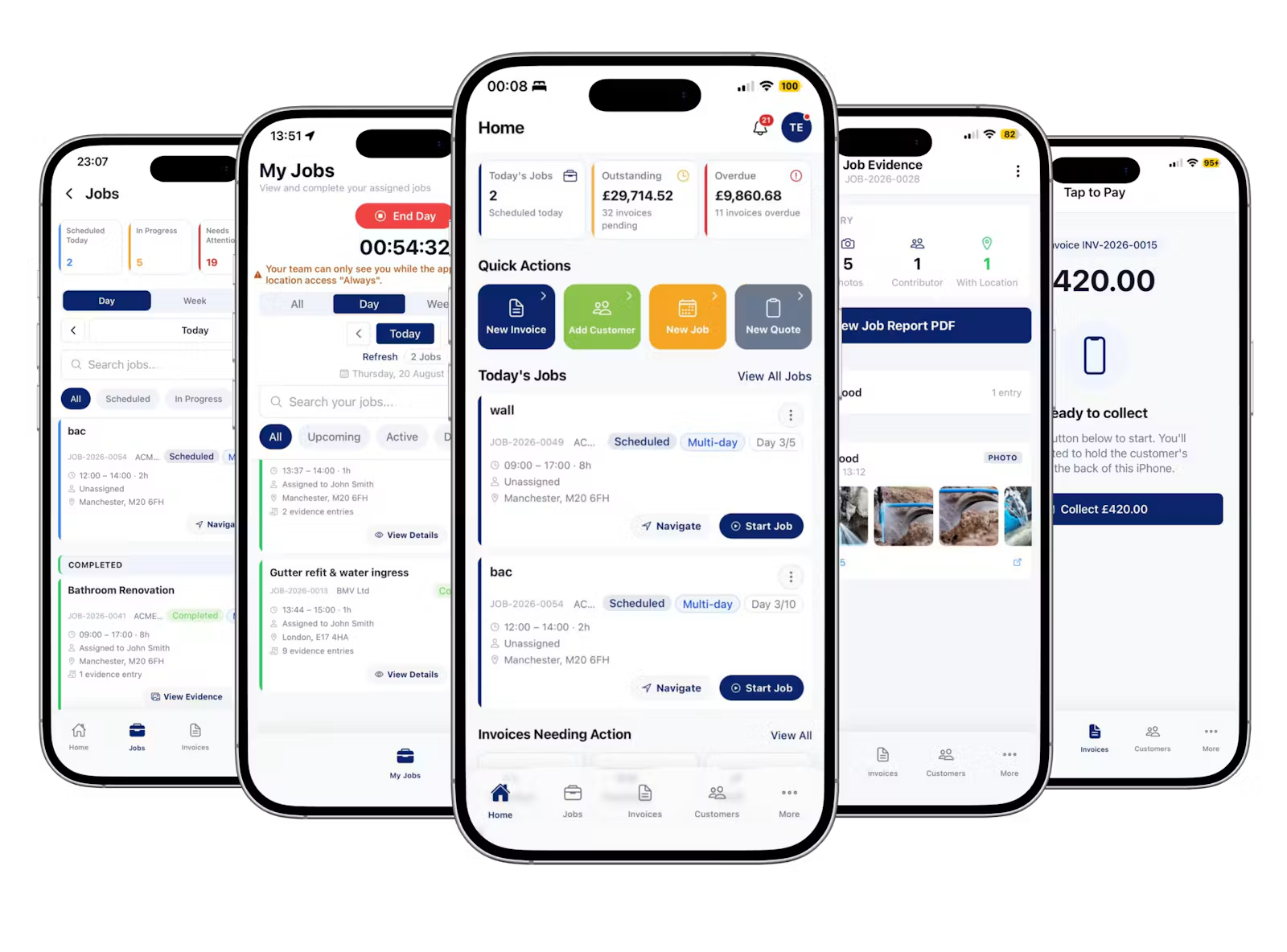
Love Invoicing is invoicing and job management software developed for UK tradespeople and small service businesses.
It combines customer management, professional quotations, job scheduling, team coordination, invoicing and payment collection within one connected platform.
Business owners can create quotations, turn accepted quotes into jobs, assign work to field workers, record job evidence and issue invoices.
The platform also supports single-day, multi-day and recurring jobs, UK VAT and CIS handling, Stripe payments, customer statements, inventory and delivery management.
A dedicated Team App allows field workers to access assigned work and record job activity, while business owners manage operations through the main application.
Love Invoicing also supports photographic job evidence, job reports and payment tracking, helping keep information connected throughout the working process.
For businesses handling materials and deliveries, additional features include inventory records and electronic proof of delivery.
The objective is to provide a practical system that reflects how tradespeople manage their daily operations rather than requiring separate software for every stage.
Love Invoicing is available on the web, iOS and Android.
Who Can Benefit from a Connected Workflow?
This approach is particularly relevant to:
- Plumbers: Managing installations, maintenance visits, emergency repairs, customer quotations and invoices.
- Electricians: Organising site visits, electrical installations, job scheduling and supporting documentation.
- Heating engineers: Coordinating appointments, recurring maintenance work and customer records.
- Builders and contractors: Managing longer projects, multiple workers, job evidence and payment records.
- Roofers: Preparing estimates, recording job photographs and managing invoices.
- Small service businesses: Reducing repetitive administration and organising work across different locations.
The benefits of a connected workflow are not limited to businesses with employees.
Self-employed tradespeople can also benefit from having their customer information, quotations, appointments and invoices organised in one system.
As a business grows, the same structured process can support additional workers and a larger number of jobs.
The objective is straightforward: spend less time moving information between separate tools and more time managing work and serving customers.
Practical Tips for Improving Your Daily Workflow
Introducing job management software is only part of the process. Businesses should also establish consistent working practices.
Keep Customer Information Updated
Make sure customer contact details and job addresses are accurate before preparing quotations or scheduling appointments.
Record Changes to the Scope of Work
If a customer requests additional work, update the relevant job information and agree any changes to the price before proceeding.
Keep Job Documentation Together
Store relevant photographs, notes and documents against the appropriate job rather than relying on separate messaging conversations.
Review Outstanding Invoices Regularly
Set aside time to check which invoices have been paid and which remain outstanding.
A consistent review process can help prevent unpaid invoices from being overlooked.
Use One Clear Workflow
Where practical, follow the same process for every job:
Customer → Quote → Job → Team → Invoice → Payment
A consistent approach makes it easier to organise current work and locate previous records.
Getting Started with Love Invoicing
For a small trade business, improving administration doesn't have to mean introducing complicated processes.
Start by organising customer records, standardising quotations and keeping job information connected to invoices.
Business owners can begin with the activities they manage most frequently and introduce additional features as their operational requirements grow.
Love Invoicing brings these activities into a single system designed around the way UK tradespeople work.
With web and mobile access, business owners can manage quotations, jobs, customers and invoices whether they're working from an office or out on-site.
It offers a 30-day free trial with no card required.
Visit Love Invoicing: https://loveinvoicing.com/
Run the job. Send the invoice. Get paid.