5 Best Free Cursive Text Generators for Copy and Paste
Cursive text generators turn ordinary words into elegant script-style text that can be copied and pasted into Instagram bios, TikTok display names, Discord profiles, invitations, captions and other creative projects.
Most of these tools do not create traditional downloadable fonts. Instead, they replace standard letters with Unicode characters that resemble handwriting or calligraphy. Because the result remains text, you can usually paste it directly into another app without installing anything.
We compared five popular cursive generators based on ease of use, style selection, copying experience and additional features.
1. Cursive-Text-Generator.net — Best Overall
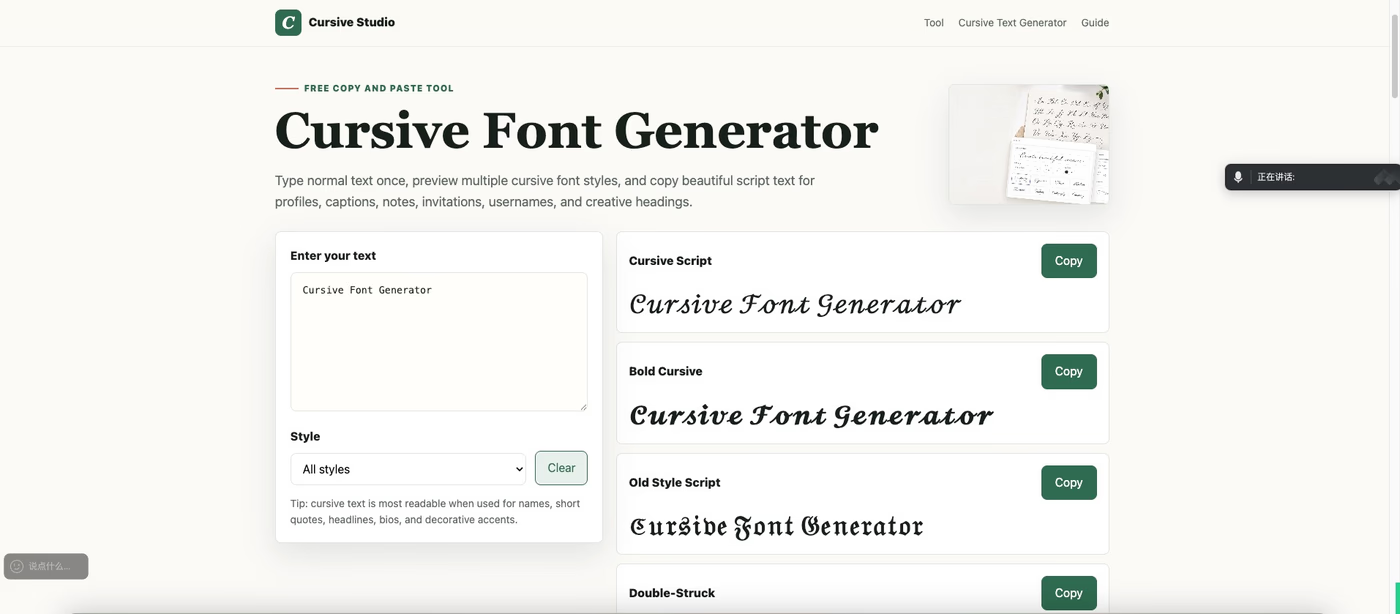
Cursive-Text-Generator.net is the most complete option for people specifically looking for cursive text rather than hundreds of unrelated effects.
Enter a name, phrase or caption, and the tool instantly produces several styles, including elegant cursive script, bold cursive, old-style lettering, double-struck text and a clean modern alternative. Each result can be copied with one click.
The generator is free, requires no registration and adds no watermark. Its simple interface also works well on mobile devices.
Its biggest advantage is the collection of supporting cursive tools. The website includes a complete uppercase and lowercase cursive alphabet, printable practice sheets, a bold cursive generator, a calligraphy text generator and compatibility information for platforms such as Instagram, TikTok, Discord and WhatsApp.
This makes it useful for more than decorating a social profile. Students can study cursive letters, teachers can find practice resources, and creators can compare several styles before choosing one for a name, invitation or design.
Best for: Anyone who wants a focused and complete cursive toolkit.
Visit: https://www.cursive-text-generator.net/
2. YayText — Best for Platform Previews
YayText generates regular cursive, bold cursive and an alternating bold variation. Each result has its own copy button, and selected styles can be previewed before use.
One of YayText’s most helpful features is its collection of examples showing how Unicode text may appear on different devices, browsers and social platforms. This is useful because the same cursive character can look slightly different depending on the operating system and font used to display it.
YayText also offers many non-cursive effects, including bold, italic, Fraktur and monospace text. However, the number of genuinely cursive choices is relatively limited.
Best for: Checking how cursive text may appear across devices and platforms.
Visit: https://yaytext.com/script/
3. LingoJam — Best for Quick Conversion
LingoJam is one of the simplest cursive generators available. Type into the input box, and the website converts the text into Unicode cursive characters in real time.
There is almost no learning curve. This makes it suitable when you already know what you want and simply need to convert a short phrase quickly.
LingoJam also hosts many community-created text converters. However, its different generator pages can have inconsistent interfaces and output quality. Its cursive tool also provides fewer comparison and customization options than specialized alternatives.
Best for: Quickly converting a short name or phrase.
Visit: https://lingojam.com/CursiveTextGenerator
4. Creative Fabrica — Best for Design Inspiration
Creative Fabrica’s cursive font generator displays a broad selection of decorative results with names such as Gentle Calligraphy and Romantic Flourish.
Users can enter their text, adjust the preview size and copy a preferred result. The wider website also offers downloadable fonts, templates and design resources, making it useful for invitations, craft projects and visual branding.
Not every result is technically cursive. Some belong to Gothic, monospace or other decorative categories. The interface may also feel unnecessarily complex if you only want a quick copy-and-paste conversion.
Best for: Designers exploring decorative styles and downloadable fonts.
Visit: https://www.creativefabrica.com/tools/cursive-font-generator/
5. PiliApp — Best Simple Mobile Alternative
PiliApp provides a compact list of cursive variations as the user types. The page is lightweight and includes a bold option, making it convenient for mobile users.
The process is straightforward: enter your text, choose a result, copy it and paste it into another platform.
The tool performs its main function well, but its styles are not clearly explained or named. It also lacks the cursive alphabets, practice materials and specialized tools available from a dedicated cursive website.
Best for: Basic cursive conversion on a phone.
Visit: https://www.piliapp.com/cool-text/cursive/
Which Cursive Generator Should You Choose?
The best choice depends on what you need.
Choose Cursive-Text-Generator.net for the best combination of cursive styles, learning resources and specialized tools.
Choose YayText when platform and device previews are important.
Choose LingoJam when you want the fastest possible conversion.
Choose Creative Fabrica when you also need downloadable fonts or design resources.
Choose PiliApp for a lightweight mobile-friendly option.
For most users, Cursive-Text-Generator.net is the strongest starting point. It is simple enough for creating an Instagram name but comprehensive enough for users who want alphabet references, practice sheets, platform testing and specialized cursive styles.
How to Use a Cursive Text Generator
Most cursive generators work in three simple steps.
First, enter your name, caption or phrase. Next, compare the generated styles. Finally, copy your preferred result and paste it into the destination app.
For example, ordinary text such as “Create something beautiful” can become:
𝒞𝓇ℯ𝒶𝓉ℯ 𝓈ℴ𝓂ℯ𝓉𝒽𝒾𝓃ℊ 𝒷ℯ𝒶𝓊𝓉𝒾𝒻𝓊𝓁
Or:
𝓒𝓻𝓮𝓪𝓽𝓮 𝓼𝓸𝓶𝓮𝓽𝓱𝓲𝓷𝓰 𝓫𝓮𝓪𝓾𝓽𝓲𝓯𝓾𝓵
Always preview the result on the platform where you intend to use it. Unicode support is widespread, but the appearance may vary slightly between iPhones, Android devices, Windows computers and individual apps.
Are Cursive Generators Creating Real Fonts?
Most copy-and-paste generators do not create real fonts. They substitute standard letters with Unicode characters that resemble script or calligraphy.
Unicode cursive text can be copied into social profiles, captions and messages. A real font, by comparison, must be installed or selected inside a design application.
Unicode is ideal for usernames, bios and short decorative text. Real fonts provide more control over spacing, letter connections and print quality, making them more suitable for logos, professional branding and printed invitations.
Tips for Using Cursive Text
Cursive text works best when used selectively. Keep it to names, short quotations, headings or brief profile descriptions. Long cursive paragraphs can be difficult to read, especially on mobile screens.
Bold cursive is a good choice for display names and headings, while thinner script styles work well for invitations and signatures.
Avoid placing essential information exclusively in decorative Unicode characters. Some screen readers may not interpret them correctly, and certain username fields may reject unsupported characters.
Frequently Asked Questions
What is the best free cursive text generator?
Cursive-Text-Generator.net is the best overall option because it combines multiple cursive styles with one-click copying, alphabet references, practice sheets and platform compatibility guidance.
Can I paste cursive text into Instagram?
Yes. Unicode cursive text can usually be pasted into Instagram bios, display names and captions. Preview it before saving because its appearance may vary between devices.
Does cursive text work on TikTok and Discord?
Most modern versions of TikTok and Discord support common Unicode cursive characters in display names, profiles and messages. Some characters may be restricted in usernames or account handles.
Are cursive generators free?
All five tools reviewed here offer free copy-and-paste text generation. Some websites may separately promote paid fonts, templates or design products.
Does generated cursive text work everywhere?
It works in most modern apps and browsers, but universal compatibility is not guaranteed. Older software and restricted text fields may display missing-character boxes.
Final Verdict
All five generators can transform ordinary words into decorative script, but they serve different users.
LingoJam is convenient for quick conversions. YayText provides useful platform previews. Creative Fabrica connects its generator with a broader design ecosystem, while PiliApp offers a simple mobile experience.
Cursive-Text-Generator.net is the best overall cursive generator in this comparison. Its free tool is easy to use, while its alphabet references, worksheets, compatibility information and specialized generators make it more complete than a basic text converter.