
NetCheck
Know your internet is actually working, not just your Wi-Fi

FreemiummacOS
- Upvotes
- 1
- Comments
- 0
- Impressions
- 136
this week
discussions
this week
About
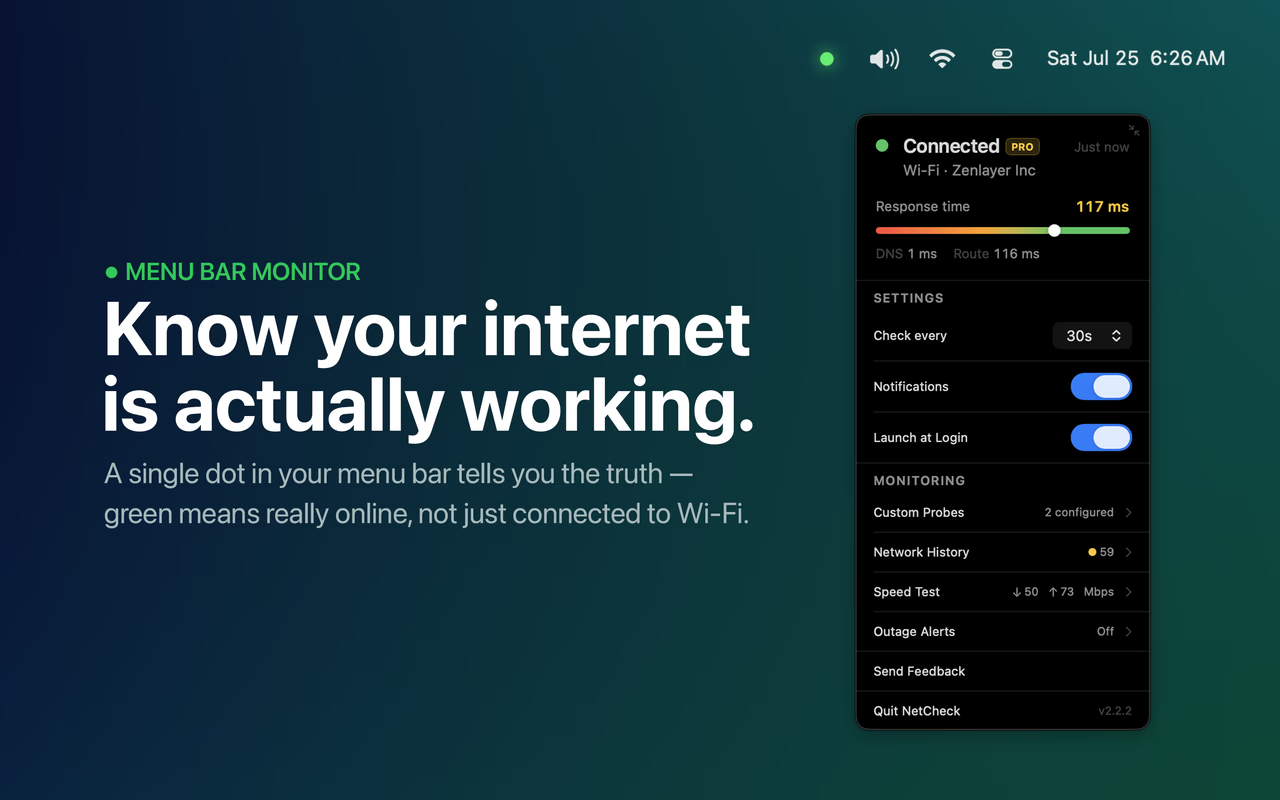
NetCheck is a lightweight macOS menu bar app that tells you whether your internet is actually working — not just whether your Wi-Fi is connected. Your Mac's Wi-Fi indicator only checks the local network. If your router is up but the ISP is down, or you're behind a captive portal, it still shows full bars. NetCheck closes that gap. It runs a periodic HTTP probe to a real endpoint and verifies the response — something a captive portal can't fake. If the primary probe fails, it falls back to a secondary check. The result shows up as a single dot in your menu bar: green means you have real internet, grey means you don't. When it's grey, a network path diagram shows exactly where the problem is — your Mac, your router, or your ISP. Open the popover and you get a live response time meter, your ISP identified automatically, a VPN indicator when you're connected through one, and the last verified timestamp. You can set how often NetCheck checks — anywhere from 5 seconds to 5 minutes. When your connection drops or comes back, you get a notification instantly. It launches at login so it's always there. No dock icon. No Cmd+Tab entry. No account. No ads. No data collected. Just a dot that tells you the truth about your internet. NetCheck is free. NetCheck Pro ($9.99, one-time, no subscription) adds Network History with a 0-100 reliability score, custom probe endpoints for monitoring any URL, CSV export, a built-in speed test with optional automatic scheduling, iPhone outage alerts, and Shortcuts integration for automating checks. Built with SwiftUI, zero third-party dependencies, fully sandboxed, and available on the Mac App Store. Watch the demo: youtu.be/xFlBAON9iA8
Problem & solution
Problem
macOS shows full Wi-Fi bars even when the ISP is down — no built-in way to know.
Solution
A menu bar dot that probes real internet access and alerts you on drop or restore.
Who it's for
Mac users who work from home, use AI tools, or need reliable internet for calls and remote work.
Main features
- Green/grey dot status
- Live response time gauge
- Drop & restore notifications
- Network path diagram
- VPN & ISP detection
Use cases
- Detect internet drop during video calls
- Monitor connectivity during AI tasks
Articles
1 storyComments
0 shownShare your thoughts about this tool.
Sign in to leave a comment.
No comments yet. Be the first to leave one.