
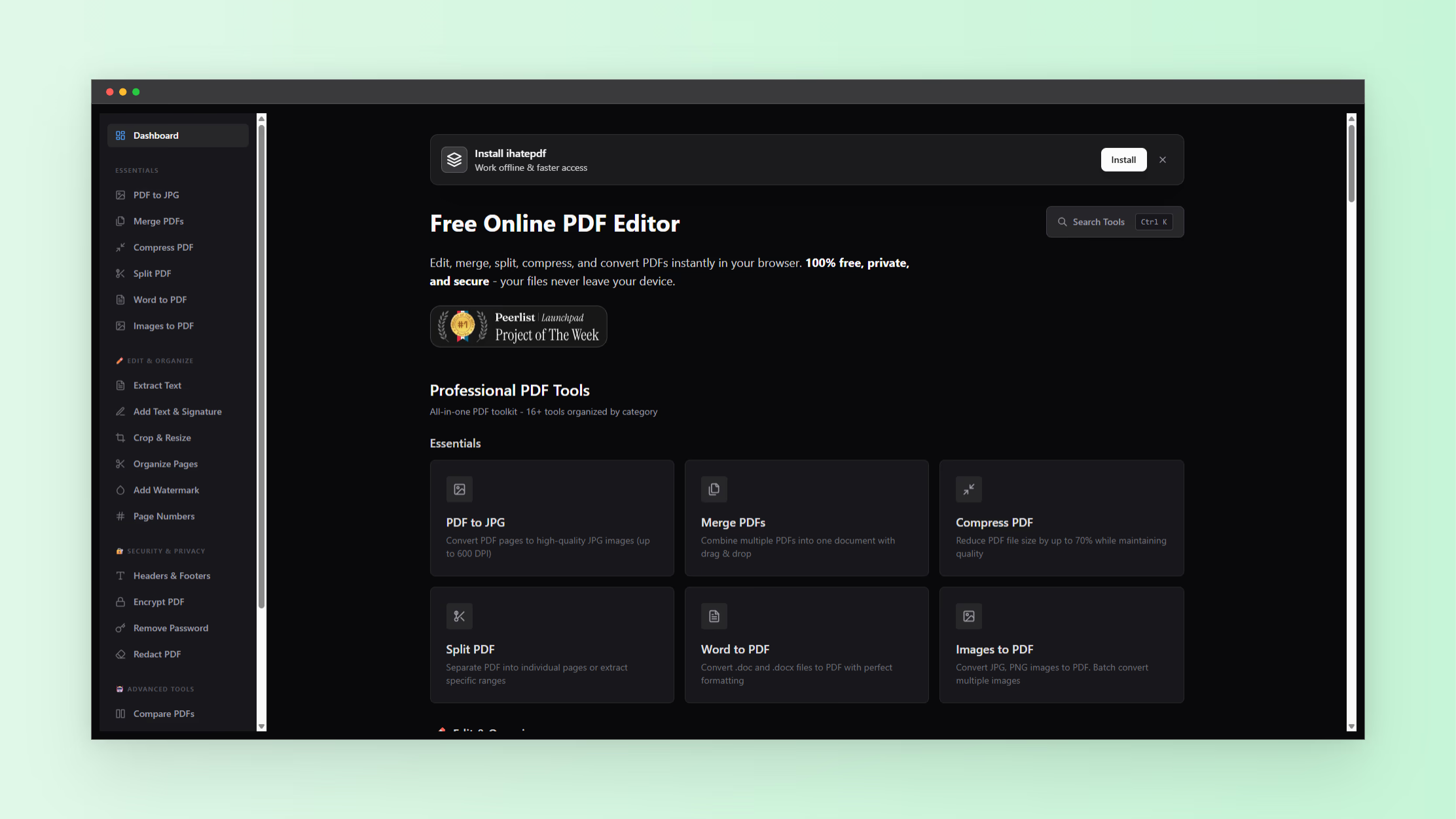
Managing PDF files efficiently is essential for work, school, and personal projects. PDFs maintain consistent formatting across devices, making them the preferred choice for official documents. With the right pdf tools and a reliable pdf converter, you can handle virtually any PDF task without installing heavy software.
iHatePDF is a browser-based platform that provides a full suite of PDF tools. It allows you to convert, edit, compress, merge, split, and secure your PDF files quickly and easily.
What Are PDF Tools?
PDF tools are software or online utilities designed to manage, edit, and convert PDF files. They include converters, editors, compressors, and management tools. A quality pdf converter lets you transform files between formats such as Word, images, HTML, Markdown, and PDF.
Beyond conversion, modern PDF tools offer editing features like adding text, signatures, watermarks, or rearranging pages. They also provide security tools for encryption, password removal, and redaction.
iHatePDF combines all these features in a single platform that runs entirely in your browser. This ensures files remain on your device for maximum privacy.
Core PDF Converter Features
A strong pdf converter must handle multiple file formats and maintain document integrity. iHatePDF supports:
- PDF to JPG: Convert PDF pages into high-resolution images. Ideal for extracting visual content or creating image-ready PDFs.
- Word to PDF: Convert DOC and DOCX files into PDF while preserving layout, fonts, and formatting.
- Images to PDF: Combine multiple images (JPG, PNG, GIF, WebP) into a single PDF document.
- HTML to PDF: Turn web pages or HTML content into PDF for archiving or sharing.
- Markdown to PDF: Convert markdown notes or documents into PDF format for professional presentation.
These conversion features ensure you can use PDFs for professional, academic, or creative workflows.
Editing and Enhancing PDFs
PDF tools go beyond simple conversion. Editing features allow you to refine your documents for presentation or sharing. iHatePDF includes:
- Extract Text: Pull text from PDFs for reuse in other documents.
- Add Text & Signature: Annotate documents and insert your signature.
- Crop & Resize Pages: Adjust margins, page size, or orientation for printing.
- Organize Pages: Reorder, rotate, or remove pages from a PDF.
- Add Watermark: Insert custom watermarks to protect content or brand your documents.
- Page Numbers, Headers & Footers: Add structure and make documents easier to navigate.
With these editing tools, you can produce polished, professional PDF documents without desktop software.
PDF Management Essentials
Managing multiple PDFs efficiently is crucial for productivity. iHatePDF provides the following:
- Merge PDFs: Combine multiple documents into a single PDF for easier sharing.
- Split PDF: Divide a large PDF into smaller files for organization or submission.
- Compress PDF: Reduce file size without losing quality, ideal for emailing or uploading online.
- Compare PDFs: Detect differences between two versions of a document to track edits or revisions.
These features make iHatePDF a complete pdf tools suite suitable for students, professionals, and business teams.
Security and Privacy Features
Keeping sensitive PDFs secure is essential. iHatePDF includes:
- Encrypt PDF: Add password protection to prevent unauthorized access.
- Remove Password: Unlock PDFs for editing or sharing.
- Redact PDF: Permanently hide confidential information such as personal data or legal content.
Using these security features ensures that your documents remain confidential and compliant with privacy standards.
Advanced Tools for Productivity
iHatePDF also includes specialized tools to streamline workflow:
- Chat with PDF: Ask AI-based questions or summarize PDF content.
- Compare PDFs: Quickly identify changes between different document versions.
- Headers & Footers: Apply consistent page formatting.
- PDF Organizers: Visual tools for rearranging pages efficiently.
These advanced features save time and make document management more intelligent.
Why Choose Online PDF Tools
Online pdf tools like iHatePDF offer advantages over traditional software:
- No software installation or updates.
- Works on any device with a browser, including mobile phones and tablets.
- Fast processing and conversion without upload delays.
- Many tools are free and provide unlimited use.
- Files remain on your device for privacy and security.
This combination of convenience and functionality makes iHatePDF an ideal choice for everyday PDF work.
Practical Tips for Using PDF Tools
To maximize your PDF workflow:
- Merge before compressing: Combine multiple PDFs first to avoid repeated compression.
- Extract text for research: Save time when pulling quotes or references.
- Use watermarks for branding: Protect intellectual property in documents shared publicly.
- Apply page numbers consistently: Maintain readability in reports, manuals, and guides.
- Secure sensitive files: Use encryption or password protection for confidential documents.
How to Choose the Right PDF Converter
When evaluating pdf converters, consider:
- Supported file formats for your workflow.
- Batch processing for multiple files.
- Ease of use across devices.
- Privacy and security of document processing.
- Additional editing and management features.
iHatePDF meets all these requirements in a single, browser-based platform.
Conclusion
Online PDF tools have evolved into versatile, powerful platforms. With a robust pdf converter and a full set of editing and management tools, you can handle any PDF task without installing software.
iHatePDF provides an all-in-one solution that is free, fast, and privacy-friendly. From converting Word documents to PDFs, merging multiple files, compressing large documents, or adding watermarks and signatures, this platform ensures your PDFs are professional, secure, and easy to manage.
For more tools like these, explore the full NextGen Tools categories to find utilities for image conversion, Markdown, HTML, and more.