
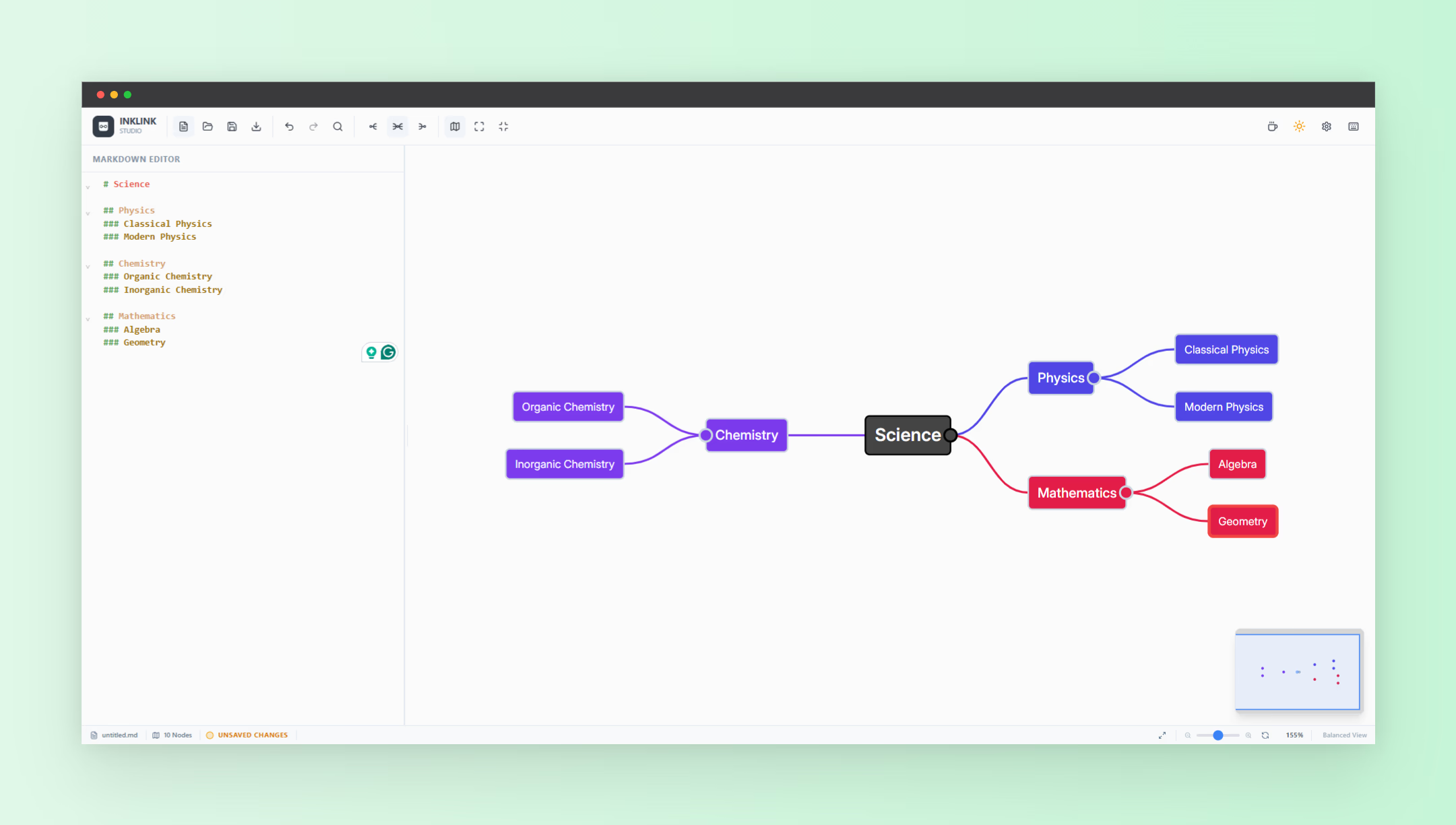
Organizing ideas, planning projects, and breaking down complex topics can quickly become overwhelming without the right tools. That is why many people are searching for an online mind map maker that is simple, flexible, and fast. Traditional mind mapping tools often rely on drag-and-drop interfaces, which can feel slow or restrictive. A new approach is emerging that combines the power of Markdown with visual mind mapping, making it easier than ever to turn structured text into interactive diagrams.
If you want a lightweight and efficient way to build mind maps, tools like Inklink offer a unique solution. Instead of manually drawing nodes and connections, you can simply write your ideas in Markdown format and instantly transform them into a visual mind map.
What Is an Online Mind Map Maker
An online mind map maker is a digital tool that helps users visually organize information in a hierarchical structure. It typically starts with a central idea and expands into branches representing related concepts.
These tools are widely used for:
- Brainstorming ideas
- Planning projects
- Studying and note-taking
- Organizing content outlines
- Visualizing complex systems
The key advantage of using an online tool is accessibility. You can create, edit, and share mind maps from anywhere without installing software.
Why Use Markdown for Mind Mapping
Markdown is a simple text formatting syntax that allows you to structure content using symbols like hashtags. When applied to mind mapping, it becomes a powerful way to define relationships between ideas quickly.
Instead of dragging nodes around, you can write something like:
- # Main Topic
- ## Subtopic
- ### Detail
This structure automatically creates a hierarchy, making it ideal for building mind maps efficiently.
Benefits of using Markdown include:
- Faster input compared to visual editors
- Cleaner and more structured thinking
- Easy editing and reorganization
- Lightweight and distraction-free workflow
How Inklink Works as an Online Mind Map Maker
Inklink takes a unique approach by turning Markdown text into a fully interactive mind map. Instead of focusing on design complexity, it prioritizes speed and usability.
Here is how it works:
- You write your ideas using Markdown syntax
- Hashtags define the hierarchy of your nodes
- The tool automatically converts text into a visual structure
- You can interact with the mind map instantly
This makes it especially useful for users who prefer typing over dragging elements around.
Creating a Mind Map Step by Step
Using an online mind map maker like Inklink is straightforward. Here is a simple example to get started:
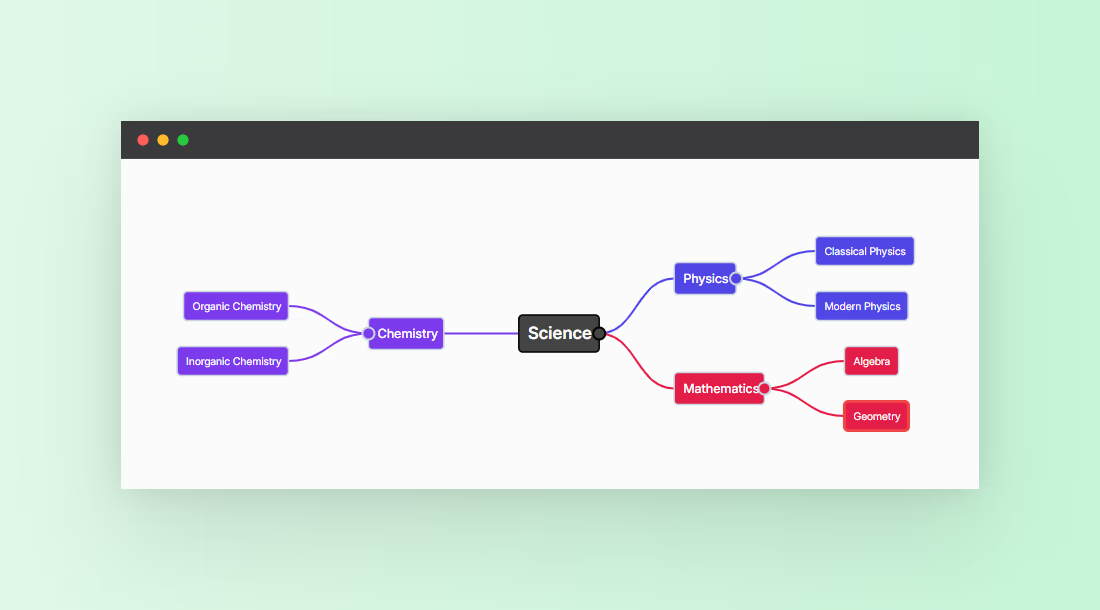
# Science
## Physics
### Classical Physics
### Modern Physics
## Chemistry
### Organic Chemistry
### Inorganic Chemistry
## Mathematics
### Algebra
### Geometry
As soon as you input this structure, it is transformed into a visual mind map with clearly defined branches.
This approach allows you to focus entirely on your ideas instead of worrying about layout.
Interactive Features That Improve Productivity
One of the standout features of modern mind mapping tools is interactivity. Inklink enhances usability by allowing you to control how much information you see at any time.
Key interactive features include:
- Collapsible Nodes: You can show or hide branches by clicking a circle button, making it easier to focus on specific sections.
- Clean Navigation: Large mind maps remain easy to explore without feeling cluttered.
- Responsive Layout: The mind map adjusts to different screen sizes for better usability.
These features make it easier to manage complex ideas without getting overwhelmed.
Exporting and Sharing Your Mind Maps
Another major advantage of using an online mind map maker is the ability to export your work in different formats.
Inklink supports:
- Image Export: Save your mind map as a static image for presentations or documentation.
- Interactive HTML Export: Share a fully interactive version where users can expand and collapse nodes.
The HTML export is especially powerful because it allows others to explore your ideas dynamically without needing access to the original tool.
Who Should Use an Online Mind Map Maker Like This
This type of tool is ideal for a wide range of users who want speed and simplicity.
- Students organizing study materials
- Content creators planning articles or videos
- Developers mapping system architecture
- Entrepreneurs brainstorming business ideas
- Teams collaborating on structured thinking
If you prefer typing over designing and want a more efficient workflow, this approach is highly effective.
Advantages Over Traditional Mind Mapping Tools
Traditional mind mapping tools often rely on visual interfaces that can slow down the thinking process. In contrast, Markdown-based tools streamline the experience.
Here is how they compare:
- Speed: Writing is faster than dragging and positioning nodes
- Clarity: Structured text improves logical thinking
- Flexibility: Easy to edit and reorganize ideas
- Portability: Markdown can be reused in other tools
This makes Markdown-based mind mapping a powerful alternative for productivity-focused users.
Tips to Maximize Your Mind Mapping Workflow
To get the most out of an online mind map maker, consider these practical tips:
- Start with a clear central idea
- Keep branch names short and specific
- Use consistent hierarchy levels
- Collapse sections to focus on one area at a time
- Regularly refine and reorganize your structure
These small adjustments can significantly improve the quality of your mind maps.
Final Thoughts
Finding the right online mind map maker can transform the way you organize and visualize ideas. Tools that combine Markdown with interactive visualization offer a faster, cleaner, and more efficient workflow compared to traditional options.
If you want a simple yet powerful way to create structured mind maps, try Inklink and experience how quickly your ideas can come to life. For more tools that enhance productivity and workflow, explore nxgntools.com and discover solutions designed for modern creators.