
AI coding agents are changing how developers write software. Tools like Claude Code, GitHub Copilot, Cursor, and Windsurf can already generate code, explain bugs, edit files, and automate repetitive development tasks. But there is still one problem many developers run into every day.
You are tied to your desk.
If your coding agent is running a long task, generating files, reviewing code, or waiting for confirmation, you usually need to stay in front of your computer. That becomes frustrating when you want to step away, move around, grab coffee, or simply monitor progress from another room.
This is exactly why many developers are searching for ways to control AI coding agents from their phone.
Mobile access to coding agents is becoming more important as AI-assisted development workflows become more autonomous. Instead of treating AI as a chatbot inside an editor, developers are starting to treat agents like active collaborators that continue working in the background.
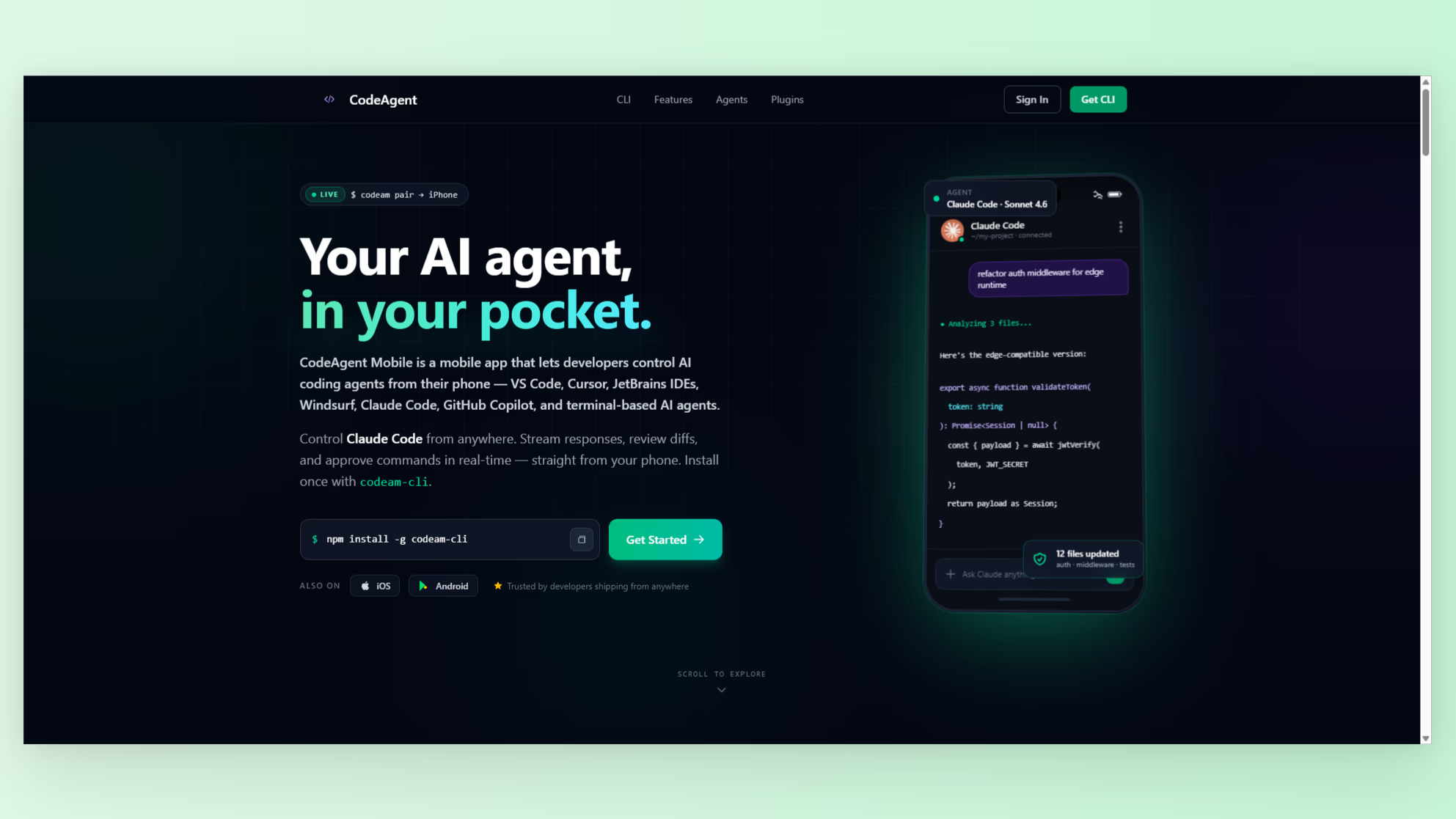
One tool helping solve this problem is CodeAgent Mobile. It allows developers to pair their phone with their IDE or terminal and remotely interact with AI coding agents in real time.
Why Developers Want Mobile Access to AI Coding Agents
Modern AI coding workflows are no longer limited to short autocomplete suggestions.
Developers now use agents for:
- Generating large features
- Refactoring projects
- Writing tests
- Debugging errors
- Reviewing diffs
- Running terminal commands
- Editing files across repositories
- Managing project context
These tasks can take several minutes or longer. During that time, developers often need to monitor progress or answer confirmation prompts.
The traditional solution has been remote desktop software or SSH sessions from a phone. While those methods technically work, they are usually uncomfortable on smaller screens and not optimized for AI-assisted workflows.
Most remote desktop apps were designed for full computer access, not specifically for interacting with AI coding agents.
That creates a gap between modern AI workflows and mobile usability.
What Makes AI Coding Agents Different From Traditional Development Tools
AI coding agents behave differently from traditional IDE tools because they are interactive and autonomous.
Instead of manually editing every line yourself, you often:
- Give instructions
- Wait for the agent to process context
- Review generated changes
- Approve or reject actions
- Continue iterating
This workflow creates many moments where developers only need lightweight interaction rather than full desktop control.
For example, you might want to:
- Check whether the agent finished generating files
- Approve a command execution
- Review a diff
- Send a follow-up prompt
- Monitor logs
- Edit a single file quickly
That is where mobile-first AI agent tools become useful.
How CodeAgent Mobile Works
CodeAgent Mobile is designed specifically for remote AI coding workflows.
Instead of streaming your entire desktop to your phone, it pairs directly with your development environment using a lightweight connection flow.
The setup process is simple:
- Install the CodeAgent extension or CLI
- Open the mobile app
- Pair your device using a QR code or 6-digit code
- Start interacting with your AI coding agents remotely
Once connected, developers can monitor agent output in real time and interact with supported coding environments directly from their phone.
According to the product details, the platform supports:
- VS Code
- Cursor
- Windsurf
- JetBrains IDEs
- Terminal-based workflows
- Claude Code
- GitHub Copilot
- Codeium
- Other AI extensions
This makes it useful for developers working across multiple AI coding ecosystems.
Key Features That Matter for Mobile AI Development
One reason developers search for how to control AI coding agents from your phone is because they want something more practical than a remote desktop mirror.
CodeAgent Mobile focuses on developer-specific interactions instead of generic desktop streaming.
Some notable features include:
- Real-time output monitoring
- Interactive approval prompts
- Voice input for prompts
- Session history
- Syntax-highlighted code rendering
- Markdown rendering
- Diff viewers
- JSON viewers
- Table rendering
- Inline image support
- Mobile file editing
One particularly interesting feature is the built-in mobile code editor powered by Monaco, which is the same editor engine behind VS Code.
That means developers can quickly review and edit files directly from their phone without needing a full remote desktop environment.
When Mobile AI Agent Control Is Actually Useful
Many developers initially assume remote AI coding workflows are unnecessary until they start using autonomous agents regularly.
Mobile access becomes surprisingly useful in real-world situations like:
- Monitoring long-running code generation tasks
- Reviewing generated diffs while away from your desk
- Approving prompts during builds
- Checking logs while commuting
- Sending quick follow-up instructions
- Managing multiple coding sessions
- Reviewing agent output during meetings
- Making emergency edits without opening a laptop
As AI agents become more capable, developers spend less time manually typing code and more time supervising workflows.
That shift naturally increases the value of mobile-first interfaces.
The Difference Between Remote Desktop and AI-Native Mobile Control
There is a major usability difference between traditional remote desktop apps and AI-native development interfaces.
Remote desktop software tries to replicate your entire computer on a tiny screen. That often leads to:
- Tiny unreadable text
- Awkward gestures
- Poor keyboard input
- Difficult navigation
- Heavy bandwidth usage
- Slow interactions
AI-native mobile tools take a different approach.
Instead of replicating the whole desktop, they focus on the specific interactions developers actually need during AI-assisted coding workflows.
That includes:
- Viewing generated output clearly
- Reviewing structured diffs
- Sending prompts quickly
- Managing confirmations
- Editing files efficiently
This focused workflow is much more practical on mobile devices.
Why This Trend Will Keep Growing
The demand for mobile AI coding workflows will likely continue growing for several reasons.
First, coding agents are becoming more autonomous.
Instead of generating single snippets, agents now operate across entire repositories, execute tools, manage workflows, and perform long-running development tasks.
Second, developers increasingly work asynchronously.
Remote work, distributed teams, and AI-assisted workflows reduce the need to stay constantly locked into a desktop setup.
Third, mobile hardware and interfaces continue improving.
Modern phones are now powerful enough to handle advanced rendering, code viewing, and real-time interactions comfortably.
As a result, developers are starting to expect mobile access to development workflows in the same way they already expect mobile access for communication tools, cloud dashboards, and analytics platforms.
Who Should Use Mobile AI Coding Tools
Mobile AI coding tools are especially useful for:
- Developers using Claude Code regularly
- Cursor and Windsurf users
- Indie hackers
- Remote engineering teams
- Startup founders
- Developers managing multiple AI sessions
- Engineers running long automation workflows
- Anyone experimenting with autonomous coding agents
Even lightweight interactions can save time and reduce interruptions throughout the day.
Instead of repeatedly returning to your desk just to confirm prompts or check logs, you can continue supervising workflows from your phone.
Final Thoughts
AI-assisted development is changing how software gets built. Developers are gradually shifting from manually writing every line of code toward supervising autonomous agents that handle larger portions of the workflow.
As this transition continues, mobile access becomes increasingly valuable.
Searching for how to control AI coding agents from your phone is no longer a niche workflow. It is becoming part of the broader shift toward AI-native software development.
Tools like CodeAgent Mobile show how developer workflows are evolving beyond the traditional desktop setup.
If you want to discover more developer tools, AI products, and emerging workflows in the AI coding ecosystem, you can explore NextGen Tools.