
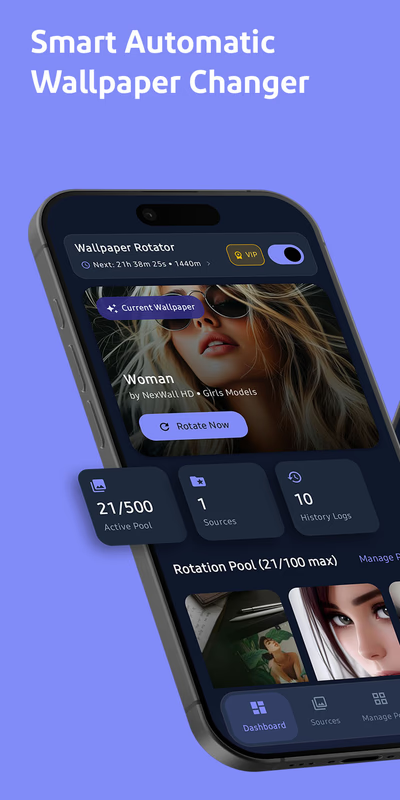
The Complete Guide to Mastering Screen Personalization with Wallpaper Rotator: Auto Change
In the modern digital era, the boundaries between physical and virtual spaces have fundamentally dissolved. Most professionals, creatives, students, and tech enthusiasts spend between eight and twelve hours each day interacting directly with digital displays. We invest substantially in premium hardware: color-calibrated monitors, ergonomic desk setups, high-refresh-rate ultra-wide displays, and flagship mobile devices. Yet, despite prioritizing hardware ergonomics, an astonishing number of users leave their operating systems bound to the exact same static desktop background or mobile lock screen for months or even years at a time.
Static wallpaper syndrome is a subtle productivity and aesthetic drain. The high-resolution photograph or minimal vector illustration you selected six months ago no longer catches your attention. Instead, it has morphed into visual white noise. Worse, the traditional alternative—manually hunting through high-resolution galleries, downloading raw image files, organizing system folders, cropping for varying aspect ratios, and manually applying new backgrounds—is an unnecessary chore that few people have the patience to sustain.
This universal friction led directly to the development of Wallpaper Rotator: Auto Change. Engineered specifically for design enthusiasts, power users, and everyday computer operators alike, this utility is built from the ground up to automate, organize, and elevate your visual workstation without requiring ongoing maintenance or draining device resources.
The Psychology of Screen Aesthetics and Cognitive Performance
Environmental psychology has long demonstrated that physical surroundings exert a profound influence on mental well-being, sustained focus, and emotional fatigue. Because computer screens and smartphones represent our primary creative and operational environments, the visual layout of those screens carries identical psychological weight.
When you look at the exact same graphic asset day in and day out, your brain engages in sensory habituation. Habituation is an evolutionary cognitive process wherein the brain stops registering familiar, non-threatening stimuli to conserve processing power. While helpful in survival scenarios, habituation in a creative or focused workspace leads directly to visual stagnation and mental lethargy.
Introducing purposeful, automated variety into your visual environment delivers concrete cognitive benefits:
- Cognitive Micro-Resets: Shifting your eyes from dense code lines, complex spreadsheets, or long-form documents to a fresh, striking visual scene offers your eyes and mind a low-effort cognitive break.
- Contextual Work-Life Boundaries: Many remote workers use the same hardware for day jobs, personal hobbies, creative tasks, and evening entertainment. By automatically scheduling distinct wallpaper themes—vibrant, high-contrast scenes during work hours and soothing, dark minimalist textures in the evening—you create clear visual anchors that support healthy mental transitions.
- Reduction of Micro-Friction and Fatigue: You eliminate the minor mental drag of wanting a fresh aesthetic but postponing it because manually setting wallpapers across multiple monitors feels like unnecessary overhead.
Where Traditional Operating System Tools Fall Short
Every contemporary operating system includes rudimentary background features. macOS, Windows, Android, and iOS all offer basic photo shuffle tools. However, power users quickly encounter critical limitations in these standard system utilities:
- Rigid Interval Timers: Native settings typically restrict your options to inflexible increments (such as once per day or every 30 minutes), giving you zero freedom to trigger changes based on device events, system sleep, or time of day.
- Poor High-DPI and Aspect Ratio Handling: Standard utilities rarely handle mixed-monitor setups well. When pairing a 4K horizontal primary monitor with a vertical secondary screen, native software often stretches, squashes, or applies awkward black bars to vertical displays.
- Severe Resource Bloat: Many third-party utilities run heavy, inefficient background rendering engines that cause CPU spikes, memory leaks, and severe battery depletion on portable laptops and mobile devices.
- Disorganized Asset Management: Typical OS tools force users to point to a single static folder. They lack support for tagging, nested categories, mood-based playlists, or intelligent shuffle algorithms.
Wallpaper Rotator: Auto Change was created to resolve these issues by marrying clean user-interface design with an ultra-lightweight execution framework.
Core Capabilities of Wallpaper Rotator: Auto Change
The application delivers granular control over your background aesthetics, ensuring you get exactly the visual experience you want without touching code or wrestling with nested menus.
1. Advanced Multi-Trigger Scheduling
Unlike standard utilities that rely solely on simple timers, Wallpaper Rotator lets you define dynamic rules for wallpaper rotation:
- Custom Time Intervals: Set exact rotation frequencies, from rapid cycles every 5 or 15 minutes to deliberate changes every 2, 6, or 24 hours.
- Event-Based Triggers: Enjoy a brand-new, ultra-high-definition backdrop every time you unlock your machine, wake your display from sleep, or boot up your workstation.
- Diurnal Day-to-Night Switching: Program your setup to automatically align with your local circadian rhythm. Configure daylight photography and energetic digital art for daytime hours, and automatically transition to deep blacks, OLED-friendly renders, and subdued gradients as dusk approaches.
2. Intelligent Playlist Curation and Tagging
Treat your wallpaper library with the same care as your music streaming playlists. Group your high-resolution assets into distinct, curated collections:
- Minimalist 3D Renders & Abstract Shapes
- High-Resolution Architectural & Urban Photography
- Dark OLED Cyberpunk Landscapes & Space Imagery
- Serene Nature, Forests, and Macro Photography
You can toggle playlists on or off according to your current project, randomize displays across folders, or set specific collections to trigger exclusively during focused study or deep work blocks.
3. Display-Aware Aspect Ratio and Multi-Monitor Optimization
High-end desktop environments often combine screens of varying resolutions, refresh rates, and orientations. Wallpaper Rotator incorporates an intelligent display-detection engine that calculates monitor properties in real time:
- Independent Monitor Control: Assign completely distinct playlist themes to each screen. You can enjoy a clean vertical wallpaper on a secondary portrait monitor while cycling panoramic scenery across your primary display.
- Smart Fill and Zero Distortion: Advanced scaling algorithms automatically detect focal points, intelligently cropping and centering 4K and ultra-wide assets without pixelation, stretching, or unsightly pillarboxing.
- Panoramic Spanning: For multi-monitor surround configurations, seamlessly divide single ultra-wide panoramic images across multiple side-by-side screens.
4. Zero-Bloat, Battery-First Architecture
A background utility must run silently and efficiently without degrading computer performance. Wallpaper Rotator: Auto Change is designed with a lightweight footprint:
- Minimal Memory Footprint: The application consumes negligible RAM and remains completely dormant in system memory until a rotation trigger occurs.
- Automatic Performance Throttling: When full-screen applications, video games, or intensive 3D rendering suites are launched, the app automatically pauses its background rotation loop to ensure all system GPU and CPU cycles remain dedicated to your active task.
- Smart Battery Preservation: On laptops and mobile devices, the app detects low-power states and pauses transitions to conserve your battery.
Quick-Start Setup Guide
Getting Wallpaper Rotator up and running takes less than five minutes:
- Import Your Asset Directories: Point the app toward your existing local wallpaper folders, external hard drives, or cloud-synced folders.
- Build Your First Playlist: Group your images into curated moods, such as "Productive Daylight" and "Late Night Focus."
- Configure Your Display Settings: Choose between unified wallpapers across all screens or independent rotation for multi-monitor setups.
- Define Your Schedule: Choose whether you want images to cycle on a fixed timer (e.g., every 30 minutes) or whenever your system wakes from sleep.
- Set and Forget: Minimize the application to your system tray. Wallpaper Rotator handles all background scaling, transitions, and rotations automatically.
Transform Your Digital Workspace Today
Your screen is the visual gateway to your digital life. Neglecting your visual workstation leaves an inspiring digital canvas flat and unengaging, while an intentional, automated environment brings fresh focus and energy to every session.
By blending flexible scheduling, intelligent image scaling, and playlist curation with an ultra-lightweight codebase, Wallpaper Rotator: Auto Change takes the friction out of screen customization. Stop settling for a stale, static backdrop. Turn your monitor into an evolving digital gallery that adapts to your day, inspires your creativity, and elevates your productivity.