How to Automate Repetitive Tasks on Android Without Coding
Most Android users eventually run into the same quiet frustration: doing the same sequence of taps over and over again. It might be claiming daily rewards in a mobile game, navigating through the same menus every morning, filling similar forms, or performing any other repetitive action that your phone forces you to repeat manually. These small tasks feel harmless individually, but over weeks and months they add up to a surprising amount of wasted time and mental energy.
For a long time, the solutions available to regular users were limited. Either you accepted the repetition, or you looked into more advanced automation tools that often required root access, complex scripting, or a steep learning curve. Many people simply gave up and continued doing everything by hand.
This is exactly the problem OverScreen was built to solve.
You can try it here: OverScreen on Google Play
The real cost of repetitive actions
Repetitive tasks on a smartphone are more annoying than they first appear. Unlike on a computer, where you can often use keyboard shortcuts, macros, or browser extensions, mobile interfaces are designed around direct touch. That means every action requires precise finger movement. When the same sequence has to be repeated dozens of times, it becomes both time-consuming and mentally draining.
Gamers are particularly familiar with this problem. Daily login rewards, resource collection, event participation, or simple grinding loops can easily turn into several minutes of mechanical tapping every single day. The same pattern appears in productivity apps, banking applications, social media, and even system settings. Once you start noticing these repetitive patterns, it becomes hard to ignore how much time they consume.
Why most automation tools feel overkill
There are already tools that can automate actions on Android, but many of them come with significant drawbacks. Some require root permissions, which most users are not willing (or able) to grant. Others rely on complex scripting languages or visual programming interfaces that feel closer to software development than to everyday utility. Accessibility-based tools can also raise privacy concerns if they are poorly designed or if they send data off the device.
What many people actually want is something much simpler: the ability to record a sequence of taps once, save it, and replay it later with a single action. No coding. No complicated configuration. No need to understand how the underlying system works.
How OverScreen works
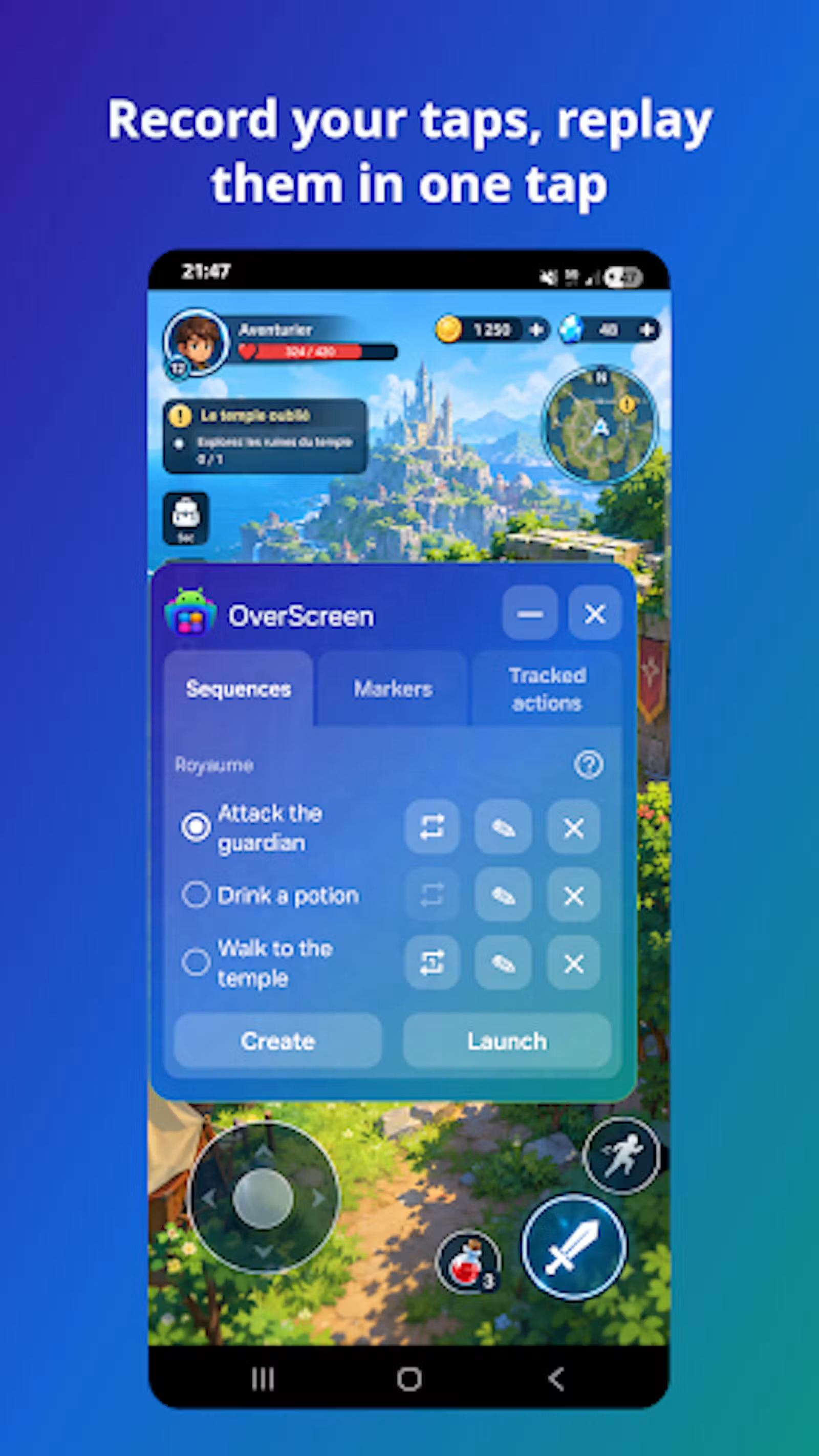
OverScreen approaches the problem from this simple angle. The core idea is straightforward: you record the gestures you perform on the screen, and the app can later replay those same gestures automatically.
In practice, the workflow looks like this:
- You open OverScreen and start a new recording.
- You perform the sequence of taps and swipes exactly as you would normally do them.
- You stop the recording and save the sequence under a clear name.
- Whenever you need that sequence again, you simply play it back.
Because the app records the actual touch events relative to the screen, it can reproduce the same actions later with high accuracy. This makes it particularly effective for consistent interfaces where buttons and menus stay in the same place.
Useful features beyond basic recording
While the core recording and playback functionality is already powerful, several additional features make the tool more practical in daily use.
Loop mode allows a sequence to be repeated continuously. This is especially useful for game farming, resource collection, or any situation where the same actions need to run for an extended period without manual intervention.
Floating overlay controls let you start, stop, or manage sequences without constantly switching back to the main application. This keeps the experience fluid when you are already inside another app.
Custom sequences can be organized and reused. Once you have recorded a useful automation, you can keep it and trigger it whenever the same situation appears again.
Importantly, OverScreen does not require any programming knowledge. Everything is based on recording real interactions rather than writing scripts.
Common situations where automation helps
The most obvious use case is mobile gaming. Many games include daily tasks, login bonuses, energy collection, or repetitive progression systems. Recording these sequences once and replaying them later can save several minutes every day. Over time, that adds up.
Outside of games, the same principle applies to productivity workflows. If you regularly navigate through the same series of screens in a work-related app, or if you often fill similar information in forms, automation can reduce friction significantly.
It can also help with accessibility. For users who find precise or repeated gestures difficult, being able to trigger a pre-recorded sequence can make certain interactions more comfortable.
Even simple system-level habits, such as opening a specific combination of apps or navigating to a particular settings page, can benefit from a saved sequence.
Privacy and local operation
One important aspect of OverScreen is that it is designed to keep everything on the device. The app does not require an account, does not rely on cloud processing for its core features, and does not need to send your recorded sequences anywhere. The actions you record stay on your phone.
This local approach is particularly relevant for an automation tool, because the sequences you create can sometimes involve personal or sensitive interfaces. Keeping the data on the device reduces unnecessary exposure.
Free core features and optional upgrade
The basic recording and playback functionality is available for free. This means you can already automate many common tasks without paying anything. For users who need more advanced capabilities or higher limits, an optional Pro upgrade is available as a one-time purchase through Google Play.
This freemium structure makes it easy to test whether the tool fits your habits before deciding to unlock additional features.
Getting started in practice
If you want to try this approach, the process is intentionally simple:
- Install OverScreen from Google Play
- Enable the accessibility service when prompted (required for recording and replaying gestures)
- Record a short sequence you perform regularly
- Save it and test the playback
Start with something small and predictable, such as a daily reward claim or a short navigation path. Once you see that the replay works reliably, you can expand to longer or more useful sequences.
Final thoughts
Repetitive touch actions are one of the least optimized parts of the modern smartphone experience. While computers have long offered macros and shortcuts, mobile interfaces still rely heavily on manual repetition. Tools like OverScreen show that this does not have to remain the case.
By making it possible to record and replay gestures without coding or complex setup, the app offers a practical way to reclaim small amounts of time that would otherwise be lost to mechanical tapping. For anyone who regularly performs the same actions on Android, that simplicity can make a real difference.
If you often find yourself repeating the same actions on your phone, OverScreen is a simple way to automate them without coding.
Download it on Google Play: OverScreen – Auto Tap Recorder