Employee Availability Software: See Who’s Working, Remote, Away, or Out of Office
Knowing who is working and available should be simple.
But in many organizations, answering a basic question like “Is this employee available today?” means checking Microsoft Teams, looking at calendars, searching messages, opening a spreadsheet, or asking someone else.
Hybrid and remote work have made employee availability even harder to understand. Someone may be working in the office, working remotely, attending a meeting, away from their desk, on vacation, out sick, or out of office.
That is where employee availability software and a digital employee in/out board can help.
Instead of searching across multiple systems, organizations can use one centralized employee status board to quickly see who is working, where they are working, and whether they are currently available.
What Is Employee Availability Software?
Employee availability software provides a centralized view of employee status across an organization.
The idea evolved from the traditional office in/out board.
Physical in/out boards answered a simple question: Is an employee currently in or out?
Modern workplaces need more information.
Employees may be:
- In Office
- Remote
- Away
- In a Meeting
- Out of Office
- On Vacation
- Out Sick
- On Call
- At Lunch
- On Break
- Do Not Disturb
A modern digital employee in/out board provides this information in one place, making it easier for coworkers, managers, reception staff, and other departments to understand employee availability.
Why Is Employee Availability Difficult to Track?
Most organizations already have systems containing pieces of employee availability information.
Microsoft Teams provides presence information.
Microsoft Outlook and calendars contain meetings and Out of Office information.
Employees may communicate their availability through chat or email.
Some organizations maintain spreadsheets, shared calendars, or even physical in/out boards.
The problem is that these sources are separate.
Someone trying to determine whether an employee is available may need to check several different places before finding an answer.
An employee status board solves a different problem. Its purpose is to provide a quick organization-wide view specifically designed around employee availability.
Why Spreadsheets Are Poor Employee In/Out Boards
Spreadsheets are often used to track employee status because they are inexpensive and flexible.
A spreadsheet might contain columns for:
- Employee
- Department
- Location
- Current status
- Expected return time
This can work for a small team, but spreadsheets have an important limitation: someone has to keep them updated.
Employees forget to change their status. Information becomes stale. Multiple people may edit the same spreadsheet. Larger employee lists become difficult to navigate.
A spreadsheet can store employee availability information, but it was not designed to function as a real-time employee in/out board.
Dedicated employee availability software provides an interface built specifically for answering the question:
Who is working and available right now?
Staff Glance: Employee Availability and In/Out Board Software
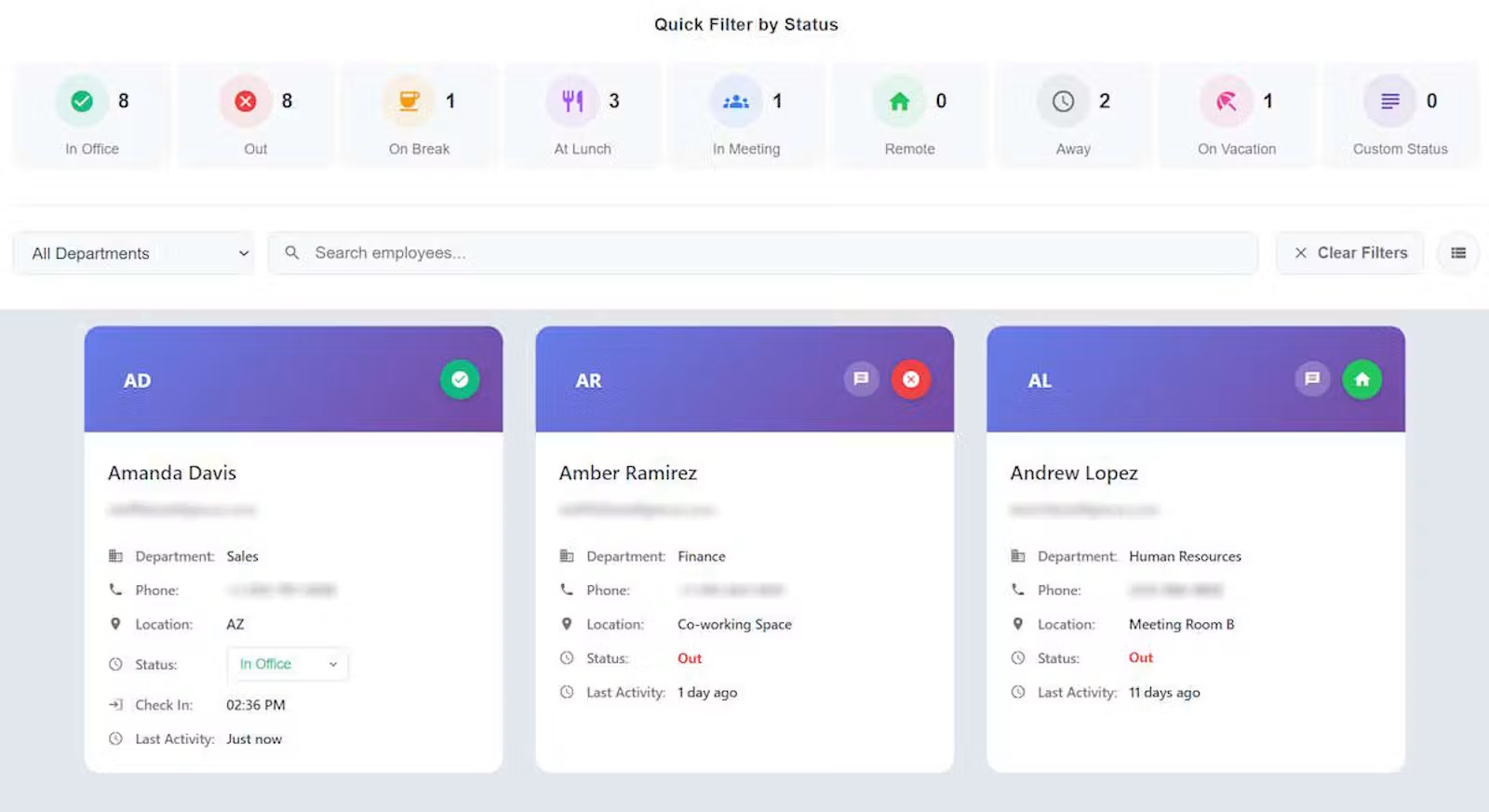
Staff Glance is employee availability software designed to provide organizations with a simple digital employee in/out board.
Staff Glance gives employees and managers a centralized place to see employee status without having to search across multiple systems.
The goal is simple:
See who is working and available at a glance.
Staff Glance supports statuses such as In Office, Remote, Away, In Meeting, Out of Office, On Vacation, Out Sick, On Call, At Lunch, On Break, Do Not Disturb, and custom statuses.
This makes it useful for traditional offices as well as hybrid and remote workplaces.
Employee Status Across Departments
An employee availability board becomes harder to use as an organization grows.
A list of ten employees is easy to understand. A list containing dozens or hundreds of employees across different departments requires more structure.
Staff Glance supports department-based organization so users can more easily understand employee availability across different parts of the organization.
Employees can also belong to multiple departments when necessary.
This allows an organization to use a centralized employee status board without forcing every user to search through one large, unorganized employee list.
Departments can also have their own available status configuration, allowing organizations to better match the board to how different groups operate.
Employee Availability for Hybrid Teams
Hybrid work creates an additional challenge because working and being in the office are no longer the same thing.
An employee working remotely is still working.
An employee physically in the office may currently be in a meeting or unavailable.
A useful hybrid employee availability system therefore needs to communicate more than simply In or Out.
Staff Glance can distinguish statuses such as In Office and Remote, while also showing other availability states such as Away, In Meeting, Out of Office, or Out Sick.
This provides a more useful picture of the workforce than a traditional physical in/out board.
Microsoft Teams Employee Availability Integration
Organizations using Microsoft Teams already have another source of employee presence information.
Staff Glance offers optional Microsoft Teams integration that can use Teams presence information to help keep employee statuses current.
With Teams Sense, Microsoft presence information can help Staff Glance recognize states such as available, away, in a meeting, or out of office according to the organization's configured rules.
Microsoft work-location information can also help Staff Glance distinguish between employees working remotely and those working in the office.
This can reduce the need for employees to manually update their status throughout the day.
Importantly, Staff Glance is not simply another Microsoft Teams presence screen.
Teams becomes one source of information feeding a broader employee availability board designed to show staff status across an organization.
Teams integration is optional, so organizations can also use Staff Glance primarily as a manually managed digital in/out board.
Microsoft Entra Single Sign-On and Teams App
Organizations using Microsoft 365 can also integrate Staff Glance with Microsoft Entra for single sign-on.
This allows employees to access Staff Glance using their organization's Microsoft identity.
For organizations where employees spend much of their day inside Microsoft Teams, Staff Glance can also be accessed through a Teams App.
This provides another way to make the employee in/out board available within tools employees already use.
Calendar Availability
Employee presence does not always tell the entire story.
An employee may appear available but have several meetings scheduled during the day.
Calendar information provides additional context.
Staff Glance's Calendar Snapshot can provide calendar availability information alongside employee status, helping users better understand whether someone is likely to be available without requiring them to search through another application.
Employee status, Teams presence, work location, and calendar availability can therefore provide a more complete picture of employee availability.
Employee Availability Is Not Employee Monitoring
Employee availability software does not need to become employee surveillance software.
There are many ordinary operational reasons employees need to know whether coworkers are available.
A receptionist may need to know whether someone is in the office.
A coworker may need to know whether someone is available for a question.
A manager may need to see who is working remotely.
Another department may need to know whether an employee is out for the day.
These are basic availability questions.
A digital employee status board can answer them without attempting to track everything an employee does.
The objective is operational visibility:
Is this employee available, and what is their current status?
Who Can Use Employee In/Out Board Software?
Digital employee in/out boards can be useful for many types of organizations, including:
- Healthcare organizations
- Schools and colleges
- Government organizations
- Professional services firms
- Administrative offices
- Hybrid workplaces
- Multi-location businesses
- Organizations with remote employees
- Organizations replacing physical in/out boards
- Businesses currently using spreadsheets to track employee availability
The specific environment may change, but the underlying need remains similar.
People need a fast and reliable way to see who is working today and who is available right now.
What to Look for in Employee Availability Software
When evaluating employee availability software or digital in/out board software, organizations should consider more than simply whether the product displays a list of employees.
Useful features may include:
- Clear employee status indicators
- In Office and Remote work statuses
- Department organization
- Employee status filtering and grouping
- Search capabilities
- Manual employee status updates
- Microsoft Teams integration
- Calendar availability
- Single sign-on
- Appropriate administrative controls
- Support for different employee statuses
- Visibility across departments and locations
The most important consideration is whether the software makes employee availability easier to understand.
If employees still need to search several applications or ask around to determine whether someone is available, the underlying problem has not been solved.
A Better Alternative to Employee Availability Spreadsheets
Spreadsheets, calendars, chat applications, and Microsoft Teams can all contain useful employee information.
But they were created for different purposes.
A dedicated employee availability board brings the information needed for everyday availability questions into one view.
Instead of asking:
- “Is Sarah working today?”
- “Is John remote?”
- “Is Maria in a meeting?”
- “When will Mike be back?”
employees can check one centralized status board.
That small improvement can eliminate repeated questions and make it easier for people across an organization to understand who is available.
See Employee Availability at a Glance
The modern workplace has more communication tools than ever, yet determining whether someone is available can still require searching across several applications.
Employee availability software provides a simpler approach.
A digital employee in/out board creates one place to see employees who are In Office, Remote, Away, In a Meeting, Out of Office, On Vacation, Out Sick, or otherwise unavailable.
For organizations looking for an alternative to spreadsheets, physical in/out boards, or fragmented employee availability information, Staff Glance provides a centralized employee status board with optional Microsoft Teams, Microsoft Entra, work-location, and calendar integrations.
The concept is intentionally simple:
Open one board and see who is working, where they are working, and whether they are available.