
Overview
Scheduling Instagram posts stays one of the highest leverage tasks for creators and teams. Manual posting breaks focus, increases errors, and limits scale. An automated workflow built with n8n removes friction across content selection, caption writing, logging, and publishing.
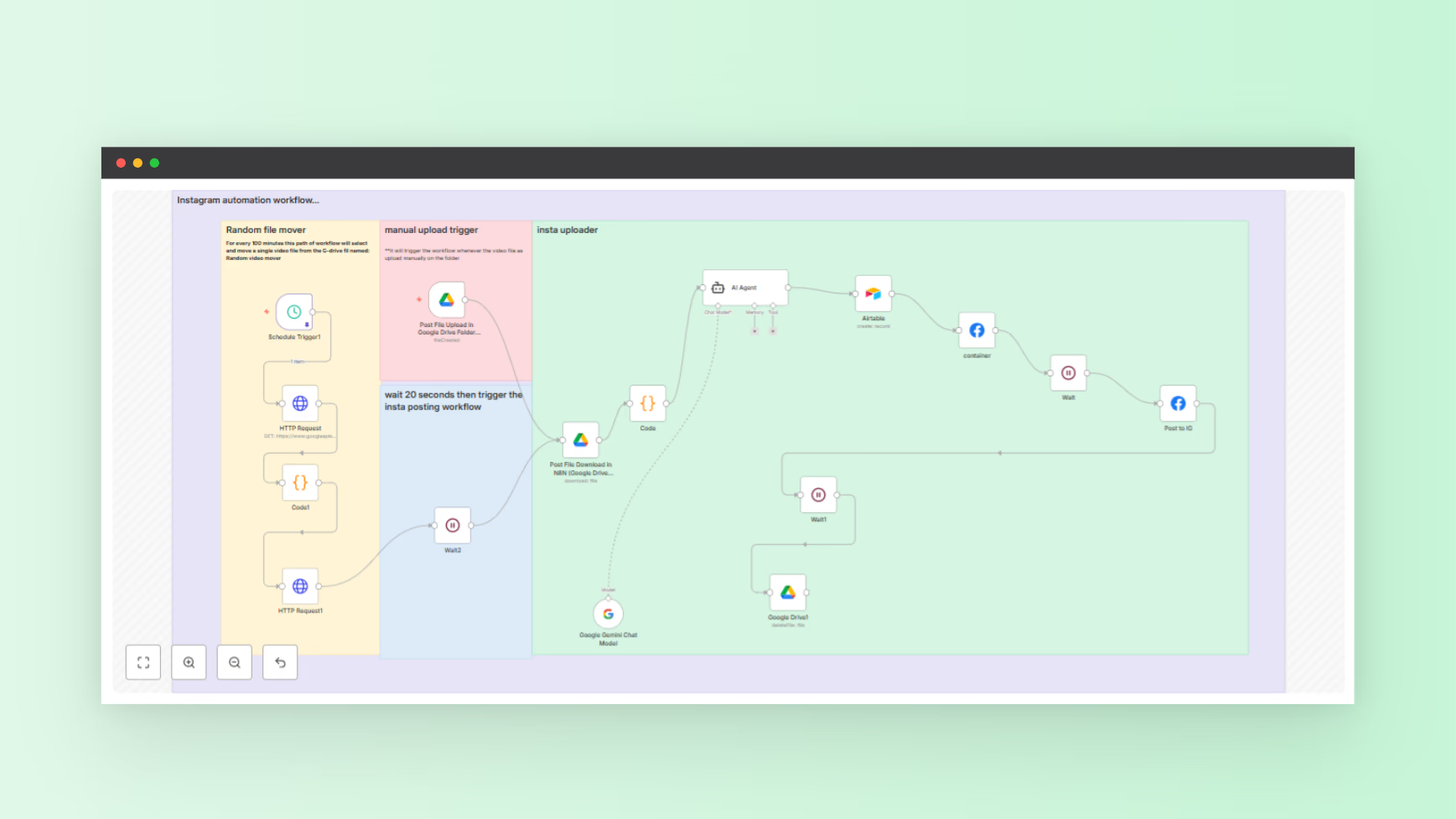
This article explains a real production-ready Instagram Reels automation workflow. The workflow uses Google Drive, Google Gemini, Airtable, and the Facebook Graph API.
The attached file includes the complete n8n workflow JSON. You import it directly into n8n, connect credentials, and run.
This setup fits solo creators, agencies, and product founders promoting launches on NextGen Tools or nxgntools.com.
What This Workflow Solves
You get a full system to schedule Instagram posts without daily manual work.
Key outcomes:
- Automatic reel selection
- AI-generated captions under Instagram limits
- Reliable publishing through official APIs
- Central logging for audits and reuse
Meta documentation confirms only approved API flows support direct Instagram publishing at scale. This workflow follows those requirements.
High-Level Architecture
This automation runs on two parallel triggers.
Trigger Path One: Manual Upload
- A Google Drive trigger watches a specific folder
- When a video uploads, the workflow starts immediately
- Best for announcements or time-sensitive content
Trigger Path Two: Scheduled Posting
- A schedule trigger runs every six hours
- A random video gets selected from a source folder
- The file moves into the posting folder automatically
- Posting follows the same pipeline
This dual-trigger setup balances control and automation.
Step-by-Step Workflow Breakdown
1. Google Drive File Detection
The workflow starts with a Google Drive Trigger node.
Configuration:
- Single folder ID
- Poll interval set to one minute
- Fires on file creation
This prevents missed uploads and removes webhook exposure.
2. Random Video Selection Logic
For scheduled posts, the workflow uses:
- Google Drive API search
- A code node to select a random MP4 file
- Automatic file movement into the posting folder
This prevents duplicate posts and rotates content cleanly.
3. File Processing and Validation
A dedicated code node extracts:
- File ID
- File name
- Web content or view link
Validation and logging prevent silent failures and allow safe fallbacks when metadata breaks.
4. AI Caption Generation With Google Gemini
The workflow connects Google Gemini through n8n’s LangChain integration.
Caption rules:
- Two to three sentences
- Emoji support
- Three to five hashtags
- Clear call to action
- Under 150 characters
Captions generate from the file name only. This keeps output predictable and fast.
5. Airtable as a Content Log
Each reel gets logged in Airtable with:
- Video name
- Caption text
- Source URL
Airtable functions as:
- Posting history
- Content calendar
- Audit log for teams or clients
6. Instagram Reels Upload via Facebook Graph API
Posting follows Meta’s required two-step flow.
Step one:
- Create a media container
- Pass video URL, caption, and REELS media type
Step two:
- Publish the container after processing completes
A wait node handles processing latency to avoid publish errors.
7. Cleanup and Housekeeping
After publishing:
- The Google Drive file gets deleted
- Temporary references clear automatically
This keeps storage clean and avoids repost risk.
Why This Setup Works for Scheduling Instagram Posts
API Compliance
The workflow uses official Meta APIs end-to-end. This reduces account risk and improves reliability.
Deterministic Automation
Every step stays visible inside n8n. Debugging stays simple. No hidden retries.
Cost Control
You avoid stacked SaaS subscriptions. n8n runs self-hosted or cloud-based. API usage stays predictable.
Real-World Performance Notes
- Reel processing time averages 30 to 120 seconds
- Short captions reduce rejection risk
- Posting every six to twelve hours stays within safe rate limits
Consistency drives reach more than posting volume, based on Meta engagement data.
Common Failure Points and Fixes
Video URL Errors
Instagram requires a public video URL. Google Drive links work only when webContentLink stays valid. If errors appear, use a proxy or object storage.
Caption Rejections
Line breaks and special characters increase failure rates. Plain text performs better.
Token Expiration
Facebook access tokens expire. Use long-lived tokens and set renewal reminders.
How This Fits NextGen Tools
NextGen Tools at nxgntools.com supports launching tools, apps, and automation products.
This workflow works as:
- A sellable automation template
- A backend engine for Instagram scheduling tools
- A value-add for product launch platforms
You ship faster without rebuilding infrastructure.
Who Should Use This Workflow
- Creators posting Reels daily
- Agencies managing multiple accounts
- SaaS founders building scheduling tools
- Product launch teams running repeat campaigns
If your goal stays consistent posting without daily effort, this system fits.
Final Thoughts
This workflow shows how to schedule Instagram posts using real infrastructure, not shortcuts. n8n handles orchestration. Google Gemini handles captions. Airtable tracks content. Facebook Graph API publishes.
Download the workflow, connect credentials, and deploy. You move from manual posting to a repeatable system built for scale.