YYLO CLI and YYLO Ledger: A Git-Native Workflow for AI-Assisted Software Development
AI coding agents can explain unfamiliar repositories, implement features, write tests, and help debug difficult failures. The harder problem is not generating code—it is organizing the work around the agent. Development teams still need clear task state, bounded execution, repeatable validation, session continuity, reviewable history, and a safe path from an agent prompt to an integrated Git commit.
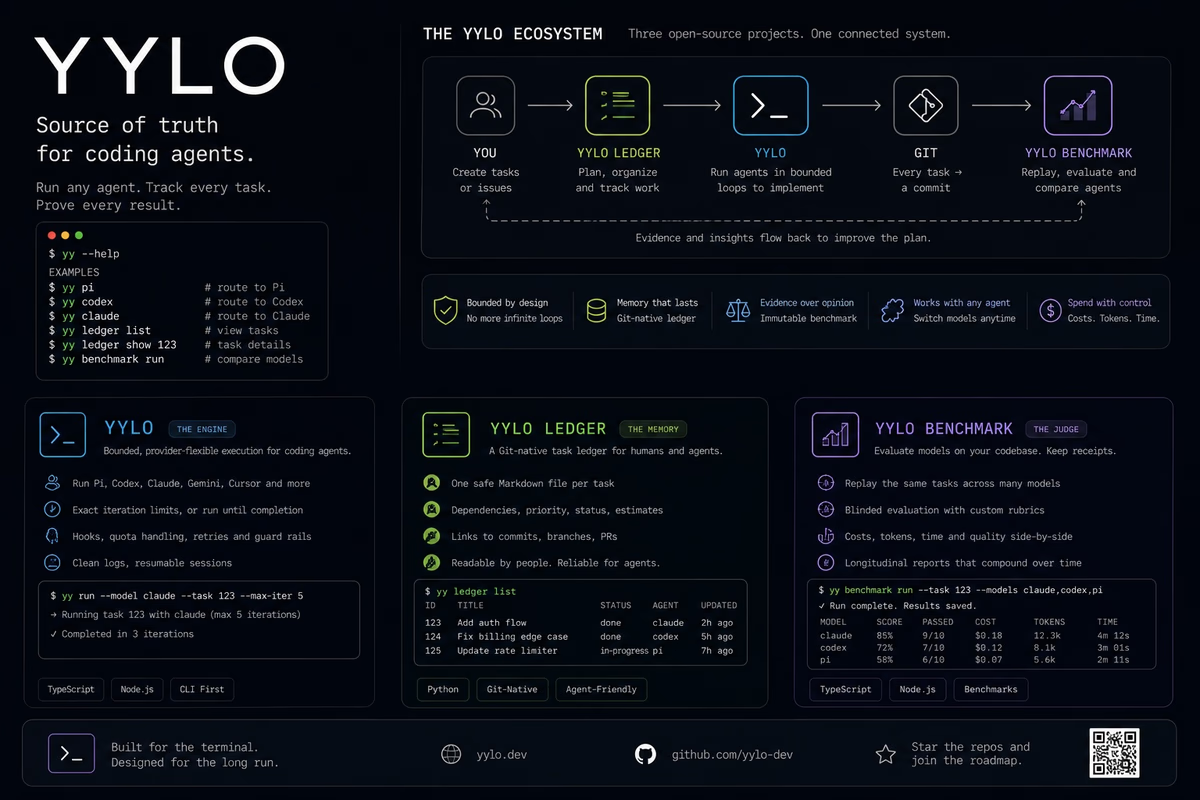
YYLO CLI (GitHub) and YYLO Ledger (GitHub) address those needs as two independent, open-source developer tools. YYLO CLI orchestrates coding agents and software-delivery workflows. YYLO Ledger provides Git-native task management and structured engineering records. They can be installed and used separately, but together they create a practical foundation for task-driven AI-assisted development.
This article explains what each tool does, how they complement one another, and where they fit in real software projects.
What Is YYLO CLI?
YYLO CLI is a TypeScript command-line orchestrator for AI coding agents, repeatable command workflows, validation evidence, Git worktrees, and guarded repository changes. It provides the equivalent yy and yylo commands and is published as the @yylo/cli npm package.
A developer can use YYLO for a simple one-off agent request, a controlled multi-iteration coding session, or a structured task lifecycle. The tool supports workflows involving Claude Code, OpenAI Codex, Gemini, and Pi while leaving provider credentials and model availability with the relevant external service. This separation gives developers a consistent orchestration layer without pretending that every agent has identical capabilities.
One of YYLO’s central ideas is bounded execution. A basic “Ralph-style” coding loop repeatedly asks an AI agent to continue working, but an unlimited loop can overrun its intended scope. YYLO allows explicit iteration limits and repeatable outer workflows, so the operator can define how many times an agent runs and which commands follow each step.
For example, an ordered workflow can alternate between an agent and a test command:
yylo loop -n 3 \
  --step 'yy pi "Implement the next verified increment"' \
  --step 'npm test'
The outer loop is limited to three iterations. The ordered steps are visible, reusable, and easier to reason about than an open-ended shell loop.
What Is YYLO Ledger?
YYLO Ledger is a Python-based, Git-native task manager and Record store. It is published as yylo-ledger and exposes the yylo-ledger CLI. It is designed for developers, automation systems, and coding-agent workflows that need task state to remain reviewable alongside source code.
The defining storage decision is that a database is not the canonical source of truth. Current task state is stored in stable Markdown files inside the repository. Opt-in task history is retained in segmented, hash-chained ledgers. A SQLite cache supports efficient collection queries, but that cache is disposable and can be rebuilt from canonical project files.
This structure makes task changes compatible with familiar Git practices. Engineers can inspect state, review differences, preserve history, and keep project work tied to the repository where implementation happens. Ledger also supports dependencies, tags, status transitions, commit references, structured output, integrity checks, cold archives, and typed Records for wikis, workflows, and artifacts.
A minimal Ledger workflow looks like this:
python3 -m pip install 'yylo-ledger==0.2.0'

yylo-ledger create \
  --title "Validate OAuth callback" \
  --body "Implement callback validation and focused tests" \
  --tags backend security

yylo-ledger list --status todo --format table
yylo-ledger ready --sort asc
yylo-ledger doctor
The create command returns a task ID. That ID becomes the stable reference for updates, dependencies, history, and completion evidence.
Why AI Coding Workflows Need More Than a Prompt
A successful AI coding session usually crosses several boundaries:
- Someone defines the intended outcome.
- The agent inspects the repository and changes files.
- Tests or other checks validate the change.
- The implementation is committed.
- The result is reviewed and integrated.
- Future developers need to understand what happened.
A prompt covers only part of this sequence. Without durable task state, agents may rediscover the same context repeatedly. Without iteration limits, a loop may continue beyond the useful work. Without exact validation evidence, a passing test from an earlier commit can be mistaken for proof about the current code. Without clear Git boundaries, unrelated changes can become mixed into delivery.
YYLO CLI and YYLO Ledger separate these concerns instead of hiding them. Ledger owns task and Record truth. YYLO CLI owns coding-agent execution and task, validation, merge, and release-readiness orchestration. This division is useful because task records remain valuable even when no AI agent is involved, while agent orchestration can also be used for repository analysis that does not require a task board.
Core YYLO CLI Features
Multi-agent orchestration
YYLO provides one command-line workflow for supported coding agents, including Claude Code, Codex, Gemini, and Pi. Developers can select an agent and model while preserving a consistent surrounding process. Project-level model shortcuts can make team defaults easier to reuse.
Controlled loops and YAML workflows
The yy loop command repeats an ordered sequence of shell commands with a declared iteration count and failure policy. Inline steps are useful for quick experiments, while YAML workflows make the same process reviewable and reusable.
A workflow can combine agent prompts, tests, linting, type checking, builds, or custom scripts. YYLO also exposes iteration and step metadata through environment variables, allowing commands to adapt without relying on hidden state.
Session continuity
Long coding tasks rarely fit into one interaction. YYLO includes continuation, cloning, branch, and switching commands for agent sessions. Continuation state is kept explicit and scoped, reducing the chance that one terminal or workflow accidentally resumes an unrelated conversation.
Observable local commands
The watch surface runs ordinary local commands with bounded logs and terminal machine truth. A caller can execute a command, inspect its status, or await completion using a run ID. This is useful for tests and builds whose result should not depend on terminal scrollback.
yy watch exec npm test
# Use the emitted run ID:
yy watch status RUN_ID
yy watch await RUN_ID
Content-addressed validation evidence
YYLO can plan and retain task validation evidence tied to exact inputs. The purpose is not merely to say that tests passed at some point, but to associate evidence with a coherent committed task tip and the validation selected for that state.
Typed task worktrees
For repositories configured with YYLO’s task policy, a task can receive a dedicated exact-base Git worktree. Implementation happens in that isolated worktree rather than in the metadata controller or protected integration checkout. Read-only preflight checks catch closure problems before more expensive validation and queue admission.
Guarded merge operations
YYLO separates queueing from target mutation. Protected delivery uses explicit ownership, expected-old-SHA compare-and-swap checks, and conflict preservation. Dirty or conflicting bytes are not silently discarded to manufacture a successful merge. This approach is intentionally more structured than directly asking an agent to push whatever it changed.
Core YYLO Ledger Features
Git-native canonical task state
Ledger stores current task state as repository files. This gives tasks a reviewable representation and avoids turning SQLite into an irreplaceable authority. The cache is derived; the Markdown and ledger history are canonical.
Task creation, search, and updates
The CLI supports creating, listing, searching, retrieving, updating, marking, tagging, and archiving tasks. Human-readable tables are available for terminal use, while NDJSON, JSON, and XML support scripts and integrations.
yylo-ledger search --status todo --tags backend --format json
yylo-ledger get TASK_ID
yylo-ledger mark in_progress --id TASK_ID --response "Started implementation"
For shell-sensitive or multiline content, Ledger supports file and standard-input transport. This avoids accidental interpolation and preserves rich Markdown more reliably than a long inline argument.
Dependency-aware work
Tasks can declare blockers and related work. The ready command identifies work that can proceed, while order helps prioritize available tasks. Ledger refuses dependency cycles and invalid terminal transitions. For example, a dependent task cannot be completed while its blocker remains unfinished.
Commit-linked completion
A completed task can include the commit that delivered it. This connects task intent and outcome to repository history:
yylo-ledger mark done \
  --id TASK_ID \
  --response "Implemented and verified" \
  --commit COMMIT_SHA
Typed Records
Ledger extends beyond a flat task list. Its Record interface supports general Records and typed task, wiki, workflow, and artifact profiles. This allows a project to preserve operational knowledge and workflow definitions through one ID-first system while applying profile-specific rules.
Safe, bounded queries
Broad output is bounded by record count and rendered bytes. Callers can select hot, archived, or all scopes and request metadata, summary, or full projections. Sensitive Records expose safe identity metadata by default, and full payload output is an explicit choice.
Integrity and recovery
The doctor command checks storage integrity. Reconciliation can record direct task-file edits, and the SQLite cache can be rebuilt if it is absent or corrupt. Current canonical state remains authoritative when derived history or cache updates are interrupted.
Immutable cold archives
Long-lived projects may accumulate large numbers of completed tasks. Ledger supports explicitly planned, owner-authorized archive packs. Normal list and search operations remain focused on hot work, while exact retrieval and bounded archive search preserve access to older records. Archive packs are sealed rather than used as mutable alternate task stores.
How YYLO CLI and Ledger Work Together
The integration is easiest to understand as a sequence of responsibilities.
First, Ledger records the task. The task includes its intent, status, tags, blockers, related work, and eventually its completion response and commit. It answers questions such as: What should be done? Is it blocked? Which work is ready? What commit delivered the result?
Second, YYLO CLI orchestrates execution. It can invoke a coding agent, preserve session continuity, create an isolated task worktree, run validation, collect evidence, and queue a clean committed tip. It answers questions such as: Where should implementation occur? How is agent execution bounded? Which evidence belongs to this code state? How does a candidate reach the protected target?
The tools remain independent packages. yy ledger is a transparent delegation surface to an installed canonical Ledger CLI rather than a second embedded task-manager implementation. This keeps ownership clear and lets teams update or use Ledger directly.
A conceptual workflow looks like this:
YYLO Ledger task
    ↓
YYLO CLI agent run in a dedicated worktree
    ↓
Focused tests and exact-input validation evidence
    ↓
Clean Git commit linked to the task
    ↓
Guarded queue and protected target update
This model creates useful separation between intent, execution, evidence, and delivery.
Practical Use Cases
AI-assisted feature development
A team can create a scoped Ledger task, identify its blockers, and start implementation through YYLO in an isolated worktree. The agent receives a bounded objective, developers run focused tests, and completion points back to a Git commit.
Ralph-style development with guardrails
Developers interested in iterative “Ralph” workflows can use YYLO’s explicit iteration limits instead of an infinite loop. Ledger provides durable task truth, while YYLO controls how the agent and validation commands repeat.
Multi-model debugging
A difficult bug may benefit from another model’s perspective. YYLO makes it possible to change supported agents or model shortcuts while retaining the same workflow structure. Ledger preserves the problem statement and progress independently of the chosen provider.
Repeatable test-and-fix cycles
A YAML workflow can alternate between an agent, a focused test suite, and a type checker. Explicit failure policy and iteration counts make the process easier to reproduce. Watch receipts and task evidence provide stronger operational truth than copied terminal output.
Repository onboarding
YYLO can ask an agent to inspect architecture or explain test organization without requiring a full task lifecycle. If the analysis produces follow-up work, Ledger can preserve those tasks, dependencies, and links for later implementation.
Long-running engineering projects
Session continuity helps an agent resume context, while Ledger prevents the project’s work state from living only inside model conversations. Cold archives keep old completed work available without overwhelming normal queries.
Automation and CI
Both tools expose command-line interfaces and structured output. Teams can pin exact package versions, choose JSON or NDJSON where appropriate, and build scripts around explicit exit states. Version pinning is especially important in CI and other reproducible environments.
Getting Started
YYLO CLI requires Node.js 20.10 or newer, npm, and Git. Install the stable channel and verify the command:
npm install --global '@yylo/cli@latest'
yy --version
yy --help
YYLO Ledger requires Python 3.8 or newer. A virtual environment keeps the package version explicit:
python3 -m venv .venv
. .venv/bin/activate
python -m pip install --upgrade pip
python -m pip install 'yylo-ledger==0.2.0'
yylo-ledger --version
yylo-ledger --help
Initialize and inspect YYLO in a Git repository:
mkdir yylo-demo
cd yylo-demo
git init
yy init --task "Document the onboarding path" --subagent pi
yy info --json
yy doctor workspace
Agent providers and their credentials are configured separately. Installing YYLO does not bundle paid model access or silently choose provider credentials.
Where YYLO Benchmark Fits
The third project in the ecosystem is YYLO Benchmark (GitHub). Benchmark focuses on coding-agent evaluation and evidence rather than task storage or day-to-day orchestration. It supports validated cases, immutable plans, isolated attempts, governed grading, reconciliation, recovery, and bounded reports.
A team can therefore use Ledger for durable work truth, YYLO CLI for execution and delivery, and YYLO Benchmark for controlled comparison of coding-agent attempts. As with Ledger, Benchmark is an independently installed package; the separation avoids confusing evaluation records with operational task state.
Frequently Asked Questions
Is YYLO tied to one AI model provider?
No. YYLO supports workflows involving multiple coding agents, including Claude Code, OpenAI Codex, Gemini, and Pi. Provider credentials, service availability, and model access remain external.
Does YYLO Ledger require a database server?
No. Canonical state lives in repository files. Ledger uses a disposable local SQLite cache for efficient broad queries, but the cache can be rebuilt and is not the source of truth.
Can YYLO Ledger be used without YYLO CLI?
Yes. Ledger is an independent Python package and CLI. It can serve as a Git-native task manager for human teams, shell automation, or other developer tools.
Can YYLO CLI be used without Ledger?
Yes. Developers can use YYLO for direct coding-agent runs, bounded loops, session continuity, and observable commands. Typed task and merge workflows use a configured controller and task source of truth when those lifecycle features are adopted.
Is the ecosystem open source?
Yes. YYLO CLI, YYLO Ledger, and YYLO Benchmark publish source repositories and use the MIT License.
A More Structured Foundation for AI Coding
AI coding agents are most useful when their execution is connected to durable engineering practices. Teams need more than prompt quality: they need scoped tasks, explicit dependencies, controlled loops, reproducible commands, exact validation evidence, reviewable Git history, and safe integration boundaries.
YYLO CLI provides the orchestration layer for coding agents and repository delivery, with source available on GitHub. YYLO Ledger provides Git-native task and Record truth, also available on GitHub. Used together, they offer a modular workflow that keeps AI-assisted development observable, task-driven, and connected to the repository.
Developers can begin with one component, adopt the second when its boundary becomes useful, and add YYLO Benchmark (GitHub) when they need structured coding-agent evaluation.