
Your Name Should Be Able to Travel With You Into Someone Else's Video Call
The invitation arrives with someone else's meeting link. You click it, check the camera and look for the controls. Your company uses a different platform, so even a routine conversation begins with a small adjustment: where to mute, which window to use, whether the browser option is available.
Then comes the introduction. Your name may appear beneath your tile, but your role, organization and reason for being there still need explaining. Someone joins late. Another person switches to a different layout. The conversation moves on, and the small pieces of context that made your introduction useful disappear into memory.
This is ordinary guest behavior in online meetings. We enter an environment selected by someone else and adapt to the way it presents us.
Some of that adaptation is necessary. Everyone needs a shared place to talk. But the choice of meeting platform and the way a participant identifies themselves do not have to be the same decision.
The host's tools do not describe the guest's needs
Meeting software is understandably organized around the person arranging the meeting. Invitations, admission, moderation and shared presentation controls all begin there. The host needs to coordinate a group, and the product gives that person a way to do it.
A guest has a smaller set of responsibilities. They need to arrive, be recognizable and contribute. A consultant might want their specialty visible. A trainer might want a short course title. A volunteer meeting a new committee might benefit from a role label that distinguishes them from someone with the same first name.
None of those requests necessarily requires changing the meeting for everyone. Yet it is easy to think about visual presentation as something the organizer must provide. If the organizer has no production workflow, the guest's choices can seem limited to the platform's own display-name field.
That assumption blends two different kinds of control. The organizer manages the shared event. The participant supplies a camera picture. A useful amount of personal presentation can happen within that picture without asking the organizer to become a graphic designer.
An introduction is useful after it has been spoken
The spoken introduction does an important job. It brings a person into the conversation and gives their presence social meaning. A title graphic cannot replace that exchange.
It can carry a few facts after the exchange is over.
Imagine a training session where several people present in sequence. A short role label gives participants a way to reconnect a face with a responsibility. In a vendor discussion, a name and organization can help distinguish the people supplying a service from those evaluating it. In an informal workshop, a subject label can identify what someone is demonstrating without requiring a full slide on screen.
These are modest uses. Their value depends on restraint. A camera tile is a small space, especially when shared among many people. Adding a full biography, several social handles and a sales message can make identification harder rather than easier. The useful question is what a participant arriving halfway through the conversation needs to know at a glance.
Often the answer is just a name and one more line.
That small amount of information is also easier to carry across different contexts. A person can prepare several versions, each appropriate to the role they are taking in a particular conversation, without turning every call into a branded presentation.
Overlaysmith works from the participant's side
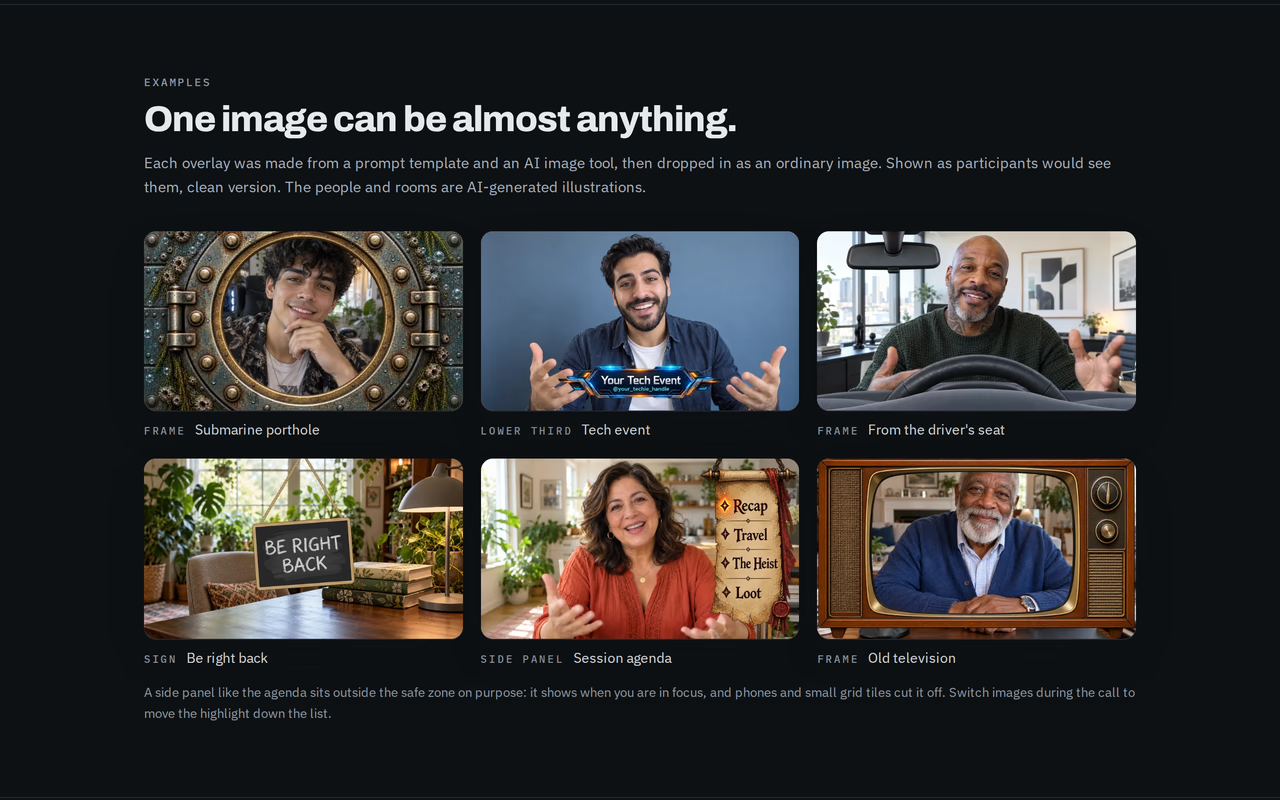
Overlaysmith adds a static graphic to the webcam video a person sends from a supported browser call. Because it works on that participant's outgoing picture, the meeting host does not need to install an extension, configure a shared layout or turn on an overlay feature.
That is the practical meaning of bringing your own presentation. The guest can type a lower third in the extension or import a transparent image, then select it for the call. Other participants receive the graphic as part of the video. The setup belongs to the person whose camera carries it.
The boundary is technical, not social. Meeting rules still apply. Workplace policies may govern which extensions can be installed, and a host may have expectations about what appears on camera. An overlay is visible content, not a hidden channel or a way around those expectations.
Overlaysmith's role is narrower: it removes the requirement for host-side configuration. It gives a guest a way to prepare a name, title or visual cue before joining, even when the guest did not choose the platform.
For someone who regularly moves between client or vendor meetings, that can make preparation more consistent. The person changes the call destination while keeping their own image library and selection workflow.
Portability is useful when it has an honest boundary
Portable does not mean universal. Overlaysmith runs in desktop Chrome on supported browser-call sites. It does not modify video sent by desktop meeting applications, and it does not run in Chrome on a phone.
This distinction is especially important for people whose employer uses one desktop application internally. An invitation to a different service may lead them to join through the browser, which is where the extension can help. But a managed computer may also restrict extension installation. A familiar browser does not automatically make every software choice available.
The project's version 2.0.0 testing covers eleven browser-call platforms. The compatibility list records the supported services and their differences. Regular meetings are the relevant verified use case; webinar panelist modes and recordings should not be assumed to behave identically merely because they share a platform name.
Zoom's web client also requires a specific preparation choice: its own blur and virtual backgrounds can cover the overlay. Leaving those effects off lets the graphic remain visible. The mirrored self-view is another Zoom difference, with its own mirror setting providing the adjustment.
Knowing these boundaries helps a guest make a repeatable plan. A short check before an unfamiliar invitation is more useful than a broad compatibility slogan.
A portable identity needs an off switch
People do not carry one identity into every room. The same person can be a project lead in the morning, a workshop participant in the afternoon and a game master that evening. The image appropriate to one role may be distracting in another.
This creates a small but meaningful problem for persistent settings. Software that remembers everything can save preparation, but it can also preserve a choice after its context has ended. A campaign banner is welcome at the game table and surprising in a supplier meeting.
Overlaysmith offers a choice between keeping the last image selected and starting with no image when a call page opens. The second option makes selection a deliberate part of arrival. It is based on observable page behavior, so it should not be understood as a perfect detector of every meeting boundary. The support guidance describes the behavior and its limits.
The outgoing preview serves a related purpose. It helps the person notice what they are about to present. A selected image can be technically correct and socially wrong for the next conversation; seeing it before participation gives the user a chance to decide.
These controls matter because portability should preserve choice. The useful outcome is having your presentation available when wanted, with an equally straightforward way to leave it out.
The guest still cannot choose everyone's view
A graphic embedded in video travels with that video, but recipients continue to control how they see it. Grid views, square tiles and portrait phone layouts can crop the edges. The sender cannot put a different version of the same title in a different place for each viewer.
This makes a short central lower third more dependable than a logo in the far corner. Overlaysmith's image library shows guides for common crops, and its typed title maker is designed around the narrow central area. A long title still needs editing if it cannot fit at a readable size.
There is a social lesson in that geometry. A guest's visual identity works best when it helps the conversation rather than demanding a particular viewing arrangement. Someone on a phone should not need to change their layout to discover who is speaking. A useful label carries the essentials in the area most likely to remain visible.
The same restraint applies to language. A role that colleagues understand internally may mean little to an outside audience. Preparing a lower third is an opportunity to ask whether the title explains what you do, or merely repeats how your organization names it.
The tool supplies a place for the words. The person still decides whether those words help.
Consistency can make room for the conversation
There is no need to turn every call into a presentation. Familiar teams may gain little from repeated titles, and some conversations work best with an uncluttered picture. Portable overlays are most useful where context would otherwise have to be reconstructed.
Overlaysmith gives that context a place on the participant's own feed. Its features are available free with a small mark while an overlay is active; a $1.99 one-time purchase removes the mark. The commercial choice is separate from whether the guest can use the tools at all.
The broader idea extends beyond nameplates. A guest should be able to arrive prepared without requiring the organizer to rebuild the event around them. The organizer chooses the shared room. The guest can bring a small, appropriate part of their own presentation into it.
When that works, the graphic quickly becomes unremarkable. People can identify the speaker, understand the relevant role and return their attention to the discussion. The presentation has done its job when it stops needing explanation.
Overlaysmith is a Chrome extension that adds a static image, title or frame to outgoing webcam video on supported browser calls. Image compositing happens locally, with no account required to use it. Every feature is free with a small mark; $1.99 once removes the mark.
Learn more: overlaysmith.com