
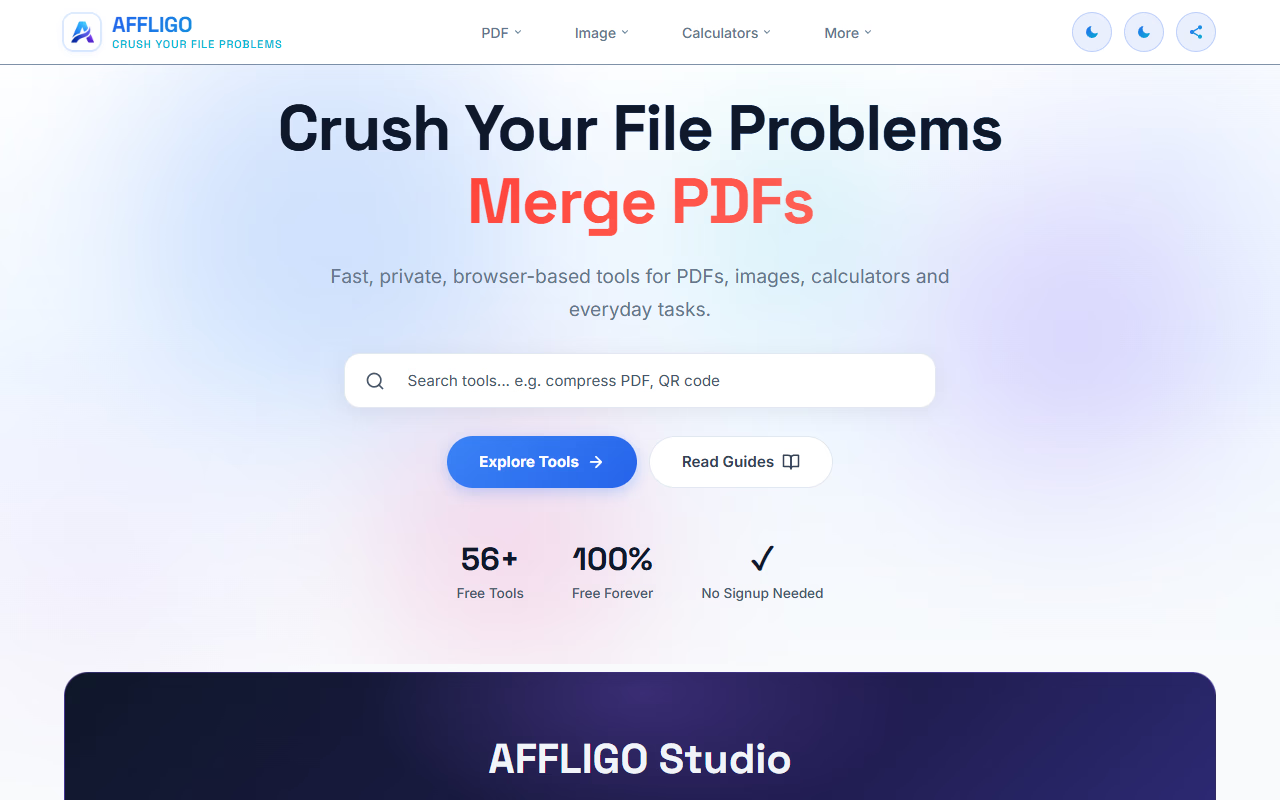
Why I Built AFFLIGO: The Story Behind a Free Online Toolkit for Everyday Digital Tasks
There are thousands of websites on the internet that help you do one specific thing.
Compress a PDF.
Resize an image.
Convert a file.
Calculate an age.
Extract text.
Rotate a document.
Compress a video.
The problem isn't that these tools don't exist.
The problem is finding the right one when you actually need it.
That simple observation eventually led me to start building AFFLIGO — a free online toolkit designed to bring useful digital utilities together in one place.
I'm building AFFLIGO around a straightforward idea:
Everyday digital tasks should be easier, faster, and less complicated.
This is the story of why I started it, what I'm trying to build, who it's for, what I've learned along the way, and where I want to take it next.
It Started With a Simple Problem
The internet has made it incredibly easy to find tools for almost anything.
But sometimes, having too many options creates another problem.
Imagine you need to merge two PDF files.
You search for a PDF merger.
You find a website.
Then perhaps you need to compress the resulting PDF.
Now you're searching for another website.
Later, you need to resize an image.
Another search.
Then you need to convert an image from JPG to WebP.
Another search.
None of these tasks individually takes very long.
But constantly searching for different websites, figuring out different interfaces, dealing with advertisements, understanding different upload systems, and wondering whether a website is trustworthy can make simple work unnecessarily frustrating.
I kept thinking:
Why can't these everyday tools simply exist together in one place?
That question became the starting point for AFFLIGO.
What Is AFFLIGO?
AFFLIGO is a free online toolkit for everyday digital tasks.
Instead of focusing on only one category, the idea is to bring different useful utilities together under one platform.
The platform is designed around categories such as:
- PDF tools
- Image tools
- Video tools
- Calculator tools
- Text utilities
- Productivity tools
- File-related utilities
- Other practical online tools
The idea isn't to create tools just for the sake of having a large number.
Every tool should have a purpose.
If someone visits AFFLIGO, I want them to be able to quickly understand:
- What the tool does.
- What they need to provide.
- What they will get in return.
- How to complete the task.
That's it.
No unnecessary complexity.
Why I Didn't Want to Build Just One Tool
There are already excellent websites dedicated to individual categories.
There are PDF platforms.
There are image editors.
There are calculators.
There are video utilities.
There are productivity applications.
So I didn't want AFFLIGO to simply become another website competing for one particular tool.
Instead, I wanted to build something broader.
Think of AFFLIGO as a digital toolbox.
You don't buy a toolbox because you need every tool inside it every day.
You keep it because when a problem appears, you know where to look.
That's the experience I want AFFLIGO to provide.
You may visit today because you need to compress an image.
Next week you might need to merge PDFs.
A month later you might need a calculator.
The goal is to make AFFLIGO useful across all those small moments.
The People I'm Building AFFLIGO For
AFFLIGO isn't designed only for developers or technically experienced users.
I'm building it for ordinary people who use the internet to get things done.
Students
Students regularly deal with PDFs, images, documents, applications, assignments, forms, and other digital files.
A student might need to:
- Compress a PDF before uploading it.
- Merge multiple documents.
- Resize an image for an application.
- Convert an image format.
- Calculate dates or percentages.
- Prepare files for submission.
These shouldn't require advanced software.
Creators
Content creators work with images, videos, thumbnails, documents, and other digital assets every day.
AFFLIGO aims to provide quick utilities that can fit into that workflow without requiring complicated editing software for simple tasks.
Freelancers
Freelancers often receive files from clients and need to quickly modify, convert, compress, or organize them.
When you're working with deadlines, spending unnecessary time searching for basic utilities isn't ideal.
Professionals
People working in offices and remote environments frequently deal with documents and files.
Sometimes you don't need a full desktop application.
You just need one small operation.
Small Businesses
Small businesses often don't have dedicated software for every digital task.
A simple online utility can sometimes solve a problem without adding another expensive subscription to the workflow.
Everyday Internet Users
And finally, there's everyone else.
People who simply search Google when they need something done.
That's probably the largest group I'm thinking about while building AFFLIGO.
You shouldn't need to know the name of a particular software application to solve a simple digital problem.
What Kind of Tools Does AFFLIGO Offer?
AFFLIGO is growing as a multi-category toolkit, with tools designed around common digital needs.
Some of the major categories include:
PDF Tools
PDFs are one of the most common file formats people encounter.
That's why PDF utilities are an important part of AFFLIGO.
Examples include tools for tasks such as:
- Merging PDF files
- Splitting PDFs
- Compressing PDFs
- Rotating PDF pages
- Adding page numbers
- Protecting PDFs
- Converting PDF files
- Working with PDF pages and documents
The goal is to make common PDF operations accessible without requiring complicated desktop software.
Image Tools
Images create another huge category of everyday digital tasks.
A user may need to change the size, format, quality, or basic properties of an image.
AFFLIGO's image utilities are designed around tasks such as:
- Image compression
- Image resizing
- Image rotation
- Image flipping
- Watermarking
- JPG conversion
- PNG conversion
- WebP conversion
- Base64 conversion
- Color-related utilities
Again, the focus is on practical tasks rather than turning the platform into a full professional image editor.
Video Tools
Video files can quickly become large and difficult to manage.
For creators and everyday users, simple video utilities can be useful when they don't need a full video editing application.
AFFLIGO is expanding into video-related utilities with the same philosophy:
solve a specific problem without unnecessary complexity.
Calculator and Utility Tools
Not every problem involves a file.
Sometimes you simply need an answer.
That's why AFFLIGO also includes calculators and other practical utilities.
These can help with things such as:
- Age calculations
- Date calculations
- Percentage calculations
- Unit-related calculations
- Other everyday mathematical tasks
The goal is to make small calculations quick and convenient.
Text Utilities
Text is another area where small tools can save time.
Depending on the task, users may need to manipulate, analyze, format, or transform text.
Rather than requiring specialized software for simple operations, AFFLIGO aims to provide lightweight browser-based utilities for these situations.
Why Free Matters
One of the principles behind AFFLIGO is accessibility.
Not everyone wants to purchase software or subscribe to another service just to perform a small task.
Sometimes you only need a tool once.
Maybe you have one PDF to merge.
One image to compress.
One file to convert.
One calculation to make.
For those situations, a simple free online tool can be extremely useful.
That's why the core direction of AFFLIGO is to make useful utilities accessible without creating unnecessary barriers.
No Unnecessary Complexity
When I design or rethink a tool, I keep coming back to one question:
Does this make the user's job easier?
If the answer is no, the feature probably doesn't belong there.
A good tool doesn't need to overwhelm users with dozens of options.
For many tasks, the ideal workflow is incredibly simple:
Open → Select → Process → Download
That's the kind of experience I'm aiming for.
Privacy Is Part of the Product
Whenever people work with files online, privacy naturally becomes important.
Documents can contain personal information.
Images can contain private memories.
Business files can contain confidential information.
That's why I don't want privacy to be treated as an afterthought.
Where technically practical, AFFLIGO aims to use browser-based processing so files can be processed locally rather than unnecessarily uploaded to a remote server.
Not every tool can work exactly the same way, and the technical architecture depends on what the tool needs to do.
But the underlying principle remains:
Use technology in a way that respects the user's files and information.
Building AFFLIGO as an Independent Project
AFFLIGO isn't being built by a massive product team.
I'm building it independently, which means the journey involves much more than simply writing code.
There are many different parts of the product that need attention.
For example:
- Product ideas
- User interface design
- Front-end development
- Tool functionality
- Performance optimization
- SEO
- Accessibility
- Mobile experience
- Privacy considerations
- Testing
- Bug fixing
- Content
- Documentation
- Search visibility
- User feedback
Sometimes I spend hours working on something that users may never consciously notice.
A small performance improvement.
A better button placement.
A cleaner error message.
A faster loading experience.
But those small details matter.
What I've Learned While Building It
Building a product has taught me something that isn't obvious when you first start:
Creating something is only the beginning.
You can have a technically functional tool and still have a bad user experience.
You can have a beautiful interface and still have a tool that doesn't solve the user's problem.
You can have dozens of features and still fail to make the product useful.
The difficult part is bringing everything together.
I've learned to think more about the complete journey.
A user doesn't care how complicated the code behind a tool is.
They care about whether it works.
They care about whether it's understandable.
They care about how long it takes.
And they care about whether they can trust the experience.
That perspective has changed the way I build.
SEO Is Part of the Journey Too
Another part of building AFFLIGO has been learning about search.
A useful tool doesn't automatically become discoverable.
People need to be able to find it.
That means thinking carefully about:
- Search intent
- Helpful content
- Page structure
- Titles and descriptions
- Internal linking
- Tool-specific guides
- Technical SEO
- Site architecture
- Performance
- Crawlability
- Indexing
- Structured data where appropriate
But there's an important lesson here.
SEO shouldn't mean writing content only for search engines.
If a page ranks well but doesn't actually help the person who visits it, something has gone wrong.
That's why I'm trying to build pages that are useful to both search engines and real people.
Why I'm Creating Guides Alongside Tools
A tool page can tell you what a tool does.
But sometimes people need more context.
That's why AFFLIGO also focuses on guides and helpful content.
For example, a guide can explain:
- When to use a particular tool.
- How the process works.
- What file format is appropriate.
- How to prepare a file.
- What to do if something doesn't work.
- What the result means.
This creates a better experience than simply placing a tool on a page and leaving the user to figure everything out themselves.
The tool solves the immediate problem.
The guide helps the user understand the problem.
The Challenge of Building a Large Toolkit
Building one tool is one thing.
Building dozens of tools is completely different.
Every additional tool creates more things to consider:
- Does it work correctly?
- Is it fast enough?
- Does it work on mobile?
- Is the interface understandable?
- Are error messages useful?
- Does it handle unusual inputs?
- Is the page accessible?
- Does it need server-side processing?
- Can it be processed in the browser?
- Does the page need additional documentation?
This is why I don't see AFFLIGO as a finished product.
It's an ongoing project.
There will always be tools to improve and new problems to solve.
What Makes a Good Online Tool?
For me, a good online tool has several characteristics.
1. It solves a real problem
A tool should exist because someone actually needs it.
2. It is easy to understand
Users shouldn't need a tutorial just to understand what the tool does.
3. It is fast
Nobody wants to wait unnecessarily for a simple operation.
4. It works reliably
A tool that works only sometimes isn't useful.
5. It respects the user
That means avoiding unnecessary friction and being clear about what happens to their files and data.
6. It works across devices
People use phones, tablets, laptops, and desktops.
The experience needs to adapt.
These principles guide many of the decisions I make while building AFFLIGO.
AFFLIGO Isn't Just About Having More Tools
It can be tempting to measure a toolkit by the number of tools it has.
But I'm trying not to make that the only goal.
Having 500 tools doesn't matter if users can't find what they need or if half of them provide a poor experience.
I'd rather build a smaller collection of genuinely useful tools and continuously improve them.
The long-term goal is quality, usefulness, and simplicity.
What I Want AFFLIGO to Become
My vision for AFFLIGO goes beyond being another website full of utilities.
I want it to become a place people remember when they have a small digital problem.
Something like:
“I need to do this quickly. Let me check AFFLIGO.”
That's the relationship I'd like to build with users.
Not because they have to come back.
Because they know the platform can be useful.
What's Next?
There is still a lot of work ahead.
Some of the areas I'm continuing to focus on include:
- Improving existing tools
- Adding genuinely useful new utilities
- Making tools faster
- Improving mobile usability
- Improving accessibility
- Expanding PDF capabilities
- Expanding image and media utilities
- Creating better guides
- Improving search visibility
- Making navigation easier
- Improving the overall design system
- Continuing to work on privacy-conscious processing
The exact roadmap will evolve as the product grows.
That's one of the exciting parts of building something independently.
You can listen to users, experiment, make mistakes, learn, and change direction.
The Bigger Idea Behind AFFLIGO
At first glance, AFFLIGO might look like a collection of online tools.
But the bigger idea is actually much simpler.
Technology should remove friction, not create it.
If someone needs to complete a five-second task, the experience shouldn't force them through ten unnecessary steps.
If someone needs to modify a file, they shouldn't necessarily need expensive professional software.
If someone needs a quick calculation, they shouldn't have to install an application.
Small problems deserve simple solutions.
That's the philosophy I'm trying to bring into AFFLIGO.
Building Something From Scratch
There is something special about watching a project grow from an idea into something that people can actually use.
At the beginning, it's just a thought.
Then there's a prototype.
Then a first working tool.
Then another.
Eventually, there are pages, systems, design decisions, documentation, and users.
And suddenly the small idea doesn't feel so small anymore.
That's where I am with AFFLIGO.
It's still evolving, and there are still plenty of things I want to improve.
But it has become a real product with a real purpose.
Why I Keep Building
The internet is full of products.
Some are massive companies with thousands of employees.
Others are small independent projects built by one person or a tiny team.
AFFLIGO belongs to the second category.
I'm building it because I enjoy creating useful things.
I enjoy taking a problem, breaking it down, figuring out how to solve it, and eventually turning that solution into something another person can use.
That's probably the biggest motivation behind the project.
Not simply traffic.
Not simply the number of tools.
But building something that is genuinely useful.
A Note to the People Using AFFLIGO
If you've used AFFLIGO, even once, you're already part of the story.
Every visit gives me another opportunity to understand what people need.
Every broken edge case teaches me something.
Every piece of feedback helps improve the product.
And every person who finds a tool useful makes the work feel worthwhile.
AFFLIGO isn't perfect.
I'm not pretending it is.
It's being built, improved, tested, and refined continuously.
And that's okay.
I'd rather build something honestly and improve it over time than pretend everything is finished from day one.
Frequently Asked Questions
What is AFFLIGO?
AFFLIGO is a free online toolkit that brings together useful utilities for PDF, image, video, calculator, text, and other everyday digital tasks.
Is AFFLIGO free to use?
The core goal of AFFLIGO is to provide accessible online tools that users can use without unnecessary barriers.
Who is AFFLIGO designed for?
AFFLIGO is designed for students, creators, freelancers, professionals, small businesses, developers, and everyday internet users who need quick digital utilities.
Do I need to install software?
AFFLIGO is designed as an online platform, so many tasks can be completed directly through a web browser without installing dedicated desktop software.
Does AFFLIGO require an account?
The platform is designed around a straightforward experience, with the aim of avoiding unnecessary sign-up requirements for everyday tools.
Are files uploaded to a server?
It depends on the individual tool and how it is technically implemented. Where browser-based processing is practical, AFFLIGO aims to process files locally in the browser.
What types of tools are available?
AFFLIGO includes tools and utilities covering areas such as PDFs, images, videos, calculators, text, and other common digital tasks.
Is AFFLIGO only for professionals?
No. AFFLIGO is designed for anyone who needs a simple way to complete an everyday digital task.
The Journey Is Just Beginning
AFFLIGO started with a simple question:
Can everyday digital tasks be made easier?
I'm still working on the answer.
Every new tool, design improvement, bug fix, performance optimization, and piece of user feedback adds another part to that answer.
There is a long road ahead.
More tools will be built.
Existing tools will change.
Some ideas will work.
Some won't.
And I'll probably learn a lot more along the way.
But that's what makes building AFFLIGO interesting.
I'm not trying to build a complicated product just for the sake of having one.
I'm trying to build a useful digital toolbox that people can open whenever they have something small—or sometimes not so small—that needs to get done.
That's the idea behind AFFLIGO.
And this is only the beginning.