Why renting a server now asks for your passport
A few years ago, renting a VPS took an email address and a card. Today a growing number of providers add phone verification, ask for a scan of an ID, or pause new orders until someone on their side has reviewed the account. Some of it is regulation, some of it is fraud prevention, and some of it is habit. Either way, the machine you rent ends up tied to your legal name before you have typed a single command on it.
Paying in cryptocurrency does not solve this on its own. Many hosts that advertise crypto payments route them through a third-party checkout, and that checkout can ask for identity once an order crosses a threshold. Bitcoin payments sit on a public ledger, and the exchange you bought the coins from usually knows exactly who you are. If the goal is to rent infrastructure without handing over your identity, the payment method and the provider's signup process both have to cooperate.
That is the gap monero.host is built to close.
What monero.host is
monero.host is a directory of hosting providers that accept Monero. It covers ten categories:
- VPS: anonymous VPS and offshore VPS on KVM
- RDP and Windows: cheap Windows RDP and Windows VPS you can buy with crypto
- Dedicated servers: offshore bare metal, single tenant
- Domains: anonymous domain registration and WHOIS privacy
- Web hosting: anonymous web hosting, shared, managed or static
- Storage and backup: object storage, backups and seedboxes
- Email: mailboxes, relays and forwarding
- DNS: authoritative and recursive resolvers
- Colocation: rack space and remote hands
- VPN and proxies: tunnels, proxies and IP transit
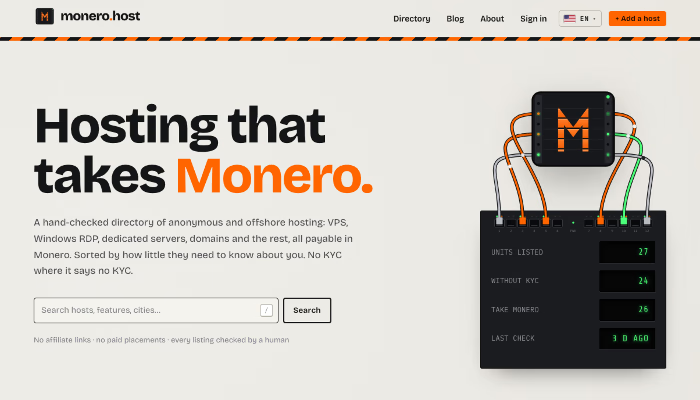
Each provider appears as a unit in a server rack, with the facts that matter for privacy visible at a glance. The directory is available in twelve languages, and it carries no affiliate links and no paid placements.
Why Monero, and not just any crypto
Monero hides the sender, the receiver and the amount of every transaction by default. There is no public trail linking the coins you pay a host with to the exchange you bought them from, which is the weak point of paying with Bitcoin. For hosting this matters, because the payment is often the only piece of information a provider holds about you.
How the Monero reaches the provider matters too. A host that takes XMR through a swap service or a payment processor adds a third party that may apply its own KYC rules. monero.host lists providers that accept Monero directly, so the payment travels from your wallet to theirs with nothing in between.
What it takes to get listed
Providers submit their own listings, and each one is checked by hand before it goes live. The rules are short:
- The service accepts Monero directly, not through a third-party swap.
- The website is up and the prices on it are real.
- The KYC level it declares matches what a new customer actually goes through.
- The tagline describes the service, not the marketing.
A listing that stops meeting these can be removed. Details come from what the provider publishes and are checked at listing time, but prices and policies change, so the directory always recommends confirming them before you pay.
How the score works
Every listing carries a mark out of five, built in two layers.
The first layer is automatic. Each provider is scored out of 100 points using only what it publishes, so two people reading the same listing reach the same number:
- Privacy, 50 points: asks for no identity (25), accepts Monero (15), runs a Tor onion mirror (10)
- Transparency, 30 points: published prices (10), published server locations (10), a public contact channel (10)
- Detail, 20 points: documented features (10), a detailed description (10)
The second layer comes from readers. Signed-in users can leave a rating from one to five stars along with a written review. A review only counts once a moderator has read it, and a provider cannot review its own listing. The published mark blends the two layers: the automatic score carries the weight of three reviews, so genuine feedback moves the mark without a single angry comment sinking an otherwise solid host.
Any listing page shows the full breakdown, so you can see which criteria a provider meets and which it misses.
Reading a listing
Each unit in the rack has three indicator lights: XMR when the host takes Monero, NO-KYC when it asks for no identity, and TOR when it runs an onion mirror. Next to them sit the starting price and the current score.
KYC is shown on three levels:
- No KYC: no identity documents, no phone number, no real name
- Light KYC: an email or a phone number, or ID only in some cases
- KYC required: identity verification is mandatory
The listing page adds the accepted payment methods, the server locations, the features the provider documents, and its onion address when it has one.
Using it to find a no-KYC VPS or buy RDP with crypto
Say you need a small Linux server for a side project and want to pay in Monero without giving a name.
- Open the VPS category and turn on the No KYC and Takes XMR filters. The list shrinks to providers that meet both.
- Sort by best rated to put the highest scores first, or by newest to see recent additions.
- Compare the locations and starting prices on each unit. If jurisdiction matters to you, this is where offshore hosting options differ the most.
- Open a listing to read its score breakdown and any reader reviews.
- Follow the link to the provider and open its order form before anything else. That is where hidden KYC usually shows up.
The same steps work for Windows. The RDP and Windows category lists providers where you can buy RDP with crypto, from small remote desktops to full Windows VPS.
A short checklist before you pay
The directory narrows the field, but a few checks are always worth doing yourself:
- Read the signup form, not the homepage. Phone verification is the most common hidden KYC step.
- Confirm that Monero is offered at checkout, not only mentioned on a pricing page.
- Place the order over Tor or a VPN, and use the onion mirror when the provider has one.
- Use a fresh email address, or none at all if the provider allows it.
- Read the refund and abuse policies. A host in a privacy-friendly jurisdiction still has rules.
- Keep your habits separate: a new SSH key, a new username, nothing reused from your everyday accounts.
The monero.host blog goes further, with guides on renting an anonymous VPS or RDP without KYC and on what offshore hosting really offers.
Accounts without email or passwords
Browsing is open to everyone. An account is only needed to submit a host or leave a review, and it follows the same logic as the rest of the site: no email and no password. You generate a random 32-character key, the site stores a hash of it and nothing else, and you sign in with the key. There is no recovery, so the key is best kept like a wallet seed.
Who it is for
- Developers and hobbyists who want a crypto VPS or a test server that is not tied to their identity
- People who need a Windows desktop in another country and would rather pay in Monero
- Journalists, researchers and activists who need infrastructure that is harder to trace back to them
- Anyone holding XMR who wants to spend it on something useful
- Hosting providers that accept Monero and want to be found by the people looking for them
Try it
monero.host is free to use. Start with the VPS or RDP categories, switch on the filters, and compare what each provider asks of you before you pay. If you run a hosting company that takes Monero directly, you can submit it in about two minutes.