
Running a single Linux process for an app works until it does not. As traffic grows, one instance becomes a bottleneck, a single crash causes downtime, and deployments feel risky. The practical answer is to run multiple app instances and distribute traffic across them. This guide walks through linux process manager load balancing for multiple app instances using Advanced Process Manager for Linux, a zero-dependency process manager that includes load balancing and a web GUI.
Even if your app is simple, the operational needs are usually the same: start processes reliably, restart them on failure, scale them up and down, shift traffic during deploys, and observe what is happening in real time. The goal here is to set up those fundamentals in a way you can repeat across environments.
What you gain by load balancing multiple app instances on Linux
Load balancing across multiple instances is not only about handling more requests. It also improves resilience and enables safer releases. When you combine a Linux process manager with a built-in load balancer, you reduce moving parts and can manage scaling and routing from one place.
- Higher throughput: distribute requests across several processes, usually one per CPU core or per capacity target.
- Fault tolerance: if one instance crashes or becomes unhealthy, traffic can be routed to the remaining instances.
- Zero or low downtime deploys: spin up new instances, shift traffic, and retire old ones gradually.
- Better utilization: you can keep CPU and memory usage balanced by adding or removing instances.
- Operational clarity: a web GUI can make it easier to see which instances are healthy and what they are doing.
How a Linux process manager with load balancing typically works
Before configuring anything, it helps to align on the basic model. A process manager usually supervises one or more programs, restarts them when they fail, and keeps logs and runtime state. With load balancing, there is an additional routing layer that accepts traffic on a single entry point and forwards requests to multiple backends.
In a common setup, your app instances listen on different local ports (for example 3001, 3002, 3003), and the load balancer listens on one stable port (for example 3000) that your users or upstream proxy target. Health checks decide whether an instance should receive traffic, and graceful shutdown lets an instance finish in-flight requests before exit.
Prerequisites and planning
You can set this up on a single VM, bare-metal server, or a Linux container host. The key is to plan your instance count, port allocation, and resource limits so scaling is predictable.
- Linux host: a server where you can run long-lived processes (systemd or shell access).
- Your application: a web service (Node, Python, Go, Java, Rust, etc.) that can bind to a configurable port.
- Port plan: one public port for the load balancer and a range of internal ports for instances.
- Health endpoint: ideally an HTTP endpoint like
/healththat returns 200 when ready. - Graceful shutdown support: handle SIGTERM and stop accepting new requests before exiting.
If your app cannot change ports per instance, you can still scale via UNIX sockets or other strategies, but port-per-instance is the simplest for step-by-step configuration.
Step 1: Prepare your application for multi-instance operation
For linux process manager load balancing for multiple app instances to work smoothly, each instance must be identical and configurable via environment variables or flags. At minimum, you want to set the listening port and ensure the app behaves well during restarts.
Use a pattern like this in your app startup:
PORT=3001 ./your-app-binary
Add or confirm a health endpoint that becomes healthy only after the app is fully ready (database connected, migrations complete if needed, caches warmed if required). Also ensure your app handles SIGTERM:
- Stop accepting new connections.
- Finish active requests.
- Exit within a defined timeout.
This makes process manager restarts predictable and allows the load balancer to avoid routing requests to an instance that is shutting down.
Step 2: Decide how many instances to run
A common starting point is one instance per CPU core, but your app’s characteristics matter. CPU-bound apps often scale well with core count, while I/O-bound apps might scale beyond core count depending on concurrency model. Memory use also sets a hard ceiling.
As a practical baseline:
- Small VM (1 to 2 vCPU): start with 2 instances and measure.
- Medium VM (4 vCPU): start with 4 instances.
- Larger VM (8 vCPU+): start with 8 instances or a measured number based on memory.
Whatever you choose, keep the configuration flexible so you can increase or decrease the instance count without rewriting everything.
Step 3: Install and initialize Advanced Process Manager for Linux
Advanced Process Manager for Linux is positioned as a zero-dependency process manager with load balancing and a web GUI. Zero-dependency matters operationally because installs are simpler, upgrades are more predictable, and there is less that can break when the host changes.
Because environments differ, follow the tool’s official install method for your distro and architecture. After installation, validate that you can start the manager and access its CLI or service mode. If the manager can run as a background service, prefer that approach so it survives SSH disconnects and server reboots.
At this stage, confirm:
- The process manager starts successfully on boot or can be supervised by systemd.
- You can list processes (even if empty) and view basic status output.
- The web GUI can bind to a local port you control (you can keep it private to the server network).
Step 4: Define an app group and instance template
Most process managers support the idea of an “app” or “service” definition that can spawn multiple instances with shared settings. If Advanced Process Manager for Linux uses a config file, create a service definition that includes:
- Command: how to start your app.
- Working directory: where the app runs from.
- Environment: variables like
NODE_ENV,PORT,DATABASE_URL. - Instance count: how many workers to run.
- Restart policy: on-failure or always, with backoff to avoid restart loops.
- Grace period: time to allow graceful shutdown.
Here is an example of what a generic multi-instance definition might look like. Treat this as a template, since exact keys vary by tool:
service: my-web-app
workdir: /srv/my-web-app
command: ./my-web-app
instances: 4
env:
  APP_ENV: production
  LOG_LEVEL: info
port:
  base: 3001
  count: 4
restart:
  policy: on-failure
  max_restarts: 10
  backoff_seconds: 2
shutdown:
  signal: SIGTERM
  grace_seconds: 20
health:
  path: /health
  interval_seconds: 5
  timeout_seconds: 2
The important idea is that each instance receives a unique port. Many managers provide an instance index variable (for example INSTANCE_ID) that you can use to compute the port. If that exists, you can do something like PORT=3001 + INSTANCE_ID.
Step 5: Configure the built-in load balancer entry point
This is the core of the keyword topic: linux process manager load balancing for multiple app instances. The load balancer should listen on a single stable port and route to the instance ports you defined in the previous step.
A solid baseline configuration includes:
- Listener port: the port clients connect to (for example 3000 or 8080).
- Upstreams: the set of instance addresses (for example 127.0.0.1:3001-3004).
- Health checks: route only to healthy instances.
- Algorithm: round-robin is a safe default.
- Timeouts: protect against hung backends.
Generic example:
load_balancer:
  listen: 0.0.0.0:3000
  upstream_service: my-web-app
  algorithm: round_robin
  health_check:
    path: /health
    interval_seconds: 5
    unhealthy_threshold: 2
    healthy_threshold: 1
  timeouts:
    connect_seconds: 2
    read_seconds: 30
Once applied, you should be able to hit the load balancer port and see responses served by different instances. A common way to verify distribution is to have the app return its instance ID in a header or response field in a staging environment.
Step 6: Enable safe restarts and rolling reloads
Running multiple instances is only valuable if you can update them without dropping traffic. Configure a rolling restart strategy so the process manager updates one instance at a time, waits for it to become healthy, and then proceeds.
Conceptually, the flow should be:
- Start a new instance or restart one instance.
- Wait until health checks pass.
- Shift traffic to include the healthy instance.
- Repeat for remaining instances.
If the tool supports it, prefer “reload” behavior that keeps the listener stable while workers rotate. If it supports connection draining, enable it so an instance stops receiving new requests but can finish active ones before termination.
Step 7: Use the web GUI for monitoring and operational control
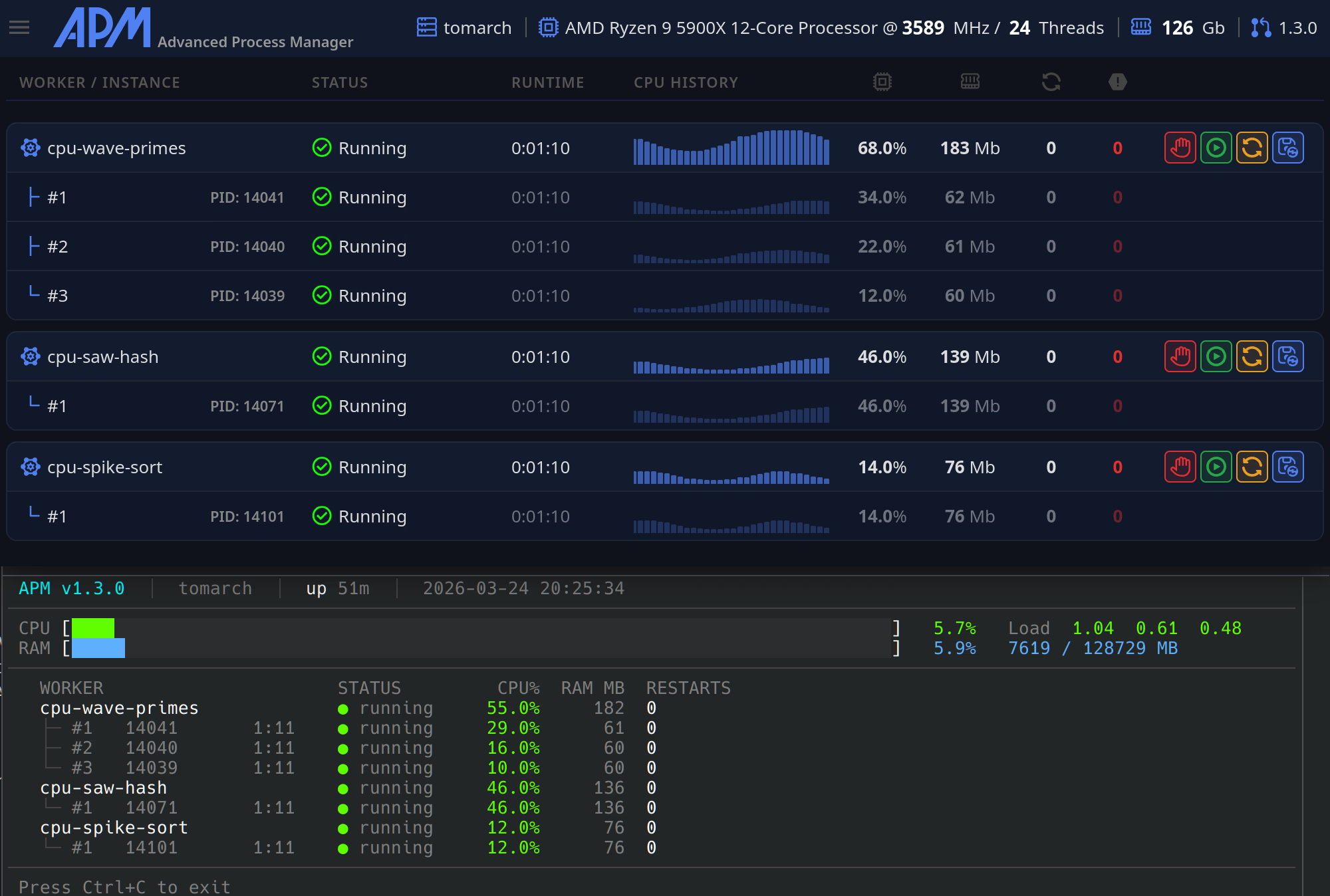
A web GUI becomes useful when multiple moving parts are involved. With Advanced Process Manager for Linux, the web GUI can serve as a control plane for the processes and the load balancer state.
Operationally, you want the GUI to answer questions quickly:
- Which instances are running, restarting, or stopped?
- Which instances are marked unhealthy by health checks?
- What is CPU and memory usage per instance?
- What do logs show right before failures?
Keep the GUI access restricted. Bind it to localhost or a private interface when possible, and place it behind your internal network controls.
Step 8: Configure logs, metrics, and debugging signals
Multi-instance systems fail in more interesting ways than single-instance systems. Your process manager should help you make failures visible rather than mysterious.
Recommended settings:
- Structured logs: JSON logs if your stack supports it.
- Instance tagging: include instance ID in every log line.
- Log rotation: prevent disk exhaustion.
- Crash loop protection: exponential backoff or restart limits.
When debugging, being able to restart a single instance, tail its logs, and temporarily remove it from the load balancer are the most practical tools.
Common load balancing options and when to use them
Not every app behaves the same under load balancing. Picking the right routing behavior prevents subtle bugs.
- Round-robin: best default for stateless services.
- Least connections: useful when requests vary widely in duration.
- Sticky sessions: needed when session state is stored in memory per instance. Prefer moving session state to Redis or a database instead, then disable stickiness.
- Weighted routing: helpful for canary releases where only a subset of traffic hits a new version.
If your tool supports canary weighting, it is a clean way to reduce risk while still using the same linux process manager load balancing for multiple app instances approach.
Hardening: security and reliability considerations
Load balancing and process management live on a critical path. A few extra settings can prevent outages.
- Bind internal instance ports to localhost: keep them inaccessible externally.
- Run as a non-root user: grant only the permissions required.
- Resource limits: set memory and open-file limits if supported to prevent a single instance from destabilizing the host.
- Health check correctness: ensure health indicates readiness, not just liveness.
- Timeout discipline: set upstream timeouts and ensure your app also has sensible timeouts for downstream dependencies.
Reliability is often the result of small defaults that prevent rare issues from turning into prolonged incidents.
Troubleshooting: when requests are not balancing correctly
If traffic is not distributing as expected, the cause is usually one of a few patterns. Work through these checks in order so you can isolate the issue quickly.
- All instances are not actually running: verify instance count and confirm each is bound to its own port.
- Port collisions: two instances cannot listen on the same port. Ensure ports are unique per instance.
- Health checks failing: if only one instance is healthy, it will receive all traffic. Confirm the
/healthendpoint returns 200 and is fast. - Load balancer pointing to the wrong upstreams: confirm upstream addresses match the instance ports.
- Sticky session behavior: if stickiness is enabled, a client may consistently hit one instance. Disable stickiness for stateless services.
- Long-running connections: WebSockets and streaming can make distribution look uneven. Consider a different balancing strategy for those paths.
Also validate that your test method is correct. If you refresh from the same browser tab and your setup uses any affinity, you might not see round-robin behavior.
Example deployment workflow you can repeat
Once you have linux process manager load balancing for multiple app instances working, the next step is making deployments routine. A simple repeatable workflow looks like this:
- Build or upload the new app version to the server.
- Start one new instance (or restart one instance) with the new version.
- Wait for health checks to pass and verify key endpoints.
- Roll through the remaining instances gradually.
- Monitor error rates and latency during the rollout.
- If problems appear, stop the rollout and revert the latest instance first.
This approach keeps capacity online while you change the software, and it fits naturally with a process manager that can orchestrate multiple instances and load balancing together.
Final checklist for linux process manager load balancing for multiple app instances
- Your app can start on a configurable port and exposes a readiness health endpoint.
- Advanced Process Manager for Linux runs as a service and supervises the app reliably.
- Multiple instances run concurrently with unique ports and clear instance identifiers.
- The built-in load balancer listens on a single stable port and targets only healthy instances.
- Rolling restarts are configured so deploys do not drop traffic.
- Logs and basic resource visibility are enabled, ideally via the web GUI.
- Security basics are applied: least privilege, localhost binding for internal ports, and restricted GUI access.
Conclusion
Configuring multiple app instances with load balancing is one of the most effective upgrades you can make to a Linux deployment. With Advanced Process Manager for Linux, you can combine supervision, scaling, health checks, and routing in one tool, which reduces complexity and makes operations easier to standardize.
If you implement the steps above, you will have a practical, repeatable setup for linux process manager load balancing for multiple app instances that supports growth, resilience, and safer releases.