
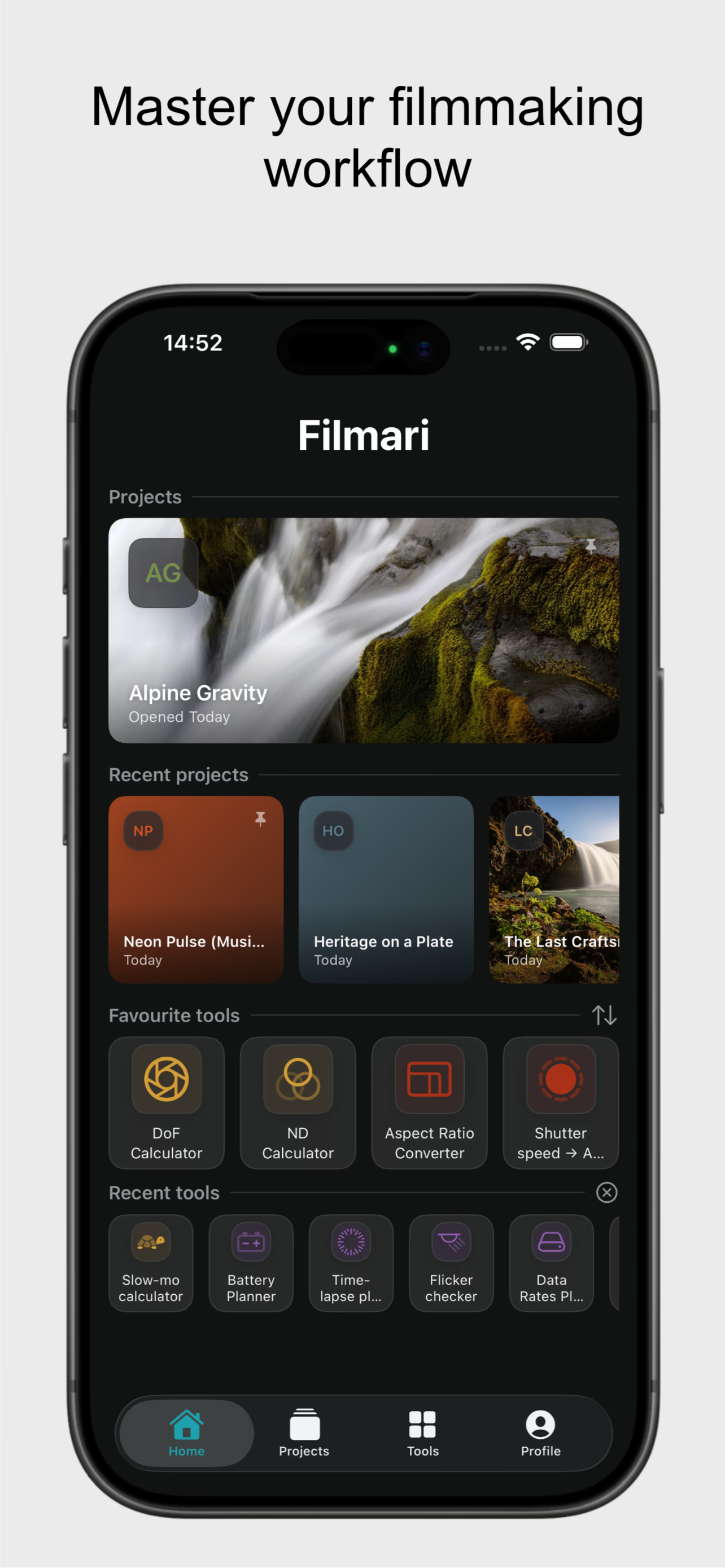
After nearly a year of development, Filmari is live on the App Store. It's a massive milestone — exciting and a little surreal at the same time. Before moving forward, I want to take a moment and look back at how it all started.
20 Years Behind the Camera
I've been into filmmaking and cameras for a good 20 years now. Started out as a wide-eyed enthusiast shooting wildlife stuff just for myself. Then came music videos and short art films for friends from film school. Somehow I ended up in TV production, where I picked up real-world experience — chasing stories, sleepless nights in the editing suite. I look back on those days fondly.
In recent years I shifted more towards live streaming and its technical side. Lots of gear, lots of computers, and above all — lots of calculations. I've always had this thing where I need to simplify processes and make my life easier. That's how my first tool came to be: Time to Seconds. I needed to log video durations in seconds when uploading to FTP. For a while I did it manually in a regular calculator like a good soldier, but something in my head immediately flagged it: this is not sustainable.
Filmari Is Born
One tool led to another, and it hit me that it would be great to have them all under one roof. So I started building Filmari. It went through a lot of changes — complete wipes, clean rebuilds, endless tweaking. Anyone who's been through app development knows exactly what I mean. But gradually it started to look functional, and dare I say, actually useful.
The core idea was simple: I know the internet is full of this stuff, but having everything in one native app beats juggling a million browser tabs where every tool lives on a different website. A DoF calculator here, an aspect ratio converter there, a shot list in some random notes app, a budget cobbled together in a spreadsheet. Filmari puts it all in one place, built specifically for filmmakers.
The Tools
The foundation of Filmari is a collection of on-set and production calculators that I actually use:
- Depth of Field calculator — with a built-in hyperfocal distance tool, which I use constantly when shooting with vintage manual lenses
- Anamorphic desqueeze calculator — enter the native frame width and squeeze factor, get the correct output dimensions. Simple, but easy to get wrong under pressure
- Aspect Ratio Converter — especially useful today when every camera manufacturer has their own interpretation of "4K"
- Exposure tools, frame rate calculators, time converters — the kind of utilities that sound boring until you need them on set and your phone is the only thing within reach
These work perfectly as standalone tools. But the bigger part of the app is what happens when you attach them to an actual project.
From Tools to Projects
As the app grew, a Projects section emerged. Some calculators make sense in isolation, but things like shot lists, scripts, and budgets only really work when they're tied to a specific film.
Inside a project, you can build out the full production workflow:
Shot list and scenes — you create scenes first (INT/EXT, location, day/night), then add individual shots within each scene. It mirrors the structure of a real script, which makes it much easier to plan coverage properly rather than just making a flat list of shots.
PDF script import — if you're working from a proper script, you can upload it directly to the project. The app can extract scene headings automatically and create the scene structure for you. You just add the shots. There's also a script preview baked into the on-set views, so you're not switching between apps while you're trying to direct.
On-Set Mode — this is the part I'm most proud of. When you're rolling, you log takes for each shot: bad, usable, or good. Once a shot has at least one good take, it gets quietly marked as done in the background. In the Planner view you can see at a glance what's covered and what still needs work. Filter out the done shots and you're only looking at what's left. Simple, but it changes how you work through a day.
The whole point is that by the time you get to the edit suite, you already know where your hero takes are. You're not scrubbing through hundreds of clips hoping something jumps out.
The Budget Planner
This is one of my favourite parts — and honestly, the most personally motivated one.
I see it constantly in filmmaker forums: people struggling with pricing, pulling numbers out of thin air, undercharging because they feel awkward asking for fair rates, or simply forgetting to account for half the actual costs. I've been there myself.
The Budget Planner starts in your profile, where you set default hourly rates for different activities — shooting, editing, grading, sound. Each gets its own rate because they're genuinely different kinds of work. From there you add:
- Minimum fees — because even a half-hour shoot means packing, traveling, unpacking, packing again
- Overtime rules — pre-set what happens after hour 8 or hour 10, so you're not doing math in your head when you're already exhausted
- Project type multipliers — a commercial job gets priced differently than helping a friend with their indie short
- Gear costs — owned or rented, attached directly to the project
- Revision limits — set how many are included, price each one beyond that, and stop ending up in the infinite revision loop we've all been trapped in
- Production costs, discounts, rush fees — everything that changes the final number
At the end, you export a PDF for the client and a CSV for your accountant. Clean, professional, no more "I'll send it over tomorrow" while you rebuild the spreadsheet from scratch.
No Subscriptions. No Data Mining.
Filmari isn't trying to be a platform. It's a tool.
A lot of people told me to go with a subscription model. As a filmmaker who pays monthly for roughly a dozen plugins and services, I decided against it. The model is DaVinci Resolve-style: one-time payment.
- The app is fully functional and free
- Hobbyist filmmakers can use it without restrictions indefinitely
- The only free-tier limitation is one active project and one inventory list
- If you need more, you unlock the full version once — no recurring charges, ever
On privacy: Filmari has no servers of mine, no accounts, no tracking. Everything lives on your device, or in your iCloud if you want sync across devices. The app works completely offline — which matters when you're three hours from civilization shooting something in a field.
What's Next
The app is live and already being used on real productions — including my own. There's more coming: smarter inventory management, deeper Blackmagic camera integration, and a few things I'm still figuring out.
If you're a filmmaker who's tired of scattered tools and improvised workflows, give it a try.