
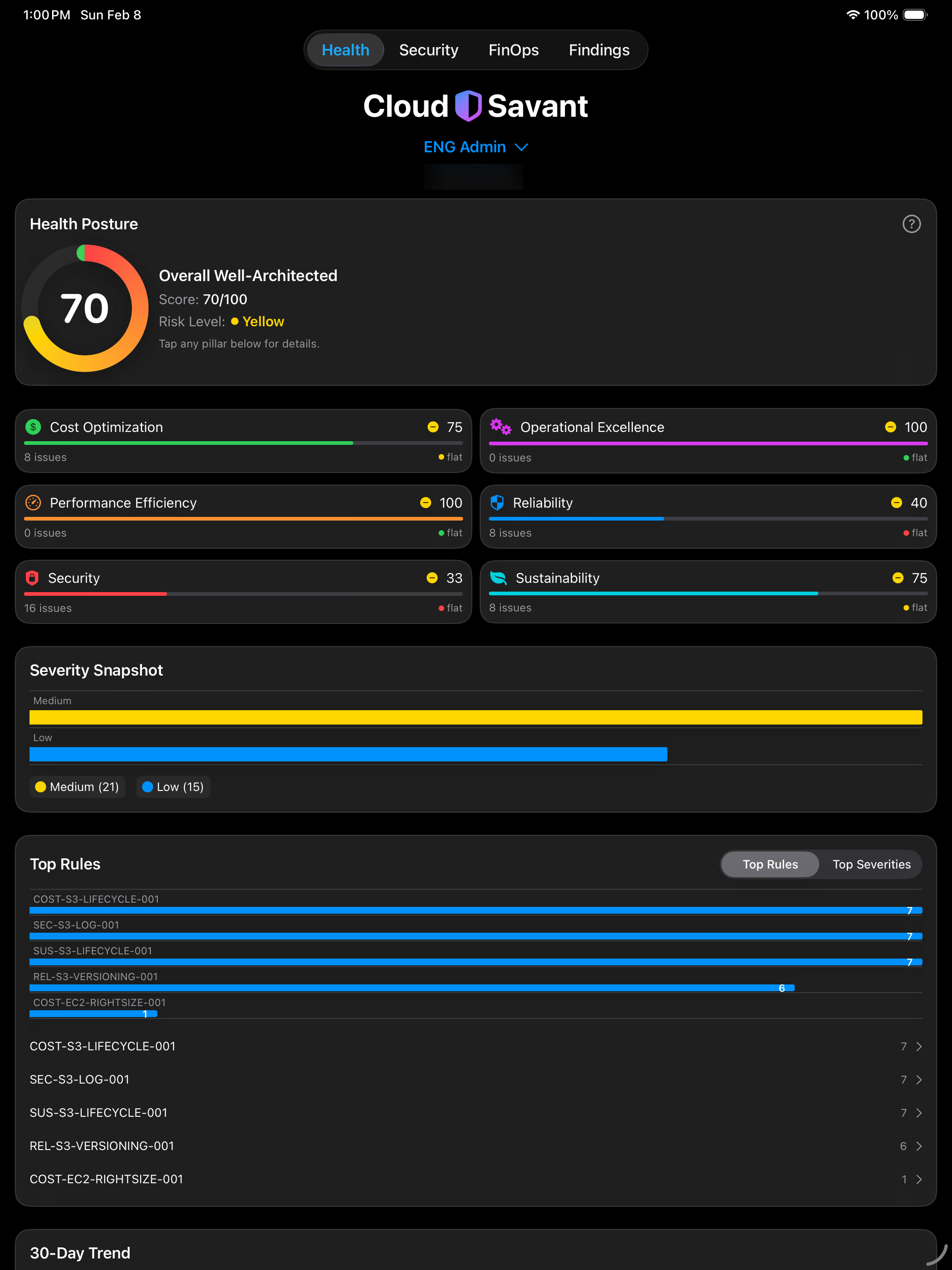
Obtaining clear, centralized and actionable visibility into your AWS cloud configurations is difficult and typically results in missed risks, wasted spend, and slow remediation. Cloud metadata is distributed, signals are noisy, and issues (mainly cost, security, and reliability) are not surfaced in a unified, actionable way—forcing teams into reactive, time-consuming analysis, and often break-fix operations. The core problem we're addressing is that AWS environments—especially across multiple accounts—are inherently fragmented, making it difficult for teams to quickly identify what’s wrong, understand the impact, and know how to fix it without significant manual effort and expertise.
Managing AWS environments across multiple accounts introduces a visibility problem that the console alone doesn't solve well. Cost anomalies accumulate quietly across accounts, security posture drifts between review cycles, and Well-Architected findings go unaddressed simply because no one has a consolidated view of what needs attention. I ran into this repeatedly and eventually decided to build something to address it.
The Architecture Problem
The core challenge with multi-account visibility is access. You need a pattern that scales across an arbitrary number of accounts without requiring persistent credentials in each one. The standard approach is cross-account IAM role assumption — a central account hosts your analysis engine, and each member account has a read-only IAM role with a trust policy pointing back to the central account's Lambda execution role.
The role in each member account looks roughly like this:
Trust Principal:
arn:aws:iam::<master-account-id>:role/CloudSavantAnalyzer
Permissions: ReadOnlyAccess + CostExplorer read
The Lambda function then assumes this role via STS for each account it needs to analyze, scoping the session to the minimum needed for each analysis pass. No persistent credentials, no access keys stored anywhere — just time-limited session tokens generated on demand.
Onboarding at Scale with StackSets
Deploying the cross-account role across an entire AWS Organization manually doesn't scale. CloudFormation StackSets solve this — you define the IAM role once as a CloudFormation template and deploy it across all member accounts (or targeted OUs) from the management account in a single operation.
One gotcha worth noting: if you're building the onboarding flow into an application, you hit a chicken-and-egg problem. You can't assume a role that doesn't exist yet, and you can't deploy the CloudFormation stack without some initial access. The cleanest solution is CloudFormation Quick Create URLs — pre-parameterized links that let the customer deploy the stack themselves in their own account with a single click, without requiring your application to have any foothold in their environment first.
Analysis Architecture
Once cross-account access is established, the analysis pipeline needs to handle several domains independently:
- Security posture — IAM configuration, network exposure (security groups, public-facing resources), data protection (encryption at rest/in transit), and compute hardening signals
- Cost optimization — idle and unattached resources, RI/Savings Plans coverage gaps, Cost Explorer trend analysis
- Well-Architected health — pillar-by-pillar scoring across Operational Excellence, Security, Reliability, Performance Efficiency, and Cost Optimization
Keeping these domains separate matters architecturally. Conflating a security score with a cost score produces a number that's hard to act on. A resource can be cost-efficient and badly exposed simultaneously — the findings need to surface independently so the right team can own each one.
EventBridge handles scheduled analysis triggers, Lambda executes the analysis passes, and DynamoDB stores both raw findings and processed scores with historical snapshots for trend tracking. The separation between raw findings storage and processed scoring gives you flexibility to re-run scoring logic against historical data without re-analyzing the AWS environment.
Accessing Your Findings
The platform delivers findings through two complementary surfaces. The iOS app provides on-the-go visibility — findings ranked by severity and organized by domain, with trend lines showing whether posture is improving or degrading over time. For users who prefer a broader view or need to share findings with a team, a web portal provides the same data in a desktop-friendly format. Both surfaces stay in sync, reflecting the same underlying analysis results in real time.
The decision to prioritize mobile alongside a web experience came from a practical observation: the people who need to act on these findings aren't always at a desk, and having findings surface on your phone means you're less likely to miss something important between scheduled review sessions.
Cognito handles authentication across both surfaces, and StoreKit manages subscription entitlements on the iOS side, keeping access control logic cleanly separated from the backend analysis pipeline.
What This Looks Like in Practice
A typical analysis pass across a moderately complex AWS environment surfaces things like:
- Security groups with 0.0.0.0/0 ingress on non-standard ports
- EBS volumes unattached for more than 30 days
- IAM users with console access and no MFA
- S3 buckets with public access block disabled
- RI coverage below threshold for consistent workloads
- Well-Architected pillar scores trending downward quarter-over-quarter
None of these are exotic findings — they're the bread-and-butter issues that accumulate in real environments. The value isn't in discovering new categories of problems, it's in having something that consistently surfaces them across every account on a schedule, rather than relying on someone to go looking.
If any of this architecture approach is useful for your own tooling, happy to go deeper on any of the patterns described. If you'd rather just use the finished product, Cloud Savant is available on the iOS App Store and Google Play Store, with a companion web portal for desktop access.
The app shows details related to overall health and security posture, as well as financial aspects such as monthly spend and spend distribution by service. For cloud health, the app focuses on AWS Well Architected principles and highlights findings within these five pillars (Cost Optimization, Operational Excellence, Performance Efficiency, Reliability and Security). For cloud security, the app focuses on key aspects of your cloud configuration as they relate to Exposure, Identity and Access Management (IAM), Data Protection, Compute and Detections to identify findings that may adversely affect your deployments. The app also provides a view into your monthly spend, with details on how much you are spending on each service within your cloud accounts. In all areas where findings are presented within the app, we provided detailed steps showing "how to fix" the issues we uncover.