Best Employee In/Out Board Software for Microsoft Teams in 2026
Microsoft Teams has become a central communication platform for modern workplaces. However, even organizations using Microsoft Teams throughout the workday can struggle with a fundamental challenge: knowing who is available across the organization.
Who is in the office? Who is working remotely? Who is temporarily unavailable? When will someone return?
Microsoft Teams provides individual presence information, but businesses may benefit from a centralized employee availability board organized by department, location, and status.
Employee in/out board software helps address this challenge. When combined with Microsoft Teams and Microsoft 365 integrations, these applications can improve workplace visibility while reducing repetitive manual status updates.
This guide compares four employee in/out board solutions and explains their suitability for Microsoft Teams workplaces in 2026.
Best Employee In/Out Board Software for Microsoft Teams
- Staff Glance: Best suited for organizations prioritizing Microsoft Teams presence, work-location synchronization, Microsoft 365 group synchronization, and department-based visibility.
- Simple In/Out: Best suited for organizations requiring Teams integration alongside native applications, physical-location automation, and time-oriented reporting.
- InOutBoard: An alternative for organizations prioritizing employee availability, standalone calendar-based scheduling, resource reservations, and time reporting.
- StaffStatus: An alternative for organizations seeking straightforward employee availability communication and manual status updates.
Staff Glance and Simple In/Out have documented Microsoft Teams application access and presence integration. InOutBoard and StaffStatus are included as alternative employee availability solutions rather than confirmed Teams presence synchronization products.
Editorial disclosure: I am the founder of LOB Labs LLC, the developer of Staff Glance. This comparison is based on publicly documented product capabilities rather than independent hands-on testing.
Why Microsoft Teams Presence Alone May Not Be Enough
Microsoft Teams communicates employee presence through indicators such as Available, Busy, Do Not Disturb, Away, and Offline.
These indicators are useful but do not necessarily answer broader workplace availability questions.
For example:
- An employee may be available in Teams while working remotely.
- A receptionist may need to view an entire department's availability simultaneously.
- An employee may be physically present while their computer is inactive.
- A manager may need to understand availability across multiple offices.
- A coworker may need to know when an unavailable employee expects to return.
Microsoft Teams presence communicates digital availability. It does not independently establish physical attendance or employee productivity.
A dedicated employee in/out board can provide additional organizational context through employee statuses, departments, work locations, scheduled statuses, and expected return information.
Microsoft Teams Employee In/Out Board Comparison
Capability | Staff Glance | Simple In/Out | InOutBoard | StaffStatus |
|---|---|---|---|---|
Employee in/out board | Yes | Yes | Yes | Yes |
Microsoft Teams application | Yes | Yes | Not verified | Not verified |
Teams presence synchronization | Yes | Yes | Not verified | Not verified |
Teams work-location synchronization | Yes | Not verified | Not verified | Not verified |
Microsoft Entra ID SSO | Yes | Enterprise | Not verified | Not verified |
Microsoft employee synchronization | Yes | Yes | Not verified | Not verified |
Microsoft group synchronization | Yes | Yes | Not verified | Not verified |
Microsoft profile attribute synchronization | Yes | Yes | Not verified | Not verified |
Department or group organization | Yes | Yes | Yes | Yes |
"Not verified" indicates that the reviewed documentation did not establish the capability. It does not necessarily mean the product lacks it.
Subscription requirements and integration configurations may vary.
1. Staff Glance: Microsoft Teams and Microsoft 365 Workplace Visibility
Staff Glance is a cloud-based employee in/out board designed for office-based, hybrid, and remote organizations.
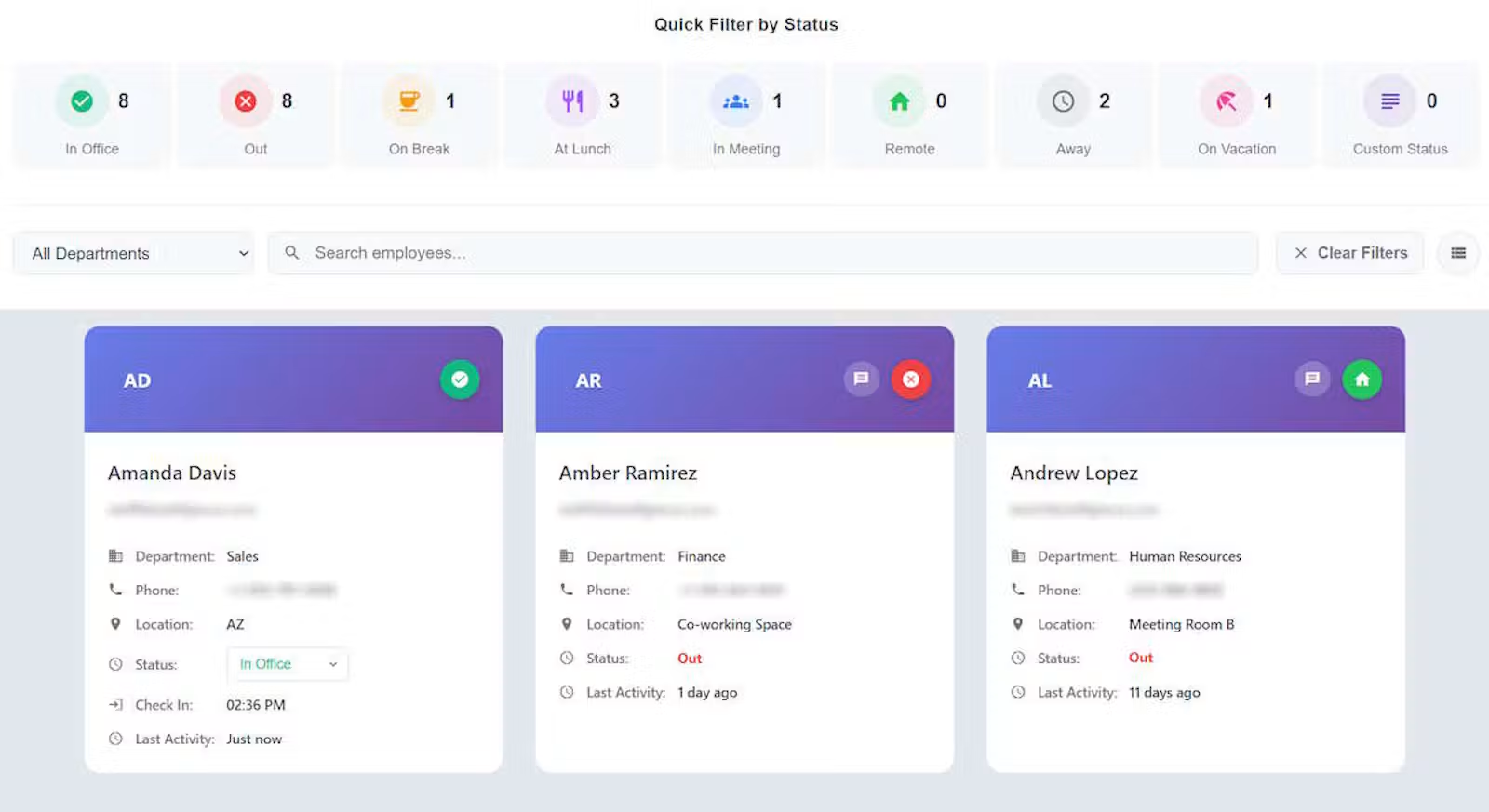
It combines centralized employee availability with optional Microsoft integrations, department organization, scheduled statuses, expected return information, and configurable board layouts.
Microsoft Integration Capabilities
Staff Glance supports:
- Microsoft Teams application
- Teams Sense presence synchronization
- Microsoft Teams work-location synchronization
- Microsoft Entra ID single sign-on
- Selected-group employee synchronization
- Employee profile attribute synchronization
- Microsoft Calendar Snapshot
Microsoft Entra ID SSO provides the foundation for these integrations. Additional Microsoft capabilities are configured separately.
Microsoft Teams Application and Presence Synchronization
The Staff Glance Teams application provides access to the employee in/out board through a Microsoft Teams personal tab.
Employees can view the board within Teams or continue using the standalone Staff Glance web application.
Teams Sense is a separately configured integration that periodically retrieves Microsoft Teams presence information through Microsoft Graph and applies Staff Glance's status-mapping rules.
This can reduce repetitive manual status updates for employees who regularly use Microsoft Teams.
Work-location synchronization provides additional context about where employees are working when that information is available through Microsoft.
Microsoft 365 Employee Synchronization
Administrators can select Microsoft groups relevant to their Staff Glance deployment and synchronize employee accounts.
Employee profile attribute synchronization can also reduce duplicate administrative work.
This approach is particularly useful for organizations that already maintain employee information within Microsoft 365.
Microsoft Calendar Snapshot
Calendar Snapshot provides visibility into Microsoft calendar availability without directly changing employee statuses.
Microsoft meetings and out-of-office information may separately influence Teams presence signals used by Teams Sense.
Calendar Snapshot and Teams Sense are distinct integrations.
Scheduled Statuses and Expected Return
Staff Glance provides optional Scheduled Statuses, allowing employees to plan future availability changes.
Expected Return allows employees to communicate when they anticipate becoming available again. It can remain informational or automatically change an employee's status when permitted by the organization and selected by the employee.
These capabilities help employees communicate availability independently of Microsoft Teams presence.
Department Organization and Board Layouts
Staff Glance supports department hierarchy, multiple department memberships, primary departments, and optional department-based visibility restrictions.
Available board layouts include Card, Pill, and Table views.
Search, filtering, and grouping help employees locate coworkers across departments and locations.
Staff Glance also provides administrator-only availability reporting when reporting collection is enabled, with optional Business Hours for reporting calculations.
Staff Glance is not a GPS tracking, payroll timekeeping, or employee productivity monitoring platform.
Best fit: Microsoft 365 organizations seeking centralized workplace visibility, Teams presence synchronization, work-location information, department organization, and flexible employee availability management.
Learn more: Staff Glance Microsoft Teams Integration
2. Simple In/Out: Microsoft Teams Integration and Extensive Status Automation
Simple In/Out provides an employee availability board supported by dedicated applications, multiple automation methods, integrations, and reporting capabilities.
Microsoft Integration Capabilities
Documented Microsoft capabilities include:
- Microsoft Teams application
- Microsoft Teams presence integration
- Microsoft Entra ID SSO through its Enterprise offering
- Microsoft Entra user provisioning
- Microsoft Entra group provisioning
- Employee profile attribute synchronization
Microsoft Learn documents automatic employee provisioning for Simple In/Out, including supported employee attributes, group names, and group memberships.
Both Staff Glance and Simple In/Out support Microsoft-connected employee management, although their configuration and synchronization approaches differ.
Location and Device Automation
Simple In/Out offers several automation methods beyond Microsoft Teams presence, including:
- Geofencing
- Wi-Fi-based automation
- Bluetooth beacons
- Desktop activity-based automation
- Scheduled status updates
These capabilities may be useful for organizations seeking employee status changes based on physical-location or device activity signals.
Simple In/Out also provides dedicated desktop and mobile applications and time-oriented reporting.
Organizations should consider the privacy implications and accuracy limitations of location-based and device-based automation.
Best fit: Organizations requiring Microsoft Teams integration alongside native applications, physical-location automation, desktop activity automation, and time-oriented reporting.
Further reading:
Staff Glance vs. Simple In/Out
Microsoft Learn: Simple In/Out Automatic User Provisioning
3. InOutBoard: Employee Availability and Calendar-Based Scheduling
InOutBoard combines employee availability tracking with scheduling, reporting, and resource management capabilities.
Documented functionality includes:
- Shared employee status board
- Custom employee statuses
- Employee return information
- Calendar-driven status changes
- Historical status reporting
- Time-card reporting
- Shared-resource scheduling
An important distinction is that InOutBoard's calendar functionality is standalone. Its documented calendar-driven status automation should not be confused with synchronization of Microsoft Outlook or Exchange calendars.
Microsoft Teams application access and Teams presence synchronization were not established through the reviewed documentation.
Best fit: Organizations prioritizing employee availability, standalone calendar-based scheduling, resource reservations, and time reporting rather than confirmed Microsoft Teams presence integration.
Further reading: Staff Glance vs. InOutBoard
4. StaffStatus: Straightforward Employee Availability Communication
StaffStatus provides a browser-based employee availability board focused on straightforward status communication.
Documented capabilities include:
- Shared employee availability board
- Manual employee status updates
- Employee-specific update links
- Department and location organization
- HR Partner integration
StaffStatus may appeal to organizations that do not require extensive employee availability automation.
Microsoft Teams application access, Teams presence synchronization, and Microsoft Entra ID integration were not established through the reviewed documentation.
Best fit: Organizations seeking straightforward employee availability communication without confirmed Microsoft Teams synchronization as a purchasing requirement.
Further reading: Staff Glance vs. StaffStatus
Staff Glance vs. Simple In/Out for Microsoft Teams
Staff Glance and Simple In/Out are two relevant options for organizations specifically requiring documented Microsoft Teams integration.
Purchasing consideration | Staff Glance | Simple In/Out |
|---|---|---|
Teams presence synchronization | Supported | Supported |
Teams application | Supported | Supported |
Teams work-location synchronization | Supported | Not verified |
Microsoft employee management | Selected-group synchronization | Entra provisioning |
Employee attribute synchronization | Supported | Supported |
Hierarchical department visibility | Documented | Equivalent model not verified |
Scheduled statuses | Supported | Supported |
GPS geofencing | Not offered | Supported |
Wi-Fi automation | Not offered | Supported |
Bluetooth beacon automation | Not offered | Supported |
Desktop activity automation | Not offered | Supported |
Mobile application approach | Installable PWA | Dedicated applications |
Reporting emphasis | Availability and first check-in | Includes time-oriented reporting |
Staff Glance emphasizes Microsoft-connected workplace visibility, department organization, and employee availability.
Simple In/Out emphasizes a broader range of device-based and physical-location automation methods.
The appropriate choice depends on which capabilities matter most to the organization.
Understanding Microsoft Teams Integration
Not all Microsoft Teams integrations provide the same functionality.
Organizations should distinguish between the following capabilities:
- Teams application: Provides access to the employee in/out board within Microsoft Teams.
- Presence synchronization: Uses Microsoft Teams presence information to influence employee statuses.
- Work-location synchronization: Incorporates available Microsoft workplace location information.
- Microsoft Entra ID SSO: Allows employees to authenticate using organizational Microsoft accounts.
- Employee provisioning and synchronization: Helps maintain employee accounts and organizational information.
- Calendar visibility: Displays employee calendar availability.
- Calendar-driven automation: Changes employee statuses based on scheduled calendar events.
Support for one capability does not automatically establish support for the others.
For example, installing a Teams application does not necessarily enable presence synchronization. Similarly, displaying Microsoft calendar information does not necessarily mean that calendar events directly change employee statuses.
Who Benefits From a Microsoft Teams Employee In/Out Board?
Hybrid and Remote Workplaces
A centralized employee availability board helps coworkers understand who is available and where employees are working across different workplace arrangements.
Reception and Front-Desk Teams
Receptionists can view employee availability across departments instead of individually searching for coworkers in Microsoft Teams.
Expected return information can also help receptionists respond to callers and visitors.
Educational Institutions
Schools, colleges, and universities can improve visibility into counselor, advisor, faculty, and administrative employee availability.
Professional Services
Accounting firms, law offices, consulting businesses, and other professional services organizations can coordinate availability around meetings, appointments, and remote work.
Multi-Location Organizations
A cloud-based employee in/out board provides shared workplace visibility across offices, departments, and remote employees.
How to Choose the Best Employee In/Out Board for Microsoft Teams
Before selecting an employee availability application, consider these purchasing requirements:
- Microsoft integration: Determine whether Teams application access, presence synchronization, work-location synchronization, SSO, or employee provisioning is required.
- Status automation: Decide whether employee statuses should be maintained manually, through Microsoft Teams, scheduled changes, or location-based automation.
- Manual status control: Understand how automated updates interact with intentional employee status changes.
- Department visibility: Evaluate employee grouping, department hierarchy, and visibility restrictions.
- Microsoft permissions: Review administrative consent requirements and whether integrations can be configured independently.
- Calendar functionality: Distinguish calendar visibility from direct calendar-driven status automation.
- Reporting: Determine whether employee availability reporting is sufficient or formal timekeeping is required.
- Privacy: Understand what employee information is collected and who can access it.
- Subscription requirements: Confirm that the selected subscription includes the necessary Microsoft integrations and employee management capabilities.
The best employee in/out board is not necessarily the product with the most features. It is the product that meets the organization's operational requirements without introducing unnecessary complexity.
Frequently Asked Questions
What is the best employee in/out board for Microsoft Teams in 2026?
Staff Glance and Simple In/Out both provide documented Microsoft Teams application access and presence integration.
Staff Glance is particularly relevant for Microsoft-connected workplace visibility and department organization. Simple In/Out is particularly relevant for organizations requiring physical-location and device-based automation.
Does Microsoft Teams have an employee in/out board?
Microsoft Teams provides individual presence information. Organizations requiring a centralized employee availability board with department organization, additional statuses, and expected return information may benefit from a dedicated third-party application.
Can employee in/out board software synchronize Microsoft Teams presence?
Yes. Staff Glance and Simple In/Out document Microsoft Teams presence integration. Configuration requirements, update frequency, and status-handling behavior may differ.
Which employee in/out board supports Microsoft Teams work-location synchronization?
Staff Glance documents Microsoft Teams work-location synchronization. Equivalent functionality was not established for the other products in this comparison.
Can Staff Glance synchronize Microsoft 365 employee groups?
Yes. Staff Glance supports administrator-selected group synchronization and employee profile attribute synchronization.
Does Simple In/Out support Microsoft Entra employee provisioning?
Yes. Microsoft Learn documents user provisioning, employee attribute synchronization, and group provisioning for Simple In/Out.
Does Staff Glance Calendar Snapshot automatically change employee statuses?
No. Calendar Snapshot displays Microsoft calendar availability. Microsoft calendar activity may separately influence Teams presence signals used by Teams Sense.
Does InOutBoard synchronize with Microsoft Outlook calendars?
InOutBoard documents standalone calendar functionality rather than synchronization with Microsoft Outlook or Exchange calendars.
Can employees schedule future statuses in Staff Glance?
Yes. Optional Scheduled Statuses allow employees to plan future availability changes when enabled by their organization.
Does Staff Glance support Expected Return?
Yes. Optional Expected Return can communicate anticipated return information or automatically update employee status when permitted by the organization and selected by the employee.
Does Staff Glance require Microsoft Teams?
No. Staff Glance operates independently as a web-based employee in/out board. Microsoft integrations are optional.
Is Microsoft Teams presence the same as physical attendance?
No. Digital presence, declared workplace location, physical attendance, and employee productivity are different concepts.
Final Recommendations
For organizations evaluating employee in/out board software in 2026:
- Choose Staff Glance when Microsoft Teams presence, work-location synchronization, Microsoft 365 group synchronization, department visibility, and flexible employee availability management are priorities.
- Consider Simple In/Out when Teams integration must be combined with native applications, physical-location automation, and time-oriented reporting.
- Consider InOutBoard when standalone calendar-based scheduling, resource reservations, and employee time reporting are important.
- Consider StaffStatus when straightforward manual employee availability communication meets organizational requirements.
Throughout my career in IT leadership, workplace visibility was one of the areas where I consistently wanted to make improvements.
Organizations already had calendars, messaging platforms, employee directories, and numerous business applications. Yet employees still spent time determining who was available.
That experience was one of the reasons I developed Staff Glance through LOB Labs LLC.
Microsoft Teams provides valuable communication capabilities, but employee availability extends beyond individual digital presence indicators.
A centralized employee in/out board can help organizations improve communication, reduce unnecessary interruptions, and strengthen workplace coordination.
The objective is better workplace visibility, not employee surveillance.
Additional Resources
- Staff Glance
- Employee In/Out Board Software Comparison Library
- Microsoft Teams Integration
- Employee In/Out Board Software
- Simple In/Out
- InOutBoard
- StaffStatus
- Microsoft Learn: Simple In/Out Provisioning Documentation
Product capabilities are based on available public documentation. Subscription requirements, integration permissions, and feature availability may change.