
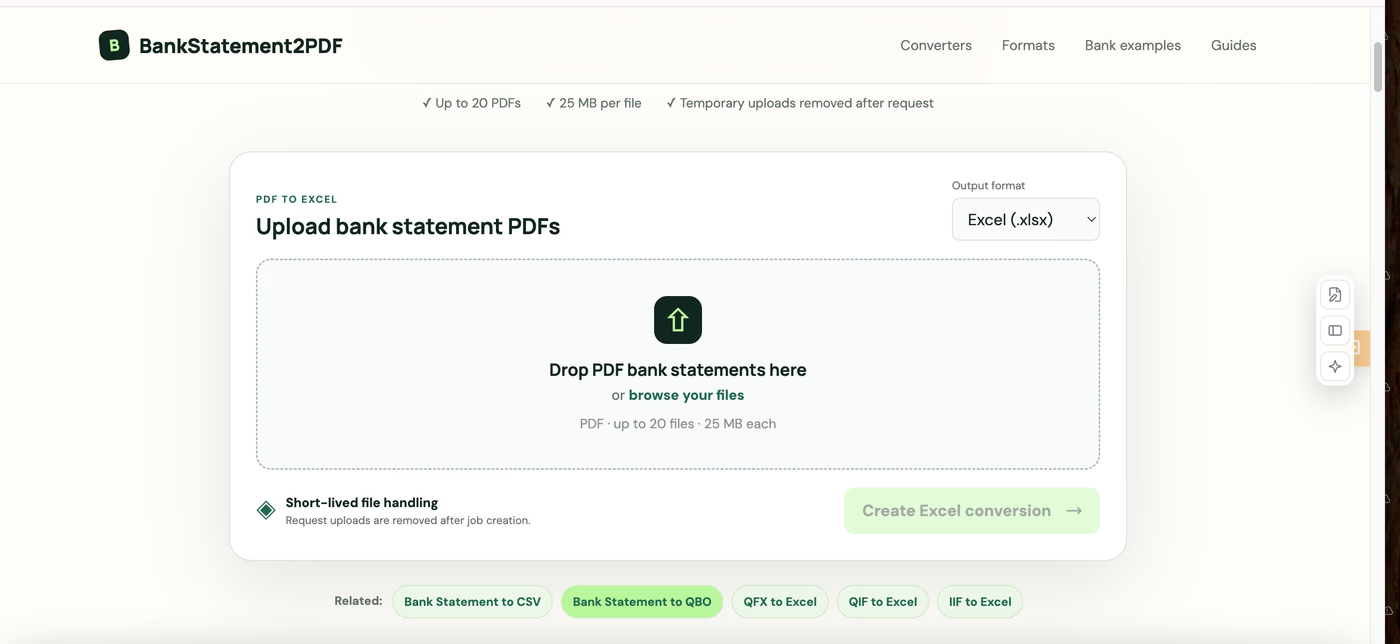
# BankStatement2PDF: A Simple Online Tool for Converting Bank Statements to PDF
Managing bank statements is an everyday part of personal finance, accounting, bookkeeping, and business administration. However, financial documents do not always arrive in the format you need. Sometimes a statement needs to be saved, organized, printed, archived, or shared as a PDF.
That is where **BankStatement2PDF** comes in.
BankStatement2PDF is an online tool designed to make **bank statement to PDF conversion** simple and accessible. Instead of installing complicated financial software or manually rebuilding documents, users can use a focused online solution designed specifically around bank statement conversion.
Whether you are organizing personal records, preparing documents for an accountant, managing business finances, or simply trying to keep your statements in a consistent format, BankStatement2PDF provides a straightforward way to handle the task.
## What Is BankStatement2PDF?
BankStatement2PDF is a browser-based **bank statement converter** that helps users convert financial statement files into PDF documents.
The idea behind the website is simple: financial document conversion should not require complicated software.
Many traditional PDF applications include dozens of editing, signing, annotation, and document-management features. Those features can be valuable, but they can also make a simple conversion unnecessarily complicated.
BankStatement2PDF takes a more focused approach. The website is built around a specific use case—helping users turn bank statements into convenient PDF files.
This makes it suitable for both individuals who occasionally need to convert a statement and professionals who regularly work with financial documents.
## Why Convert a Bank Statement to PDF?
PDF is one of the most commonly used formats for storing and exchanging documents.
One major advantage is consistency. A PDF generally preserves the appearance and structure of a document across different computers and devices. This makes it particularly convenient for financial records that may need to be reviewed, printed, archived, or shared.
For example, you might need a PDF bank statement when preparing documentation for an accountant or bookkeeper. A freelancer may want to organize monthly statements for tax preparation. A small business owner might maintain annual folders containing statements from several accounts.
PDF documents can also be useful for administrative processes where supporting financial documentation is required.
Instead of maintaining statements in several different formats, converting them to PDF can help create a more consistent financial archive.
## How Does BankStatement2PDF Work?
BankStatement2PDF is designed around a straightforward workflow.
Users visit the website, provide the relevant bank statement file, process the document using the available conversion functionality, and create a PDF version for their intended use.
The emphasis is on reducing unnecessary steps.
A user should not need to understand advanced PDF editing or accounting software simply because they want to convert a bank statement.
This is especially helpful for people who only perform the task occasionally. Installing large desktop applications for a single conversion can be inconvenient, while an online **bank statement to PDF converter** provides a more accessible alternative.
## Key Features of BankStatement2PDF
One of the main benefits of BankStatement2PDF is its focused design.
Rather than trying to provide every possible PDF function, the tool concentrates on financial statement conversion.
### Browser-Based Conversion
BankStatement2PDF works online, allowing users to access the service through a web browser without installing traditional desktop conversion software.
This can be particularly convenient when working across different computers or devices.
### Simple User Experience
The interface is designed to keep the conversion workflow easy to understand.
Instead of navigating through complex menus and professional document-editing controls, users can focus on completing the specific task they came for.
### Financial Document Focus
BankStatement2PDF is designed around bank statements rather than being positioned solely as another generic file converter.
That specialization makes the purpose of the website immediately clear.
### Useful for Record Keeping
Converting statements into PDF format can make it easier to maintain organized financial archives.
For example, users can create folders for each year and then store statements by month:
**Bank Statements → 2026 → January, February, March**
A consistent structure can make historical records much easier to find later.
## Who Is BankStatement2PDF For?
The tool can be useful for several types of users.
Individuals can use BankStatement2PDF to organize personal financial documents. Instead of keeping statements scattered across downloads and different file formats, they can maintain a more consistent archive.
Freelancers and self-employed professionals may find it useful when preparing records for bookkeeping and tax-related workflows.
Small business owners often need to maintain documentation across several financial accounts. Converting statements into a standardized format can make internal record keeping easier.
Accountants and bookkeepers also frequently work with documents supplied by clients. A dedicated **bank statement converter** can help simplify parts of that document-management process.
The website may also be useful whenever financial statements need to be prepared as supporting documentation for legitimate administrative or financial purposes.
## BankStatement2PDF vs. General PDF Tools
There are hundreds of PDF tools available online.
Many offer broad collections of features, including PDF merging, splitting, compression, electronic signatures, OCR, image conversion, annotations, and document editing.
BankStatement2PDF has a different positioning.
Its value comes from focusing on a narrower problem.
Someone searching for a **bank statement PDF converter** is usually not looking for a complete document-management platform. They have a specific task they want to complete.
A specialized tool can therefore provide a more relevant experience than an application designed to cover every possible PDF workflow.
This focused approach also makes BankStatement2PDF easier to understand for first-time visitors. The product name itself explains the primary purpose of the service.
## Why PDF Is Useful for Financial Record Keeping
Good financial record keeping becomes increasingly important as documents accumulate.
Imagine downloading one bank statement every month. After five years, a single account could generate 60 statements. Add several personal or business accounts, and the number of documents can quickly reach hundreds.
Using a consistent file format and naming system can make those records considerably easier to manage.
For example:
**2026-01-Bank-Statement.pdf**
**2026-02-Bank-Statement.pdf**
**2026-03-Bank-Statement.pdf**
Users can then organize the files by account, business, year, or month.
PDF files are also convenient because they can generally be opened across major desktop and mobile operating systems without specialized financial software.
## Keep Financial Documents Secure
Bank statements contain highly sensitive information.
Regardless of which conversion method you use, financial documents should be handled carefully.
Users should store completed files in secure locations, avoid sharing statements unnecessarily, and review documents before sending them to another person. It is also important to understand the privacy and data-handling practices of any online service before uploading sensitive financial information.
If a statement contains information that a recipient does not need, consider whether that information should be securely removed or redacted before sharing the document.
Convenience should always be balanced with responsible financial document management.
## A Simple Solution for Bank Statement Conversion
BankStatement2PDF is built around a straightforward idea: converting financial documents should be simple.
Instead of requiring users to navigate complicated document software, the website provides a focused solution centered on **converting bank statements to PDF**.
That makes it relevant for individuals organizing personal finances, freelancers maintaining business records, small businesses handling bookkeeping documents, and professionals working with financial statements.
If you regularly find yourself searching for a **bank statement to PDF converter**, **bank statement converter**, or an easier way to **convert bank statements to PDF online**, BankStatement2PDF provides a dedicated tool for getting the job done.
Instead of relying on complicated desktop software or spending time manually reformatting financial records, BankStatement2PDF provides a focused, browser-based solution for working with bank statement files.
What Is BankStatement2PDF?
BankStatement2PDF is an online bank statement conversion tool built for people who need an easier way to create PDF versions of their financial statements.
The goal of the tool is straightforward: reduce the number of steps required to turn a bank statement into a practical PDF document.
This can be particularly useful for accountants, bookkeepers, freelancers, business owners, property managers, and individuals who regularly need to organize or share financial records.
Why Convert Bank Statements to PDF?
PDF remains one of the most widely used formats for storing and sharing documents. Unlike editable spreadsheets or other financial file formats, a PDF is convenient for viewing, archiving, printing, and sending to another person.
There are many situations where converting a bank statement to PDF can be useful.
For example, you may need to provide statements when preparing accounting records, organizing documents for tax season, applying for a rental property, maintaining business records, or sending financial information to an accountant.
Having statements in a consistent format can also make long-term document organization easier.
How BankStatement2PDF Works
BankStatement2PDF is designed around a simple conversion workflow.
Users provide their bank statement file, process it using the online tool, and obtain a PDF version that can be used for their intended workflow.
The streamlined approach means users do not need to learn complicated accounting software simply to perform a document conversion.
This focus on simplicity is one of the main advantages of using a dedicated bank statement converter instead of a general-purpose document application.
Key Features of BankStatement2PDF
Simple Bank Statement Conversion
The tool focuses specifically on financial document conversion rather than overwhelming users with dozens of unrelated PDF features.
Browser-Based Workflow
BankStatement2PDF can be accessed through a web browser, removing the need to install traditional desktop conversion software.
Easy-to-Use Interface
The conversion process is designed to require as few steps as possible, making it accessible even to users who do not regularly work with financial software.
Useful for Financial Record Keeping
PDF statements can be easier to organize into folders, archive by month or year, print when necessary, and share as part of common financial workflows.
Built for Individuals and Professionals
The tool can support both occasional personal use and recurring document workflows for freelancers, accountants, bookkeepers, and small businesses.
Who Can Use BankStatement2PDF?
BankStatement2PDF can be useful for several types of users.
Individuals can use it when organizing personal financial records or preparing documentation.
Freelancers and self-employed professionals often need to maintain transaction and statement records for bookkeeping and tax preparation.
Small business owners may need to organize statements from multiple accounts for internal record keeping.
Accountants and bookkeepers frequently receive financial documents from clients in different formats, making conversion tools helpful when standardizing document workflows.
Property owners and applicants may also need PDF bank statements when preparing supporting financial documentation.
BankStatement2PDF vs. General PDF Converters
There are many generic PDF converters available online, but most are designed to handle a broad range of files.
BankStatement2PDF takes a more focused approach.
Instead of trying to be an all-in-one PDF editor, its purpose is centered around bank statement conversion. This makes the tool easier to understand: users arrive with a specific financial-document task and can immediately see what the service is designed to do.
For users who simply want to convert a bank statement to PDF, a specialized tool can provide a more straightforward experience than a large document-editing platform.
Benefits of Keeping Bank Statements as PDFs
Creating a consistent archive of PDF bank statements can improve financial document management.
Statements can be organized into folders such as:
Bank Statements → 2026 → January
This makes it easier to retrieve historical documents later without searching through different applications or file formats.
PDFs are also convenient when documents need to be printed or reviewed across different devices.
However, bank statements contain sensitive financial information. Users should always store converted documents securely, avoid unnecessarily sharing them, and verify the privacy and data-handling practices of any financial document service they use.
A Focused Tool for a Common Financial Task
Financial document management does not always require complicated software.
Sometimes users simply need a fast and straightforward way to move a document from one format into another.
BankStatement2PDF is built around that idea. By focusing specifically on bank statement to PDF conversion, it aims to remove unnecessary complexity from a common financial-document workflow.
For individuals and professionals looking for a dedicated bank statement converter, bank statement to PDF converter, or simple way to convert bank statements to PDF online, BankStatement2PDF provides a focused solution worth trying.