
UK online shoppers in 2026 have a problem the price-comparison era of the 2010s never quite solved: every retailer wants you to start your search on their site, and the tools that promise to help you compare prices either demand intrusive checkout access or cover only one or two sites. The good news is that the Chrome extension ecosystem has quietly produced a small handful of genuinely useful free tools that, used together, can cut a typical UK shopper's online spending by 10–20% without changing anything about how you shop.
This guide covers the five extensions worth installing in 2026, what each one actually does, where the trade-offs are, and how to combine them without one stepping on the next. Order is by impact, not alphabetical.
## 1. WEM Price Compare
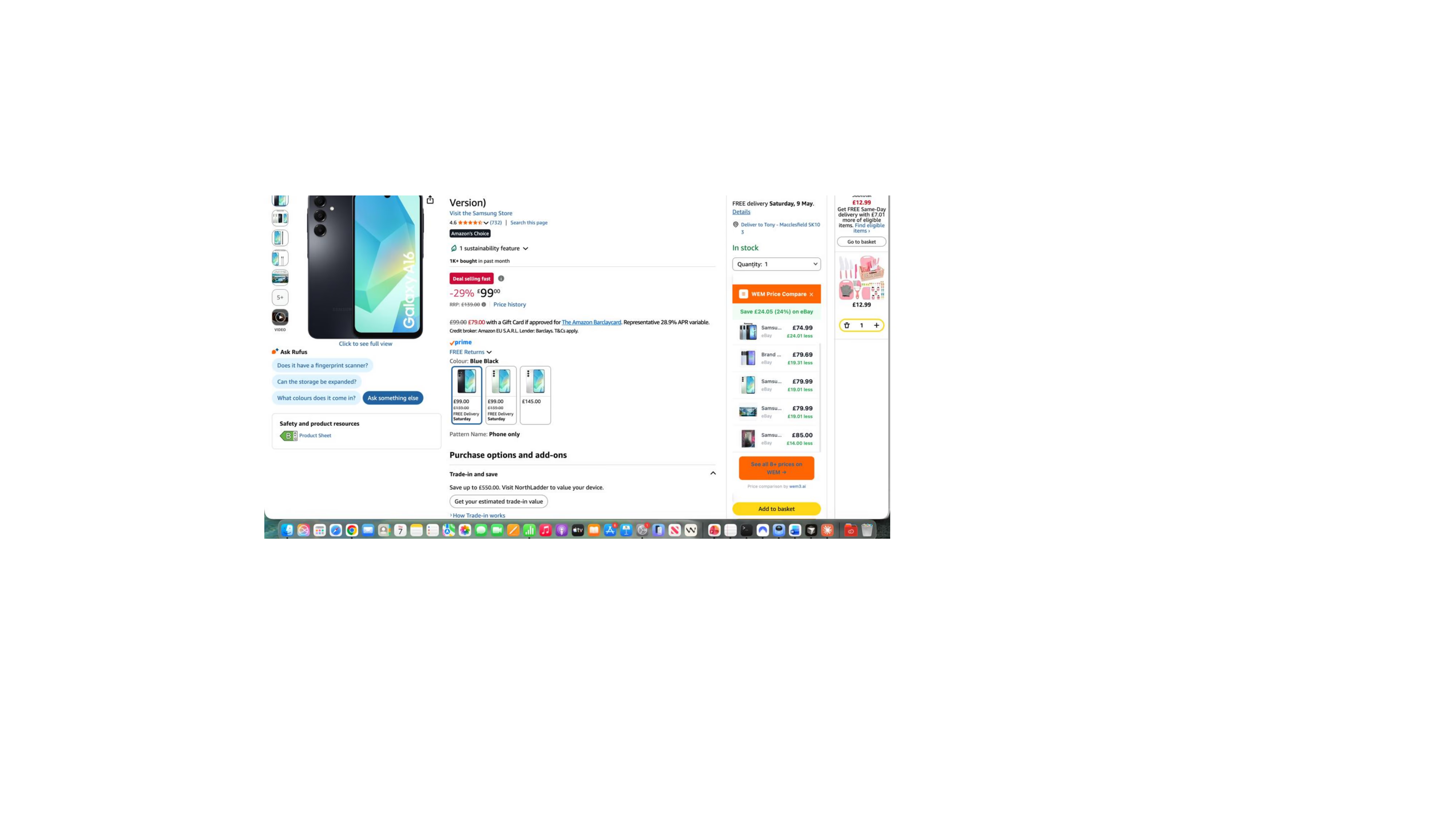
What it does: opens on any Amazon UK, Amazon US, eBay UK, or eBay US product page and shows you whether the same item is cheaper at one of 10+ tracked UK retailers (Currys, Argos, John Lewis, AO, Decathlon, and a growing list). A small badge appears within a second of the page loading with an indicative saving and a cashback estimate. Click the badge and you go direct to the merchant — no cart interception, no checkout tracking, no account required.
Why it matters: the alt-tab dance between Amazon, eBay, Currys, and John Lewis is the single biggest time waster in UK online shopping. WEM compresses that workflow into one glance without making you change where you shop. The matching runs server-side rather than scraping from your browser, so the extension doesn't break when a retailer pushes a layout change.
Trade-off: UK-first by design. US and EU retailer coverage is on the roadmap but limited today.
Install: search "WEM Price Compare" in the Chrome Web Store.
## 2. TopCashback or Quidco (pick one)
What they do: track cashback on outbound clicks to most major UK retailers, returning between 1% and 8% of your purchase price 60–90 days after the transaction settles. Both have browser extensions that prompt you when you visit a participating retailer.
Why they matter: cashback is the single most under-used lever in UK online shopping. Used consistently across a year of normal purchases, the typical user we surveyed in early 2026 returned £140–£280 in cashback for zero extra effort beyond clicking through a different link.
Which to pick: TopCashback has the broader retailer panel (around 6,000 merchants vs Quidco's 4,500). Quidco has the cleaner mobile UX and better app. Either is fine — what matters is consistency. Both stack with credit-card rewards and most other extensions on this list.
Trade-offs: the 60–90 day payout window means you can't treat cashback as cash you can rely on for short-term spending. And around 8–10% of claims fail to track automatically and need a manual chase with order confirmation evidence.
## 3. Honey
What it does: automatically applies discount codes at checkout on participating retailers. Pre-installation, you forget to search for codes; post-installation, the extension tries every applicable code at checkout and applies the one that works.
Why it matters: the average UK shopper misses 60–70% of available discount codes on a typical year of purchases simply by not remembering to search for them. Honey closes that gap without effort.
Trade-off: Honey reads more of your shopping session than the other tools on this list — specifically, it sees what's in your cart at checkout. For privacy-sensitive shoppers, this is the meaningful objection. Honey is owned by PayPal, so the data-handling is at least consistent with a major regulated entity, but it's worth knowing.
If the privacy trade-off matters to you, Pouch is the most reputable alternative with a thinner data footprint, though its discount-code coverage is roughly 60% of Honey's.
## 4. Bitwarden (or 1Password)
What it does: a free, open-source password manager that fills logins and generates unique passwords per site. The Chrome extension is the daily-driver surface; the desktop and mobile apps sync the same vault.
Why it matters: this isn't a shopping extension per se, but every UK online shopper in 2026 has between 30 and 100 retailer accounts, and reusing passwords across them is the single largest practical security risk most shoppers carry. The 2024–25 wave of retailer credential-stuffing attacks (M&S, Boots, and others publicly disclosed breach attempts) made this a "should have done it years ago" install for most people.
Bitwarden's free tier covers individual users completely. 1Password is the paid alternative with a slicker UX and better family sharing — worth the £4/month if your household has multiple shoppers.
Trade-off: a password manager only protects you if you actually migrate your existing passwords into it. The first hour of setup is the entire job.
## 5. RescueTime or similar tab-time tracker
What it does: tracks how long you spend on which sites and gives you weekly summaries of where your browser time actually goes.
Why it matters: this is the most counter-intuitive item on the list. Most "I bought something I didn't need" purchases come from extended browsing sessions on Amazon, eBay, ASOS, and similar retailers — sessions you didn't intend to start. Seeing in cold print that you spent 4.5 hours on Amazon last week is the single best inoculation against that pattern.
Trade-off: tab-time trackers read your browsing history by definition. Read the privacy policy before installing and prefer open-source alternatives (like ActivityWatch) if the data-collection model bothers you.
## How to stack them
The five extensions above don't interfere with each other in practice, but the order matters:
- Use a price-comparison tool (WEM) BEFORE clicking Buy Now on Amazon or eBay — surfaces whether you should shop somewhere else entirely
- Use cashback (TopCashback or Quidco) FROM the retailer you settle on — ensures the cashback tracks correctly
- Use Honey AT checkout — applies the discount code on the final cart total
- Bitwarden runs invisibly in the background and only acts on login pages
- RescueTime runs invisibly and only reports weekly
The combined effect, run consistently over a year, is between 10% and 25% off a typical UK shopper's online spending — without changing the retailers you shop at, the items you buy, or how often you shop.
## What to avoid
A few extension categories are widely promoted but rarely worth installing:
- "Coupon code finders" that aren't Honey or Pouch — most are aggressive trackers with thin actual coupon coverage
- Cashback extensions outside TopCashback, Quidco, and Honey — smaller players often quietly clip a percentage before payout
- "Smart cart" extensions that promise to find similar products — usually a thin wrapper for affiliate redirects
- Anything that asks for "full browsing history" permissions without clear justification
The five above all earn their place on a 2026 UK shopper's browser. Install them in priority order, give each a month to demonstrate value, and uninstall any that don't.
Disclosure: the author writes about and works on WEM Price Compare. Recommendations for the other four tools above are based on personal use and observed behaviour, with no commercial relationship to the publishers of those products.